

Email encryption is the process of encoding email content so only authorized recipients can read it, making it the primary defense for sensitive business communications. The role of email encryption for business extends well beyond privacy. It directly determines whether your organization meets HIPAA, GDPR, and other regulatory requirements that carry real financial penalties. Tools like S/MIME, PGP, and TLS each serve different purposes, and choosing the wrong one for the wrong situation leaves gaps that attackers exploit. This guide gives you a clear framework for selecting, deploying, and managing encryption across your organization.
What types of email encryption exist and how do they differ?
Three main encryption methods cover the majority of business use cases: transport layer security (TLS), end-to-end encryption, and policy-based gateway encryption. Each operates at a different point in the email delivery chain, and each carries different tradeoffs.
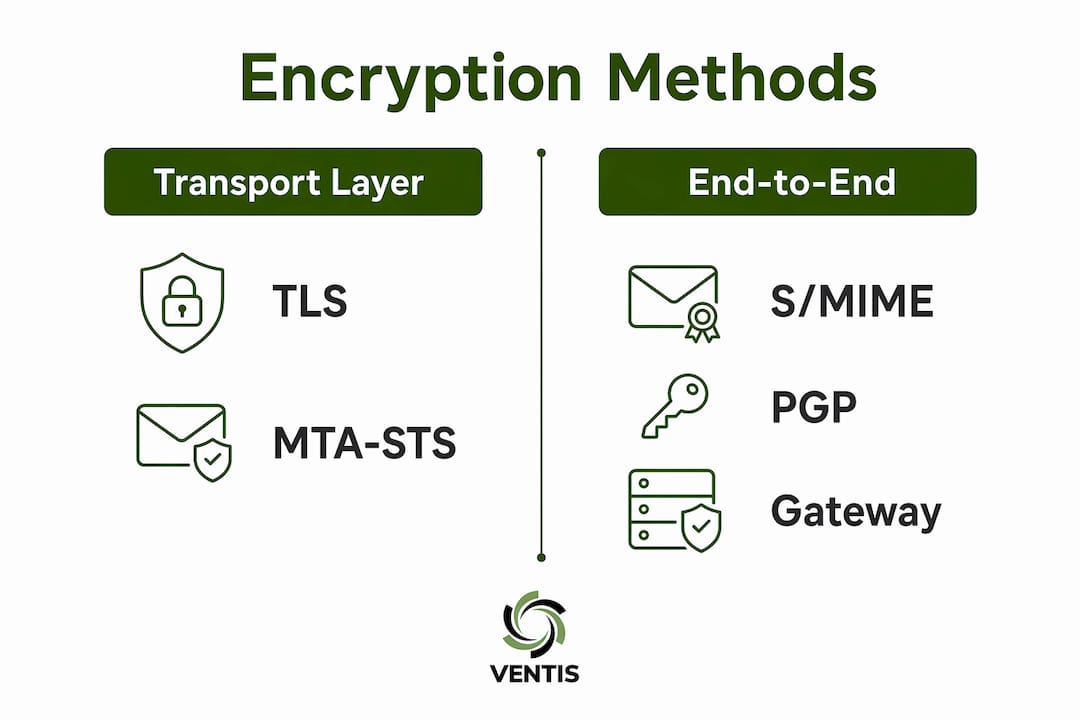
TLS (Transport Layer Security) protects email while it travels between mail servers. Think of it as a secure tunnel. The message is encrypted in transit but decrypted and stored in plain text on the receiving server. TLS protects data in transit but not at rest on mail servers or archives, which means a server breach exposes everything.

S/MIME and PGP provide end-to-end encryption. The message is encrypted before it leaves the sender's device and only decrypted by the intended recipient. S/MIME is favored for business environments with managed keys because it integrates natively with Microsoft Outlook, Apple Mail, and enterprise certificate management systems. PGP offers stronger personal privacy but requires more manual key management, making it harder to scale across a company.
Policy-based gateway encryption sits between TLS and full end-to-end encryption. A gateway server applies encryption rules automatically based on content policies, recipient domains, or data classification tags. This approach fits most compliance needs with low friction for end users.
| Method | Protects at rest | User action required | Best use case |
|---|---|---|---|
| TLS | No | None | General internal transit |
| S/MIME | Yes | Certificate setup | Legal, executive, regulated |
| PGP | Yes | Key exchange | High-privacy, technical users |
| Gateway encryption | Yes | None | Compliance-driven outbound mail |
Pro Tip: Combine TLS with enforced MTA-STS policies. Opportunistic TLS alone allows downgrade attacks where attackers strip encryption announcements and force plain-text delivery. Enforced TLS policies like MTA-STS and DANE make delivery fail rather than fall back to unencrypted transmission.
Multi-factor authentication adds another layer on top of any encryption method. It provides message-level security and creates audit trails that prove delivery to the correct recipient.
How does email encryption protect data and support compliance?
Email encryption protects business data across three dimensions: confidentiality, integrity, and authenticity. Confidentiality means only the intended recipient reads the message. Integrity means the content cannot be altered in transit without detection. Authenticity means the recipient can verify the sender's identity through digital signatures.
Compliance frameworks treat these three properties as requirements, not suggestions. HIPAA requires covered entities to protect electronic protected health information (ePHI) in transit and at rest. GDPR mandates appropriate technical measures to protect personal data. Both regulations accept encryption as a primary technical safeguard, and documented encryption policies reduce penalty exposure when breaches occur.
"Encryption protects message content in transit and at rest but does not prevent phishing or malicious attachments from harming recipients." — PCMag Security Analysis
Recipient multi-factor authentication reduces the risk of human error by limiting unauthorized access even when a message is sent to the wrong address. That audit trail is useful evidence during regulatory investigations or legal disputes. For healthcare organizations, following an enterprise-wide encryption rollout process that documents each step is often the difference between a manageable audit and a costly one.
A common misconception is that TLS alone satisfies compliance requirements. It does not. True confidentiality requires encryption that protects email content beyond the transfer stage. Regulators look at whether data is protected at rest, not just in motion.
The benefits of using email encryption for compliance purposes are concrete:
- Documented encryption policies reduce regulatory fine exposure.
- Digital signatures provide non-repudiation, meaning senders cannot deny sending a message.
- Encrypted archives satisfy data retention requirements under laws like FINRA and SOX.
- MFA-based delivery confirmation creates verifiable audit trails.
How should businesses configure and implement email encryption?
A hybrid encryption approach is the most practical path for most organizations. Use TLS for internal transit, gateway encryption for routine outbound mail, and S/MIME or end-to-end encryption for high-stakes legal and executive communications. This layered model balances security with usability. You do not need to force every employee through a complex key exchange process for routine internal messages.
When you configure email encryption for your business, follow these steps in order:
- Audit your current email flow. Map which messages carry sensitive data, who sends them, and where they go. This tells you which encryption tier each communication type needs.
- Enable and enforce TLS. Configure your mail server to require TLS with MTA-STS. Do not rely on opportunistic TLS alone.
- Deploy gateway encryption for outbound compliance mail. Set content policies that trigger encryption automatically when messages contain keywords like "SSN," "PHI," or "account number."
- Issue S/MIME certificates to high-risk users. Legal, finance, and executive teams should use certificate-based end-to-end encryption for their most sensitive communications.
- Build a key management policy. Decide who manages certificates, how long they are valid, and what happens when an employee leaves.
- Set up key escrow or recovery. IT managers must architect key escrow systems so the business can decrypt emails during investigations or when employees depart. Balancing privacy with legal needs is a real operational requirement, not a theoretical one.
- Train users. Encryption fails when users do not understand why they are being asked to take extra steps. Brief training reduces resistance and errors.
- Test and audit. Send test messages across all encryption tiers and verify that logs capture delivery confirmation.
Pro Tip: Vendor selection matters more than most IT managers expect. Your encryption solution must integrate with your existing mail platform, whether that is Microsoft 365, Google Workspace, or an on-premises Exchange server. A solution that requires users to switch clients or portals will face adoption resistance that undermines the whole program.
Policy-based gateway encryption fits the majority of compliance needs with low user friction. Reserve complex user-driven encryption for communications that genuinely require it. Forcing S/MIME on every employee for every message creates friction without proportional security gain.
For broader context on how encryption fits into your overall security posture, the cybersecurity compliance best practices framework for small and mid-sized businesses is a useful reference point.
What are common challenges and misconceptions about email encryption?
The biggest misconception about email encryption is that it stops phishing attacks. It does not. Encryption protects message content in transit and at rest. It says nothing about the trustworthiness of the sender. A phishing email can arrive fully encrypted and still trick a recipient into clicking a malicious link.
A second misconception is that encrypted email is safe from malware. Encrypted emails can carry malicious attachments that execute after decryption, bypassing pre-decryption antivirus scanning entirely. Encryption and malware protection are separate layers. You need both.
"There is no one-size-fits-all encryption solution; tools must align with data sensitivity and business workflows." — Mailfloss Email Encryption Methods Overview
Beyond misconceptions, businesses face real operational challenges:
- Multi-client compatibility. S/MIME certificates issued by one certificate authority may not be trusted by all email clients. Test across your full client environment before rolling out broadly.
- Key revocation. When an employee leaves or a certificate is compromised, revoking and reissuing keys across all contacts is time-consuming without proper tooling.
- Downgrade attacks on TLS. Without enforced TLS policies, attackers can strip encryption announcements and force plain-text delivery. This is a known attack vector, not a theoretical one.
- User friction. End-to-end encryption requires both sender and recipient to have compatible keys or certificates. External partners who have not set up S/MIME or PGP cannot receive encrypted messages without a portal-based workaround.
- False sense of security. Teams that deploy encryption sometimes reduce other security practices, assuming the encryption covers all risks. It does not.
Addressing these challenges requires treating encryption as one component of a layered security program, not a standalone fix. The cybersecurity threats facing mid-sized businesses in 2026 make that layered approach more necessary than ever.
Key Takeaways
Email encryption protects business data in transit and at rest, but only when deployed as part of a layered security strategy that includes enforced TLS policies, end-to-end encryption for sensitive communications, and multi-factor authentication.
| Point | Details |
|---|---|
| TLS is not enough alone | TLS protects email in transit but leaves data exposed at rest on mail servers. |
| Use a hybrid approach | Combine TLS, gateway encryption, and S/MIME based on message sensitivity. |
| Encryption does not stop phishing | Encrypted emails can still carry malware or trick recipients into harmful actions. |
| Compliance requires documentation | Audit trails, key escrow, and delivery confirmation support HIPAA and GDPR requirements. |
| Key management is operational | Build certificate lifecycle policies before deployment to avoid gaps when employees leave. |
Why I think most businesses are encrypting the wrong emails
After working with small and mid-sized businesses across Pittsburgh, the pattern I see most often is this: companies deploy TLS, check a compliance box, and assume the job is done. It is not. TLS is the floor, not the ceiling.
The businesses that actually reduce their risk are the ones that think about who sends what to whom. Legal sends contracts. Finance sends wire instructions. Executives send acquisition discussions. Those three groups need S/MIME or equivalent end-to-end encryption. Everyone else can use gateway encryption for routine outbound mail. That segmentation is where real protection lives.
The zero-trust model applies here too. Do not assume that because a message left your server encrypted, it arrived safely. Verify delivery. Log it. Use MFA-based confirmation for anything that matters. Zero-trust security models treat every message as potentially compromised until proven otherwise. That mindset changes how you architect your encryption program.
The other thing I tell every IT manager: encryption policy needs a review cycle. Algorithms that were strong three years ago may not be strong in 2026. Certificate authorities get compromised. Regulations change. Build a quarterly review into your security calendar and treat encryption as a living program, not a one-time deployment.
— Greg
How Ventis Consulting Group helps businesses get encryption right
Deploying email encryption correctly requires more than installing a certificate. It requires a policy framework, user training, key management, and ongoing monitoring.
Ventis Consulting Group works with small and mid-sized businesses in Pittsburgh and the surrounding area to plan and implement email security that actually holds up under audit. From configuring TLS enforcement and gateway encryption to issuing S/MIME certificates for executive teams, the work is hands-on and specific to your environment. If you are ready to move beyond basic TLS and build a program that satisfies HIPAA, GDPR, or industry-specific requirements, explore managed IT services from Ventis Consulting Group. The team brings local expertise and a consultative approach that larger providers simply do not offer.
FAQ
What is the role of email encryption for business?
Email encryption protects sensitive business communications from unauthorized access during transit and storage. It also supports compliance with regulations like HIPAA and GDPR by ensuring only authorized recipients can read message content.
Is TLS encryption enough for business email compliance?
TLS alone is not sufficient for compliance. TLS protects email in transit but leaves messages exposed at rest on mail servers, which does not satisfy the at-rest protection requirements under HIPAA or GDPR.
What is the difference between S/MIME and PGP for business email?
S/MIME integrates natively with enterprise email clients like Microsoft Outlook and uses managed certificates, making it easier to deploy at scale. PGP offers stronger personal privacy but requires manual key exchange, which is harder to manage across a large organization.
Does email encryption prevent phishing attacks?
No. Encryption protects message content but does not verify sender intent. A phishing email can arrive fully encrypted and still deceive the recipient into clicking a malicious link or attachment.
How should businesses manage encryption keys when employees leave?
IT managers should build key escrow or recovery systems before deployment. These systems allow the business to decrypt archived emails during investigations or offboarding without relying on the departing employee's credentials.