

An IT roadmap is a living document that maps technology projects to business goals, budgets, and timelines so you spend money on the right things at the right time. If you don't have one yet, start today: spend a short amount of time listing every system you run, then write down your top three business priorities for the next year. Everything else builds from there.
TL;DR:
- Small businesses should focus on impact versus effort scoring to identify quick wins, core system upgrades, and long-term growth projects.
- Conducting a monthly hardware, software, security, and connectivity audit reveals hidden costs and risks, guiding better investment decisions.
- Prioritizing initiatives with a simple impact and effort matrix ensures immediate security fixes and essential upgrades are completed promptly.
- An IT roadmap should be reviewed quarterly, tracking KPIs like system uptime, repair times, and security incidents to keep it actionable.
- Building a collaborative, living plan with clear owners and realistic timelines improves technology management and vendor negotiations.
Table of Contents
- What Is an IT Roadmap for Small Businesses?
- Why Small Businesses Need an IT Roadmap Now
- Current-State Audit: What to Inventory Before You Plan Anything
- How to Prioritize IT Initiatives: A Simple Scoring Model
- Roadmap Templates and Formats You Can Build Today
- Budgeting for Your IT Roadmap: What to Expect to Spend
- The Minimum Security Items Every Roadmap Needs
- Keeping the Roadmap Alive: Governance, KPIs, and Review Cadence
- How Ventis Consulting Group Builds and Runs SMB IT Roadmaps
- What Actually Works When Small Businesses Build Roadmaps
- Get a Working IT Roadmap Without Building It Alone
- Sources
What Is an IT Roadmap for Small Businesses?
A technology roadmap connects every IT initiative to a business outcome, an owner, a timeline, and a way to measure success. It's not a wish list of new software. It's a plan that says "this project matters because it supports this goal, it costs this much, and here's who's responsible for it." A well-built roadmap includes goals, timelines, dependencies, resource requirements, risks, and KPIs so decisions about where money goes aren't made on gut feeling alone.
The components that belong in every roadmap, regardless of company size, look like this:
- Business goal: the outcome the initiative supports (faster order processing, fewer security incidents, easier remote work).
- Current state: what exists today, including its age, reliability, and known limitations.
- Initiative: the specific project (migrate email to the cloud, replace an aging firewall, consolidate three project tools into one).
- Priority score: a ranking based on impact versus effort, covered in detail below.
- Timeline: which planning horizon the work falls into, from immediate to long term.
- Owner: the person accountable for getting it done, internal or outsourced.
- Dependencies: what has to happen first before this initiative can start.
- Risk: what breaks or gets worse if this doesn't happen.
- KPI: how you'll know it worked.
Two formats dominate real-world roadmaps. A table format works best when you have a manageable list of initiatives and want a clean, sortable view for budget conversations. A swimlane format, where each row represents a category (security, infrastructure, applications) plotted across a timeline, works better once you have overlapping projects running in parallel and need to see how they interact visually.
Why Small Businesses Need an IT Roadmap Now
Most small companies don't lack technology. They lack a plan for it. Software subscriptions pile up department by department until nobody can say what's actually being used, and that sprawl quietly drains your budget every month.
A roadmap forces visibility. When you can see every application, its cost, and its usage in one place, you can cut what isn't earning its keep and reinvest in what is. That same visibility improves uptime, because you stop discovering a server is out of support the week it fails, and it lowers security risk because gaps get flagged before they become incidents rather than after.
The security stakes are real. CISA's guidance for small businesses treats multi-factor authentication, regular backups, and incident response planning as baseline expectations, not optional extras, for companies of any size.
A roadmap also changes how you scale. Instead of adding a new hire every time a process gets clunky, you can often fix the underlying system and get more capacity out of the team you already have. It changes vendor conversations too. Walking into a renewal negotiation with a documented plan for what you need over the next 18 months puts you in a stronger position than renewing on autopilot because the contract happened to come up.
The practical benefits stack up fast:
- Fewer duplicate or unused software subscriptions.
- Faster recovery when something breaks, because you already know your dependencies.
- Stronger leverage in vendor and contract renewals.
- A documented reason for every dollar spent on technology, which matters when you're explaining budget to a business partner or lender.
Current-State Audit: What to Inventory Before You Plan Anything
You can't prioritize what you haven't counted. Before you rank a single initiative, walk through five categories and write down what's actually there, not what you assume is there.
- Hardware. List every laptop, desktop, server, and network device, along with its age and whether it's still under manufacturer support. Anything past its operating system's support window belongs near the top of your risk list.
- Software and subscriptions. Pull your credit card and bank statements for the last three months and match every recurring charge to an actual user. You will almost certainly find at least one subscription nobody remembers signing up for.
- Integrations and data flows. Note which systems talk to each other automatically and which ones require someone to manually re-enter data. Manual re-entry is usually a sign of a process ripe for consolidation.
- Security posture. Check whether MFA is enabled everywhere it can be, confirm backups actually restore (not just that they run), note your patch cadence, and write down the date of your last security incident, however small.
- Connectivity. Record your bandwidth, your uptime history over the last six months, and whether you have any redundancy if your primary connection drops.
Pro Tip: Don't rely on memory for the software inventory. Login activity reports from your identity provider or a quick review of admin consoles will surface subscriptions and shadow IT that nobody would have mentioned out loud.
Run a quick version of this audit monthly, just scanning for anything new or broken, and do the full deep audit annually. A spreadsheet is genuinely enough for most companies under 50 employees. If your connectivity checks turn up repeated outages or your bandwidth numbers look thin against your team's actual usage, that's your trigger to bring in a network specialist rather than guessing at a fix.
How to Prioritize IT Initiatives: A Simple Scoring Model
Every small business owner ends up with the same problem once the audit is done: a list of 15 things that all feel urgent. The fix is a scoring model simple enough to run in an afternoon.
Rate every initiative on two scales, each from 1 to 5:
- Impact: how much this moves the needle on revenue, risk reduction, or operational speed. A 5 might be "eliminates a single point of failure that would shut down the business for a day." A 1 might be "nice cosmetic upgrade nobody will notice."
- Effort: how much time, money, and disruption it takes to execute. A 5 is high effort (a full system migration); a 1 is low effort (turning on a feature you already pay for).
Multiply impact by effort inverted, or simply plot each initiative on a quadrant. High impact and low effort initiatives are your quick wins. High impact and high effort initiatives are core system work worth committing real budget to. Low impact regardless of effort gets parked.
That sorting naturally produces three categories worth planning around:
- Quick wins (fix first). Enabling MFA on an email platform you already own. Removing three unused software licenses. Fixing a firewall rule that's blocking a needed integration. These take days, not months, and they build momentum.
- Core systems (build next). Migrating from an aging on-premise server to a managed cloud environment. Replacing a phone system that keeps dropping calls with a unified communications platform. These take real planning and budget but directly support daily operations.
- Growth enablement (plan later). Adding a customer data platform to support a new sales channel. Building out a second office's network from scratch. These matter, but only once the fundamentals are solid.
Here's a compact example of how that scoring might play out for a 25-person company:
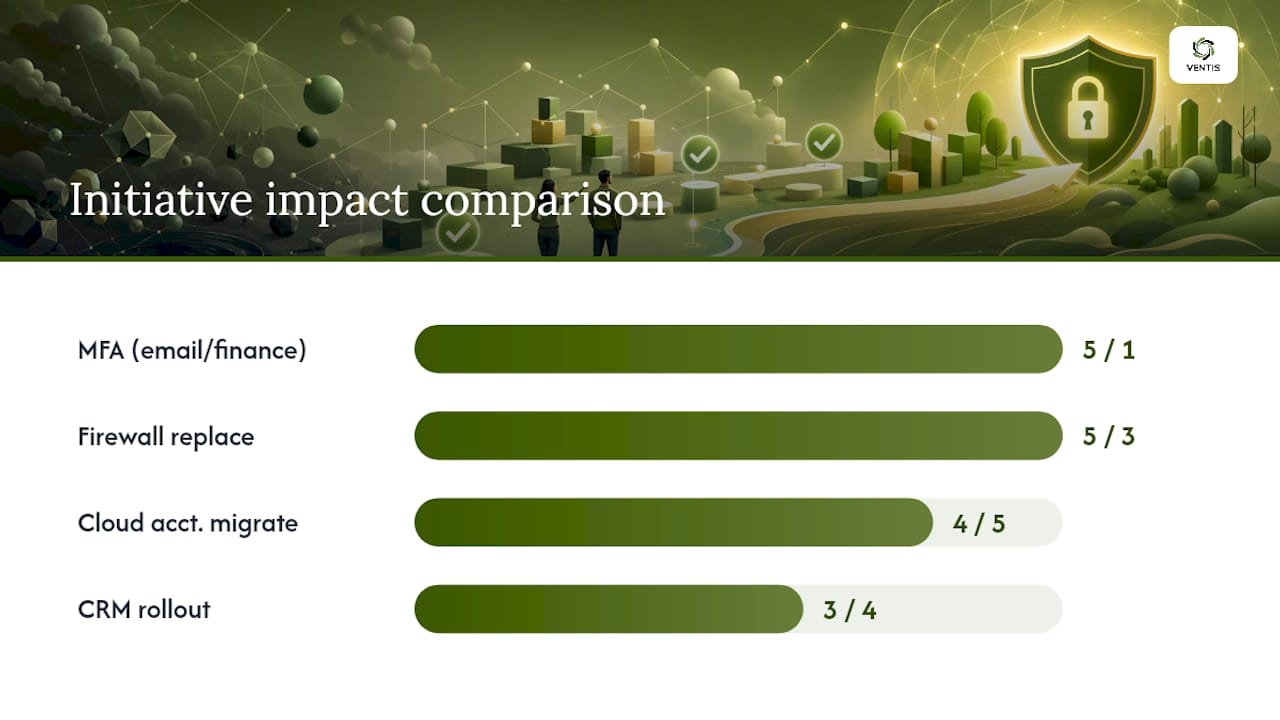
Enabling MFA across email and finance systems scores impact 5, effort 1, making it an obvious quick win to knock out this month. Replacing an unsupported firewall scores impact 5, effort 3, landing it as a near-term core project for this quarter. Migrating a legacy accounting system to the cloud scores impact 4, effort 5, pushing it into a mid-term initiative planned for two or three quarters out once budget and staff time are lined up. Rolling out a new CRM to support a planned sales expansion scores impact 3, effort 4, and gets parked in the long-term bucket until the sales hire it depends on is actually in place.
That last example points to something the scoring model alone won't catch: sequencing matters more than raw score. If an upstream network refresh has to happen before a cloud migration can proceed, the network work moves forward on the timeline even if the migration technically scored higher on impact. Dependencies override pure priority every time.
Once you've sorted initiatives, map them to three planning horizons instead of trying to schedule everything at once:
- 0 to 6 months: quick wins and any security items scoring as high risk. Assign an owner to each and get them moving now.
- 6 to 18 months: core system replacements and infrastructure work that needs budget approval and vendor selection.
- 18 to 36 months: growth enablement projects that depend on business milestones, like headcount thresholds or new locations, being reached first.
Assign a named owner to every initiative before it goes on the roadmap, even if that owner is you. An initiative with no owner is the first thing that quietly falls off the plan when the quarter gets busy.
Roadmap Templates and Formats You Can Build Today
You don't need special software to start. A spreadsheet with the right columns will carry you through your first two or three roadmap cycles just fine.
Set up your columns like this:
- Initiative name
- Business goal it supports
- Priority score (impact and effort)
- Owner
- Start quarter
- End quarter
- Dependencies
- Status (not started, in progress, blocked, complete)
- Budget estimate
- KPI or success metric
That single sheet, sorted by start quarter, functions as your table-format roadmap. It's the fastest way to get something usable in front of stakeholders this week.
If you're running several initiatives in parallel across categories, for instance security, infrastructure, and applications, all moving at once, a swimlane view makes the overlaps visible in a way a flat table can't. Build one in a spreadsheet by putting your categories as rows and quarters as columns, then drop each initiative into the cell where it starts and drag it across the quarters it spans. That visual layout is common practice in technology roadmap templates because it shows at a glance when three projects are all competing for the same team's attention in the same quarter, which is exactly the kind of conflict a flat list hides.
As your initiative count grows past 15 or 20, a dedicated project-tracking tool, the kind of software category Atlassian's products represent, starts to earn its keep by linking roadmap items directly to tasks and deadlines. Until then, the spreadsheet works, and switching tools too early just adds a learning curve you don't need yet. For more on choosing supporting software as your needs grow, our guide to essential IT tools for small businesses breaks down the categories worth considering.
Budgeting for Your IT Roadmap: What to Expect to Spend
Budget conversations stall roadmaps more than anything else, mostly because owners don't have a benchmark to anchor against. There's no universal rule, but plenty of small businesses use a percentage of annual revenue as a starting guideline rather than a hard target, adjusting up or down based on how technology-dependent the business actually is.
Split your budget into two buckets, because treating them the same is where most planning goes wrong:
- Recurring costs: software licenses, managed IT support, cloud hosting, phone and connectivity services. These repeat every month or year and should be predictable once your audit is current.
- One-time costs: system migrations, hardware refreshes, network rebuilds, new office setups. These are lumpy and need to be planned for well before the quarter they land in.
Budget for the unexpected. Financial planning for SMB technology commonly recommends a 10 to 15 percent contingency buffer on top of planned project costs, and a hardware refresh cycle of three to five years to avoid the compounding costs of running equipment past its useful life.
Skip the contingency line and the first unplanned server failure or emergency migration will blow up whatever budget you set. For a deeper breakdown of cost categories and how to build a full-year technology budget, see our small business tech budget planning guide.
The Minimum Security Items Every Roadmap Needs
Security items don't compete on the same scale as other initiatives. Treat anything that closes a known, active risk as an immediate priority regardless of how it scores on effort.
The non-negotiable baseline for any SMB roadmap includes:
- Multi-factor authentication on every account that supports it, especially email and financial systems.
- Backups that are tested with an actual restore, not just confirmed to be running.
- A regular patch management cadence for operating systems and applications.
- Endpoint protection on every device, including anything used remotely.
- Least-privilege access, meaning employees only have access to the systems their role actually requires.
- A written incident response plan, even a simple one, so nobody is improvising during an actual breach.
When you score these in your impact versus effort model, weight impact upward regardless of the raw number. A backup failure or a credential compromise doesn't wait for its turn in the queue. CISA's small business cybersecurity guidance is worth bookmarking as a standing reference, and our cloud security best practices guide covers the cloud-specific controls that pair with this baseline.
Keeping the Roadmap Alive: Governance, KPIs, and Review Cadence
A roadmap that never gets revisited becomes shelfware within two quarters. The fix is a short, recurring review, not a longer document.
Track a small set of KPIs consistently:
- System uptime across your critical platforms.
- Mean time to repair when something breaks.
- License utilization, so you catch waste before renewal.
- Percentage of initiatives on schedule versus stalled.
- Number of security incidents, however minor, logged over the quarter.
Meet quarterly, not monthly, to review the roadmap against those numbers. Keep the agenda tight: what got completed, what's blocked and why, whether business priorities have shifted since last quarter, and what that means for the budget. Frequent, lightweight reviews keep the roadmap trusted by the people using it, which matters more than any amount of upfront detail.
This same document becomes your leverage in vendor renewals and annual budgeting. Walking into either conversation with a dated, current roadmap changes the tone from reactive to planned. If you want a sharper way to track how technology decisions translate into measurable outcomes, this guide to measuring website and digital KPIs offers a useful framework that applies beyond just web metrics.
How Ventis Consulting Group Builds and Runs SMB IT Roadmaps
Ventis Consulting Group builds roadmaps the same consultative way described throughout this guide: starting with your business goals, not a vendor's product list. Our team works across managed IT support, cybersecurity assessments, cloud infrastructure, and unified communications, which means the roadmap we help you build actually maps to services we can execute, not just recommend.
A typical engagement follows three stages:
- Assessment: a full current-state audit of hardware, software, security posture, and connectivity, similar to the checklist above but conducted with a technical eye for gaps you might miss.
- Roadmap creation: initiatives scored, sequenced, and assigned across near, mid, and long-term horizons, built collaboratively with your team.
- Quarterly execution and review: ongoing management so the roadmap stays a living plan instead of a document that gets opened once a year.
What Actually Works When Small Businesses Build Roadmaps
Two patterns show up almost every time I've watched a small business go through this process. First, the software audit always turns up at least one subscription nobody remembers approving, and usually two or three. It's rarely a huge dollar amount on its own, but the pattern reveals a bigger problem: nobody owns the decision to buy or cancel software. Second, the businesses that stick with their roadmap are the ones that banked one or two visible quick wins in the first month. Momentum matters more than perfect sequencing.
Three rules worth following from day one. Do involve stakeholders outside of IT early, because sales and operations will spot risks and opportunities a technical audit alone won't catch. Don't try to fix everything in the first quarter, because a roadmap with 20 initiatives all marked "urgent" isn't a roadmap. Do revisit the plan quarterly even when nothing feels urgent, because the moment you skip a review is usually the moment priorities have already shifted without anyone noticing.
— Greg
Get a Working IT Roadmap Without Building It Alone
Building a roadmap on your own gets you organized. Building it with a team that can also execute the plan gets you results faster, without the trial and error of figuring out vendor selection, migration sequencing, or security gaps on your own. Ventis Consulting Group works with small and mid-sized businesses across Pittsburgh and the surrounding region to turn a current-state audit into a prioritized, budgeted roadmap, then stays on to actually run the initiatives that come out of it.

An initial assessment covers your hardware, software, security posture, and connectivity, the same categories outlined earlier, but with a technical team looking for the gaps a self-audit tends to miss. From there, you get a roadmap with real timelines, real owners, and real budget numbers attached, not a generic template. If unified communications is part of what's holding your team back, our unified communications solutions page outlines how that piece fits into the broader plan. Reach out to Ventis Consulting Group to schedule an assessment and get a roadmap built around what your business actually needs next.
Sources
The guidance in this article draws on a mix of practitioner frameworks and government cybersecurity resources. ProductPlan's IT strategy roadmap guide informed the emphasis on building roadmaps consultatively with business stakeholders rather than as an IT-only exercise. Atlassian's technology roadmap overview shaped the component list, including goals, timelines, dependencies, and KPIs. CISA's cybersecurity guidance for small businesses anchors every security recommendation in this guide, from MFA to incident response planning. Zylo's IT roadmap analysis supported the sections on SaaS spend visibility and cost control. Each source is worth a direct read if you want to go deeper on any single piece of the planning process.