

Small business tech budget planning is the deliberate process of allocating technology spending across core operations, security, growth, and contingency to maximize IT investment impact. Most small businesses treat tech spending reactively, buying tools as problems arise rather than building a structured IT budget. The result is overspending on redundant software, underfunding security, and missing out on tools that drive real growth. Industry benchmarks show that IT budgets for small and mid-sized businesses typically fall between 4% and 10% of annual revenue, and how you divide that number matters as much as the total. This guide gives you a practical framework to plan, allocate, and review your tech spend with confidence.
What key categories should your small business tech budget include?
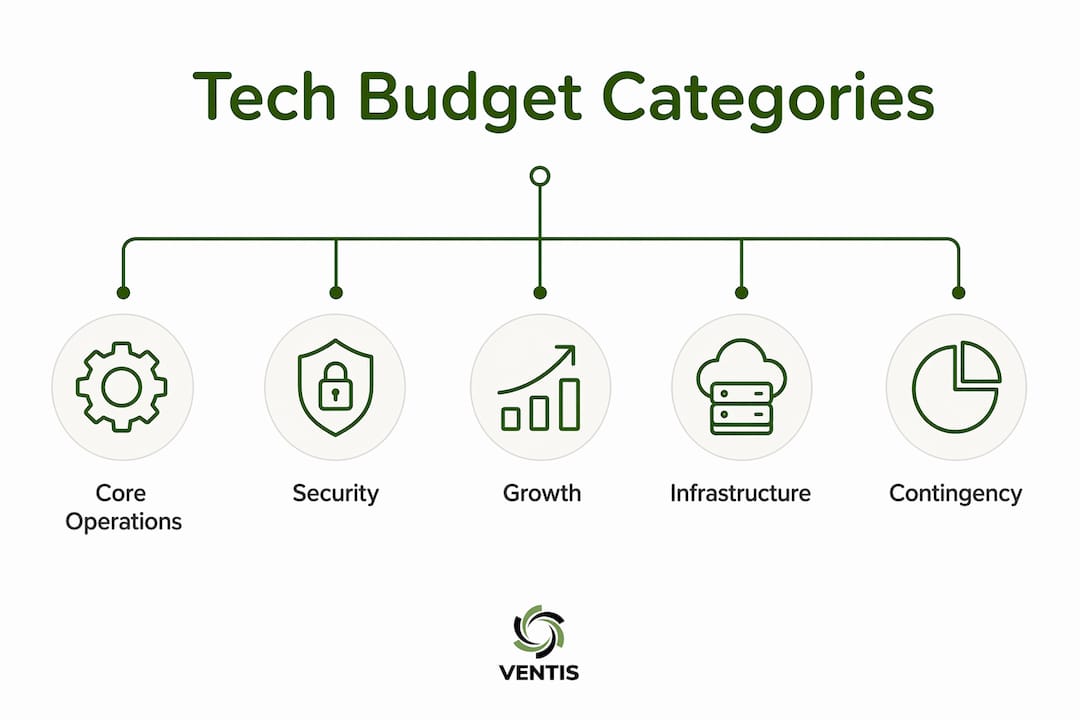
A well-structured IT budget for small businesses covers four distinct categories, and each category has a benchmark range: core operations (50–60%), security and compliance (15–20%), growth and productivity (15–20%), and infrastructure and contingency (10–15%). These percentages are not arbitrary. They reflect the real cost distribution that keeps a business running securely while leaving room to grow.
Core operations covers the tools your team uses every day. Microsoft 365, Google Workspace, Slack, and your CRM system all fall here. This category is the largest because it funds the technology your business cannot function without. Cutting corners here creates immediate productivity problems.

Security and compliance is the category most small businesses underfund, and it is the most costly mistake you can make. A single breach can cost far more than years of security investment. Endpoint protection, backup solutions, multi-factor authentication, and compliance monitoring all belong in this bucket. If your security spend is below 15% of your IT budget, you are carrying more risk than you realize.
Growth and productivity covers tools that expand capability: marketing automation platforms, project management software like Asana or Monday.com, data analytics tools, and customer experience systems. This category is where technology creates competitive advantage rather than just maintaining operations.
Infrastructure and contingency funds your network, cloud hosting, and the unexpected. Hardware failures, emergency software licenses, and unplanned migrations happen. Reserving 10–15% here prevents a single incident from derailing your entire tech budget.
| Category | Benchmark range | Examples |
|---|---|---|
| Core operations | 50–60% | Microsoft 365, Google Workspace, CRM |
| Security and compliance | 15–20% | Endpoint protection, backup, MFA |
| Growth and productivity | 15–20% | Asana, marketing automation, analytics |
| Infrastructure and contingency | 10–15% | Cloud hosting, hardware, emergency reserves |
Pro Tip: If you are building your first IT budget, start by listing every tool your team currently pays for. Categorize each one using the four buckets above. You will almost always find you are overspending on core operations and underspending on security.
How to create a practical tech budgeting process for your small business
Knowing the categories is step one. Building a repeatable process is what separates businesses that control their tech spend from those that are controlled by it. The following steps apply whether you are doing technology budgeting for startups or managing IT budget strategies for a 50-person team.
-
Audit your current tech stack. List every software subscription, hardware lease, and service contract. Include what each tool costs annually, who uses it, and whether it is actively delivering value. Most businesses discover 15–25% of their software spend goes to tools that are barely used.
-
Map your business needs for the next 12 months. Are you hiring? Expanding to a new location? Launching a new product line? Each growth initiative has a technology requirement. Identify those requirements before you set budget numbers.
-
Make deliberate build-vs-buy decisions. Building internal tools almost always costs more than buying off-the-shelf software. Build-vs-buy decisions frequently underestimate total costs by ignoring engineering time, maintenance, security patches, and opportunity costs, resulting in 3–5x higher expenses than initial estimates. Buy first unless you have a genuinely unique requirement that no vendor addresses.
-
Account for hidden costs. Hidden costs like training and migration can add 10–30% above base software license fees. Skipping user training is the single biggest reason new software fails to deliver its promised return. Budget for onboarding, data migration, and integration work from day one.
-
Set quarterly review cycles. Your budget should not be a once-a-year document. Review it every quarter: audit active licenses, check tool performance against business outcomes, and prepare for upcoming renewals. Most SaaS renewals cluster in Q4, so starting your review 90 days ahead locks in better pricing and prevents surprise expenses.
-
Assign ownership. Every budget line needs an owner who is accountable for its performance. Without ownership, spending drifts and tools go unreviewed.
Pro Tip: Use a simple spreadsheet to track each tool's annual cost, renewal date, primary owner, and a one-sentence description of the business outcome it supports. Review this document at the start of every quarter. It takes 30 minutes and saves thousands.
What are the best strategies to optimize security budgets within your tech spend?
Security is the category where small businesses most often make emotional rather than strategic decisions. They either underfund it entirely or buy tools reactively after a scare. Neither approach works. The best practice for tech budgeting in security is to frame every dollar as a risk reduction investment, not a cost.
Security spend benchmarks recommend allocating 3–6% of your total IT budget to security, or 0.2–0.5% of annual revenue, depending on your risk profile and regulatory environment. A healthcare practice or financial services firm sits at the high end. A local retail shop may sit lower. The number matters less than the reasoning behind it.
"Framing cybersecurity budgets as risk reduction investments rather than costs turns budgeting into strategic business discussions that gain leadership support." — Praetorian
When you need to justify security spend to a CFO or board, use financial language that quantifies risk reduction and compares investment costs with potential breach damages. "This $8,000 investment in endpoint protection reduces our exposure to a breach that would cost an estimated $150,000 in recovery, downtime, and reputational damage" is a far more persuasive argument than "we need better security."
To get more from your existing security budget, focus on these three moves:
- Consolidate vendors. Tool consolidation can free 20–30% of security tool spending for redeployment into higher-value investments. Running five separate security tools often delivers less protection than two well-integrated platforms.
- Prioritize validated risk. Spend where your actual threat exposure is highest, not where vendors say the threats are. A cybersecurity risk assessment tells you where your real gaps are.
- Budget for training. Employee error causes the majority of security incidents. Cybersecurity awareness training is one of the highest-ROI security investments a small business can make, and it is consistently underbudgeted.
How to manage IT support costs without compromising service
IT support is one of the most variable line items in any small business tech budget. The model you choose determines both your cost and your risk exposure. There are four primary models to understand.
| Support model | Typical cost | Best for | Main drawback |
|---|---|---|---|
| Break/fix | $100–$200/hour | Very small teams, low complexity | Unpredictable costs, reactive only |
| Managed IT services | $1,200–$5,000/month (5–25 employees) | Growing SMBs needing predictability | Requires contract commitment |
| In-house IT | $50,000–$90,000+/year per staff | Larger teams with complex needs | High fixed cost, limited specialization |
| Co-managed IT | Varies by scope | Businesses with partial in-house IT | Requires clear scope definition |
Managed IT support costs for small businesses typically run $1,200–$5,000 monthly for teams of 5–25 employees, compared to $100–$200 per hour for break/fix services. The monthly retainer model delivers predictable costs and proactive monitoring. Break/fix is cheaper on paper but expensive in practice when something goes wrong at the worst possible time.
When comparing providers, do not compare monthly fees alone. Normalize scope and SLAs before making any cost comparison. Two providers charging the same monthly rate may offer very different coverage. One may include after-hours support, backup monitoring, and security patching. The other may not. The difference in true value is significant.
Pro Tip: Before signing any managed IT contract, ask for a written list of what is explicitly included and what triggers an additional charge. Ambiguity in service agreements is where unexpected costs hide.
For small businesses exploring affordable tech solutions like cloud hosting, the same principle applies. Understand what is covered in your hosting plan before you commit, particularly around uptime guarantees, backup frequency, and security monitoring.
Key takeaways
Effective small business tech budget planning requires deliberate category allocation, a repeatable review process, and security spending framed as risk reduction rather than overhead.
| Point | Details |
|---|---|
| Use the four-category framework | Allocate across core operations, security, growth, and contingency using benchmark percentages. |
| Account for hidden costs | Training, migration, and integration add 10–30% above base software costs. |
| Frame security as risk reduction | Quantify breach costs versus investment to justify security spend to leadership. |
| Choose the right support model | Managed IT delivers predictable costs; break/fix is cheaper until something breaks. |
| Review budgets quarterly | Audit licenses, check renewals, and adjust allocations every 90 days to prevent overspend. |
What I've learned from watching small businesses budget for tech
After working with dozens of small businesses in Pittsburgh and the surrounding region, the pattern I see most often is not reckless spending. It is unintentional spending. Business owners buy tools to solve immediate problems, never audit what they already have, and end up paying for three overlapping solutions that none of their employees use consistently.
The businesses that manage tech budgets well share one habit: they treat their IT budget like a living document, not an annual checkbox. They review it quarterly, assign ownership to every line item, and ask one question about every tool: "Is this delivering a measurable outcome?" If the answer is unclear, the tool gets cut or replaced.
I also see a consistent mistake around security. Owners know they need it, but they delay investment until after a problem occurs. The framing shift that actually works is moving the conversation from "what does this cost?" to "what does a breach cost us?" When you put a real number on downtime, data recovery, customer notification, and reputational damage, the security budget conversation changes completely.
The other thing I would push back on is the idea that you need a perfect budget before you start. You do not. Start with what you know, build the four-category structure, and refine it every quarter. A budget that is 80% right and reviewed regularly beats a perfect budget that sits in a drawer. Transparent communication with your finance team or leadership about what technology is doing for the business is what builds long-term support for IT investment.
— Greg
How Ventisconsulting can help you take control of your tech budget
If you have read this far, you already know that effective tech budget planning requires more than a spreadsheet. It requires the right support structure behind it.

Ventisconsulting works with small and mid-sized businesses in Pittsburgh and surrounding areas to build IT environments that are predictable in cost, secure by design, and built to scale. From managed IT services that replace unpredictable break/fix expenses with a flat monthly rate, to security responsibility programs that protect your business without blowing your budget, Ventisconsulting gives you expert support without the overhead of an in-house IT team. Reach out today to see how a consultative IT approach can align your technology spend with your actual business goals.
FAQ
What percentage of revenue should a small business spend on IT?
Most small businesses allocate 4–10% of annual revenue to IT, with security representing 0.2–0.5% of that revenue depending on risk profile and industry. The right number depends on your growth stage, compliance requirements, and current technology gaps.
What are the biggest hidden costs in small business tech budgets?
Training, data migration, and software integrations regularly add 10–30% above base license fees. Skipping user training is the most common reason new software fails to deliver its expected return on investment.
Is managed IT or break/fix support better for a small business?
Managed IT services offer predictable monthly costs between $1,200 and $5,000 for teams of 5–25 employees, making them more cost-effective for growing businesses. Break/fix at $100–$200 per hour is cheaper for very small teams with minimal technology complexity.
How often should a small business review its tech budget?
Quarterly reviews are the standard best practice. Reviewing every 90 days allows you to audit licenses, catch unused tools, and prepare for SaaS renewals, most of which cluster in Q4.
How do I justify a larger security budget to my leadership team?
Frame the request using financial language: compare the cost of the security investment against the estimated cost of a breach, including downtime, recovery, and reputational damage. This approach gives CFOs and business owners the trade-off information they need to make an informed decision.