
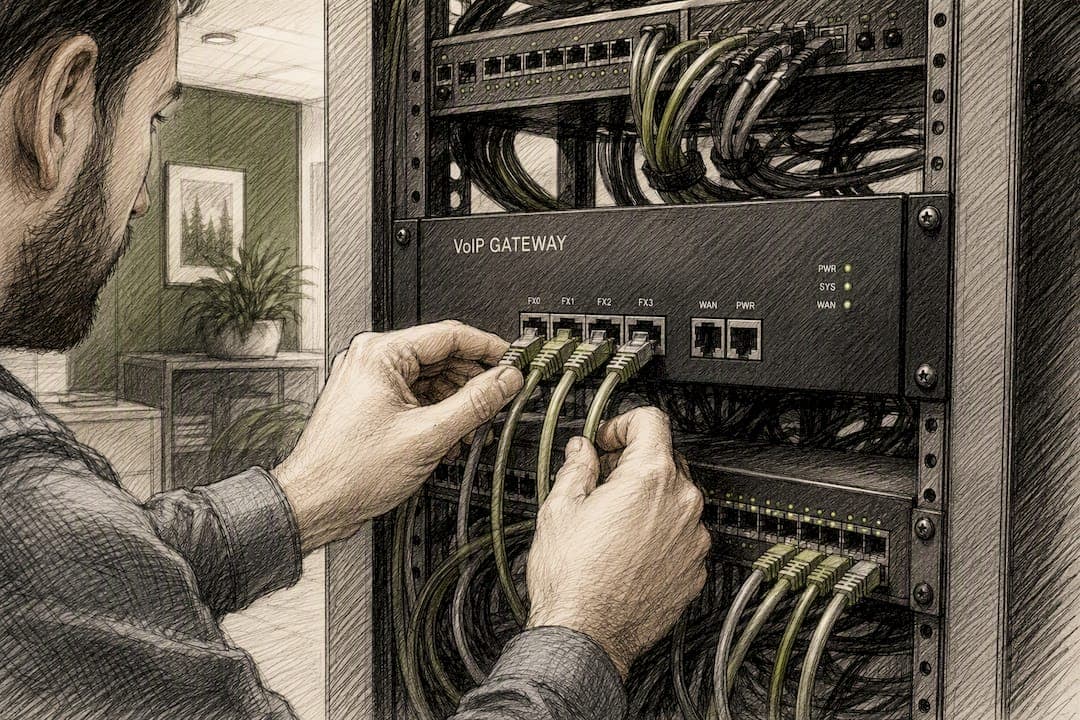
For reliable call quality, mark RTP media as DSCP EF (46), mark SIP signaling as CS3 (24) or AF31 (26), assign voice VLANs a CoS of 5, and enforce Low Latency Queueing or strict-priority queueing for EF traffic at every WAN egress point. Reserve WAN bandwidth equal to concurrent calls times per-call bandwidth, plus 20% headroom. Your numeric targets: one-way latency under 150 milliseconds (aim under 80 ms for the best MOS scores), jitter under 30 to 40 ms, packet loss under 0.5% (1% is your emergency ceiling), and a Mean Opinion Score of 4.0 or higher for toll-quality voice.
Verify before you trust it:
- Run
tcpdumportsharkon the WAN interface and confirm DSCP 46 survives to the router. - Start a large file transfer while a test call is active, then listen for degradation.
- Pull RTCP or RTCP-XR stats from your PBX or SBC and check jitter and loss against the targets above.
Pro Tip: If you only have twenty minutes before a change window closes, verify DSCP marking and run the concurrent-transfer test. Those two checks catch most misconfigurations that would otherwise show up as angry help desk tickets Monday morning.
Key Takeaways
Reliable VoIP quality depends on marking RTP as DSCP EF, enforcing strict-priority queuing on the WAN, and keeping latency, jitter, and packet loss inside their tested thresholds.
| Point | Details |
|---|---|
| Mark at the source | Tag RTP as DSCP EF (46) and SIP as CS3/AF31 as close to the endpoint as possible. |
| Hit the numeric targets | Keep latency under 150 ms, jitter under 40 ms, and packet loss under 0.5% for toll-quality calls. |
| Fix loss before latency | Packet loss does the most MOS damage, so remediate it before tuning jitter buffers or delay. |
| Verify markings survive the path | Firewalls, VPNs, and Wi-Fi controllers commonly strip or ignore DSCP unless explicitly configured to preserve it. |
| Get expert deployment support | Ventis Consulting Group provides network readiness assessments, QoS configuration, and ongoing SLA monitoring for growing businesses. |
Table of Contents
- What Does QoS for VoIP Actually Configure?
- What Are the Target Metrics and Thresholds for VoIP QoS?
- What DSCP and CoS Markings Should You Use for VoIP?
- How Do You Configure QoS on Switches, Routers, and PBX Systems?
- How Should You Configure Wi-Fi QoS for VoIP Calls?
- How Do You Plan WAN Bandwidth and Preserve QoS Across Carriers?
- How Do You Troubleshoot VoIP call quality problems?
- What Tools Should You Use to Monitor VoIP QoS?
- Your Ten-Minute QoS Deployment Checklist
- What Do Field Deployments Get Wrong About VoIP QoS?
- How Ventis Consulting Group Approaches VoIP QoS for Growing Businesses
- Sources
What Does QoS for VoIP Actually Configure?
QoS for VoIP is the set of mechanisms that decide which packets get treated as urgent and which get treated as expendable. It works as a pipeline: classification, marking, queuing, and policing or shaping, each doing a distinct job as a packet crosses your network.
Classification identifies which packets belong to voice traffic, typically by port range, protocol, or an access control list matching your SIP and RTP streams. Marking stamps that classification onto the packet itself, usually as a DSCP value in the IP header or a CoS value in the 802.1p field of an Ethernet frame, so downstream devices don't have to re-inspect the payload. Queuing decides the order packets leave an interface. Voice needs a priority queue that jumps ahead of bulk data, because a voice packet delayed by even 100 milliseconds is often worse than one dropped outright. Policing and shaping control rate. Policing drops or remarks packets that exceed a rate limit; shaping buffers and delays them instead. For voice, you generally want policing on the class as a safety valve, not shaping, because shaping adds delay.
Remarking happens at trust boundaries, where a device decides whether to honor the marking it received or overwrite it. This matters because CoS is a Layer 2 field that dies the moment a packet leaves the Ethernet frame, so a router has to translate it into DSCP to carry the priority signal across a Layer 3 hop.
Mark as close to the endpoint as you can. A softphone or hardware handset that marks its own RTP with DSCP EF is more reliable than depending on an access switch to reclassify traffic based on port heuristics. Picture the path this way: endpoint marks the packet, the access switch trusts or remarks that 802.1p CoS, the edge router translates CoS to DSCP and applies queuing policy, and the WAN egress interface enforces strict priority for EF before anything else touches the wire.
- Classification happens at the network edge, nearest the phone or softphone.
- Marking should be trusted from known endpoints and re-verified from untrusted ones.
- Queuing decisions matter most at your slowest link, almost always the WAN.
- Policing protects the priority queue from being overrun by misclassified traffic.
What Are the Target Metrics and Thresholds for VoIP QoS?
Four numbers determine whether a call sounds clean or falls apart: latency, jitter, packet loss, and the MOS score they collectively produce. Get these four right and almost every call quality complaint disappears.
Latency is one-way delay from mouth to ear. ITU-T G.114 guidance treats anything under 150 milliseconds as acceptable, but you should target under 80 ms if you want calls that feel like a normal phone conversation rather than a satellite delay. Past 150 ms, people start talking over each other because the conversational rhythm breaks down.
Jitter is the variation in arrival time between packets. Your jitter buffer smooths this out, but every millisecond of buffer adds latency, so the target is under 20 to 30 ms, with 40 to 60 ms as a practical outer limit depending on how your jitter buffer is tuned. Beyond that, audio starts sounding choppy or robotic even when packets eventually arrive.
Packet loss is the most damaging of the three. Losing 1% of packets can reduce MOS by roughly 0.4 points, which is often enough to push a call from "good" to "annoying." Keep loss under 0.5% as your working target, and treat 1% as an emergency threshold that demands immediate attention.
MOS, the Mean Opinion Score, rolls all of this into a single number on a 1 to 5 scale. A score of 4.0 or above counts as toll quality, the same experience people expect from a traditional phone line. Scores between 3.5 and 4.0 are acceptable for business use but noticeably worse. Codec choice sets your ceiling here: G.711 tops out around a MOS of 4.1, G.729 caps closer to 3.92, and Opus can exceed both under good network conditions. No amount of QoS tuning will push a G.729 call past its codec ceiling, so pick your codec deliberately rather than relying on the network to compensate.
| Metric | Target | Perceptible symptom | Primary remediation |
|---|---|---|---|
| Latency (one-way) | <80 ms ideal, <150 ms max | Talk-over, awkward pauses | Reduce hops, prioritize with LLQ, check WAN path |
| Jitter | <20 to 30 ms | Choppy or robotic audio | Tune jitter buffer, enforce priority queuing |
| Packet loss | <0.5%, <1% emergency | Dropped syllables, gaps | Fix congestion, verify DSCP marking end to end |
| MOS | ≥4.0 toll quality | Overall perceived quality | Match codec to bandwidth, fix loss first |
The fix order matters more than most admins realize. Eliminate packet loss first, since it does the most damage per unit, then tackle jitter, and only then fine-tune latency and buffer depth. Chasing latency improvements while packet loss sits at 3% is wasted effort.
What DSCP and CoS Markings Should You Use for VoIP?
Mark RTP media as DSCP EF, decimal value 46. This is the Expedited Forwarding class, purpose-built for low-latency, low-loss traffic, and it should map to a strict-priority queue on every device in the path. Mark SIP signaling separately, using CS3 (24) or AF31 (26), since signaling doesn't need the same strict priority as media but still deserves better treatment than bulk data. Video conferencing traffic typically uses AF41 or AF34, while everything else, email, web browsing, file transfers, stays at Best Effort (0).
On the LAN, translate this to 802.1p CoS values. Voice traffic gets CoS 5, which switches use to prioritize the Ethernet frame before it's even routed. Remember that CoS only exists at Layer 2. The moment a packet crosses a router, that CoS value is gone unless the router explicitly reads it and writes the equivalent DSCP value into the IP header. This is the single most common point of QoS failure: administrators mark traffic beautifully on the access switch, then watch it get treated as best-effort the instant it hits the WAN router because nobody configured the CoS-to-DSCP translation.
| Layer 2 CoS | Layer 3 DSCP | Traffic type |
|---|---|---|
| CoS 5 | EF (46) | RTP voice media |
| CoS 3 | CS3 (24) or AF31 (26) | SIP signaling |
| CoS 4 | AF41 (34) | Video conferencing |
| CoS 0 | BE (0) | Best-effort data |
Fortinet's FortiSwitch platform ships with a predefined voice QoS policy using exactly this mapping, voice at 46 and control traffic at 24 or 26, which is a reasonable starting template even outside a Fortinet environment.
Pro Tip: Remark at every trust boundary, not just once at the network edge. If a phone connects through an untrusted access port, or if traffic arrives from a partner network you don't control, don't blindly honor whatever DSCP value shows up. Reclassify it based on port or subnet, then apply your own marking. Trusting unverified markings is how a misconfigured device on the guest network ends up hogging your priority queue.
How Do You Configure QoS on Switches, Routers, and PBX Systems?
Configuration happens at four layers: the access switch, the router or firewall at the WAN edge, the PBX or softswitch itself, and, if you're running a software-based system, the Linux host underneath it.
On access switches, trust the 802.1p marking on ports connected to known VoIP handsets, and use LLDP or CDP to automatically assign phones to a dedicated voice VLAN. Separating voice into its own VLAN isolates broadcast traffic and lets you apply a distinct QoS policy without touching data traffic. A typical access port configuration sets the voice VLAN, trusts CoS from the phone, and denies trust from the data VLAN sharing that same physical port.
On routers and firewalls at the WAN edge, Cisco's Modular QoS CLI (MQC) with Low Latency Queueing is the standard pattern. You define a class map that matches DSCP EF, then a policy map that assigns that class to a strict-priority queue with a bandwidth guarantee:
class-map match-all VOICE-EF
 match ip dscp ef
class-map match-all VOICE-SIGNALING
 match ip dscp cs3
policy-map WAN-EDGE
 class VOICE-EF
  priority 1000
 class VOICE-SIGNALING
  bandwidth 256
 class class-default
  fair-queue
That priority 1000 statement reserves 1,000 kbps of strict-priority bandwidth for EF traffic. Cisco's own QoS guidance for VoIP recommends pairing this priority queue with policing, so a misbehaving device that floods the EF class doesn't starve everything else on the interface. Verify the policy is active with show policy-map interface, which reports drops, matches, and queue depth in real time.
For Asterisk and other IP-PBX systems, the media and signaling marking happens in the SIP configuration itself. In sip.conf or pjsip.conf, set:
tos_sip=cs3
tos_audio=ef
tos_video=af41
This tells Asterisk to stamp outgoing SIP packets with CS3 and outgoing RTP with EF, matching the recommended marking scheme documented in Asterisk's own configuration guide. If Asterisk is running on a Linux host that also needs to shape egress traffic, tc handles the queuing side:
tc qdisc add dev eth0 root handle 1: htb default 30
tc class add dev eth0 parent 1: classid 1:10 htb rate 1mbit ceil 1mbit
tc filter add dev eth0 parent 1: protocol ip prio 1 u32 match ip tos 0xb8 0xfc flowid 1:10
That filter matches the EF DSCP value in the ToS byte and routes it into the priority class. Confirm it's working with tc -s qdisc show dev eth0, which reports packet counts and drops per class.
- Switches: trust CoS on phone ports, assign voice VLANs via LLDP, deny trust on data ports sharing the link.
- Routers: use MQC/LLQ with strict priority for EF, bandwidth-guaranteed class for signaling, policing to cap abuse.
- Firewalls: preserve DSCP through NAT and inspection; some deep packet inspection engines strip markings by default.
- Asterisk/Linux: set
tos_audio=efandtos_sip=cs3in the dialplan config, then verify withtcpdump -von the interface.
| Device layer | Primary tool | Verification command |
|---|---|---|
| Access switch | CoS trust + voice VLAN | show interface status / VLAN check |
| WAN router | MQC / LLQ policy map | show policy-map interface |
| Linux/Asterisk host | tc qdisc + tos_* config | tc -s qdisc show |
| Any hop | Packet inspection | tcpdump -v for ToS/DSCP byte |
Pro Tip: Firewalls are the silent killer of QoS. Many deep packet inspection engines rewrite or strip DSCP values during NAT translation unless you explicitly configure the firewall to preserve them. If your marking looks perfect on the LAN side and disappears on the WAN side, check the firewall before you blame the router.
How Should You Configure Wi-Fi QoS for VoIP Calls?
Wireless breaks more voice calls than wired networks do, mostly because Wi-Fi wasn't built with strict priority queuing in mind. WMM, Wi-Fi Multimedia, retrofits four access categories onto 802.11 networks, and voice traffic needs to land in the highest one, but that only works if your access points and controller are configured to honor it.
Put voice devices on a dedicated SSID, or at minimum tag them distinctly if a shared SSID is unavoidable. This lets you apply a QoS profile specific to voice handsets rather than treating every wireless client the same way. Enable WMM and, where your handsets support it, TSPEC (Traffic Specification) for admission control, which prevents an AP from accepting more voice calls than it can actually serve without degrading everyone already connected.
Prefer 5 GHz over 2.4 GHz for voice wherever coverage allows. The 2.4 GHz band is crowded with Bluetooth, microwaves, and neighboring networks, and its limited non-overlapping channels make interference far more likely. Configure fast roaming with 802.11r, k, and v so a handset moving between access points doesn't drop the call during the handoff. Without fast roaming, a phone walking across an office can experience a 200 to 300 millisecond gap during re-authentication, which is audible and sometimes disruptive enough to drop the call entirely.
One caveat worth flagging: DSCP marking doesn't automatically translate to wireless priority. The access point or controller has to map DSCP to the correct WMM access category, and this mapping varies by vendor. Cisco Meraki's approach, for instance, applies a default traffic shaping rule set that treats known voice signatures as high priority, but you should still verify the mapping rather than assume it works out of the box, particularly after a firmware update.
- Assign voice handsets to a dedicated SSID or clearly tagged VLAN.
- Enable WMM and TSPEC where the handset and AP both support it.
- Push voice traffic to 5 GHz; reserve 2.4 GHz for legacy or IoT devices.
- Configure 802.11r/k/v for fast roaming across access points.
- Verify the AP's DSCP-to-WMM mapping after any firmware or controller update.
- Test handset behavior in motion, not just from a stationary desk.
How Do You Plan WAN Bandwidth and Preserve QoS Across Carriers?
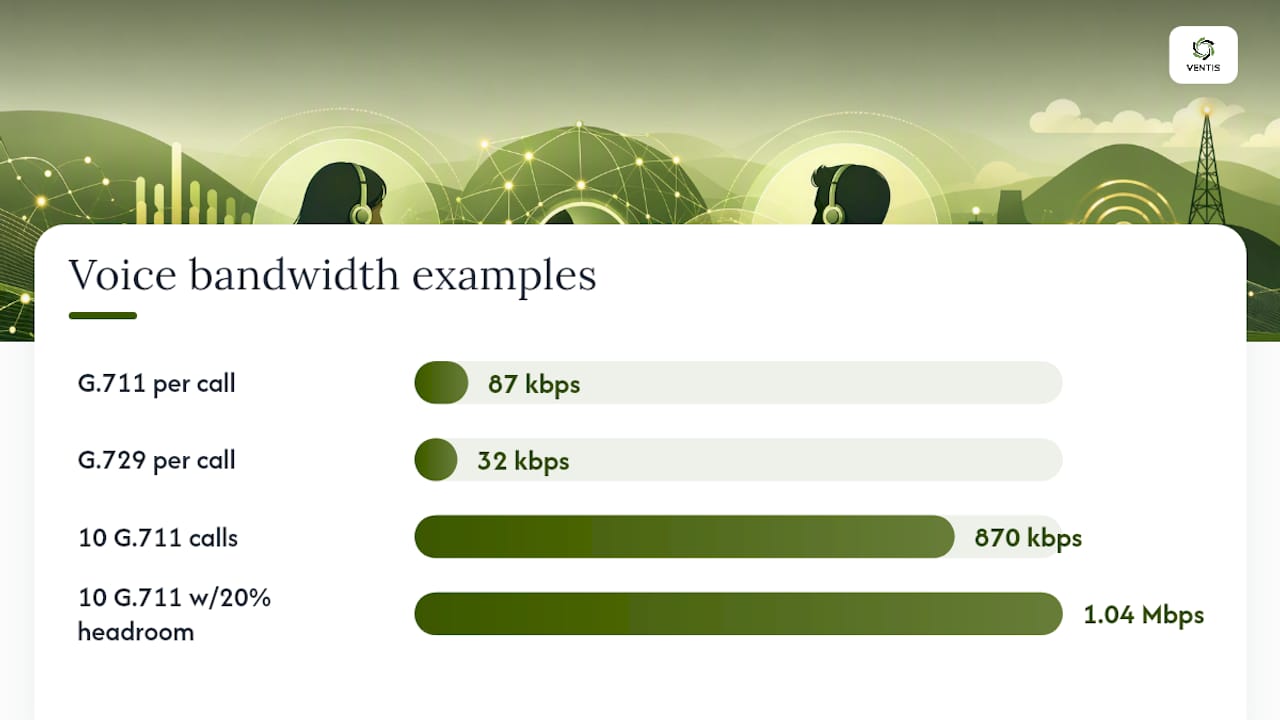
Bandwidth math starts with your codec. G.711, the most common uncompressed codec, runs about 87 kbps per call once you account for RTP, IP, and Ethernet overhead. G.729, a compressed alternative, drops that to roughly 32 kbps per call, trading some audio fidelity for bandwidth efficiency. Opus is variable-rate and can be tuned across a wide range depending on the quality target.
The sizing formula is straightforward: concurrent calls times per-call bandwidth, multiplied by a 1.2 headroom factor. Ten simultaneous G.711 calls need roughly 870 kbps of guaranteed voice bandwidth before headroom, and about 1.04 Mbps after applying the 20% buffer. Reserving 20 to 30% of total WAN bandwidth for voice is a reasonable planning rule of thumb for a typical small or mid-sized office, though you should validate it against your actual concurrent-call patterns rather than accepting it blindly.
Apply your marking and queuing policy before the WAN bottleneck, meaning on the LAN-facing side of your router, not after. QoS configured downstream of the bottleneck link is too late to matter, since congestion has already occurred by the time packets reach that interface.
DSCP preservation gets complicated once encryption enters the picture. IPsec VPN tunnels and VXLAN overlays can strip or ignore the inner packet's DSCP value unless you explicitly configure the tunnel to copy it to the outer header. Test this after standing up any VPN or SD-WAN tunnel; don't assume the marking survives encapsulation just because it worked before the tunnel existed.
Most SD-WAN platforms now ship with voice-aware policies that automatically detect RTP flows and map them to a priority forwarding class, but the policy placement still matters. Confirm the SD-WAN edge device applies its voice policy before traffic enters the overlay tunnel, not after.
If you're relying on an MPLS or carrier-managed WAN link, ask your carrier three specific questions: what committed bandwidth applies to your priority class, whether they honor DSCP markings end to end or remark at their network edge, and what QoS SLA metrics (latency, jitter, loss) they'll contractually report on. A WAN services partner can help translate vague carrier language into measurable commitments before you sign.
- Ask carriers for committed bandwidth per class, not just aggregate circuit speed.
- Confirm whether DSCP markings are honored or remarked at the carrier's edge.
- Request documented QoS SLA metrics, not just uptime guarantees.
- Test DSCP preservation across every VPN or SD-WAN tunnel after deployment, not before.
How Do You Troubleshoot VoIP call quality problems?
The fastest path to a fix is mapping what a caller hears to the exact metric that's failing, then testing that metric directly instead of guessing. Most call-quality complaints trace back to the local network path rather than the VoIP provider, so start your investigation there before opening a ticket with the carrier.
Choppy or gap-filled audio almost always points to packet loss or jitter. Check RTCP statistics from the call in question, then run a path test with traceroute or an equivalent tool to identify where loss is occurring. If loss shows up consistently at one hop, that's your congestion point.
Robotic or metallic-sounding audio is a classic packet loss signature, particularly when the loss is bursty rather than steady. Echo usually isn't a network problem at all. It's typically an acoustic issue or an echo canceller misconfigured for the delay on that specific path, so check delay settings before assuming a network fix will help.
One-way audio, where one party hears the other but not vice versa, is almost never a QoS problem. It's usually NAT traversal failure or an asymmetric routing path where RTP packets take a different route than the SIP signaling, often because a firewall pinhole only opened in one direction. Reviewing your firewall and NAT configuration resolves most one-way audio complaints faster than any QoS tuning would.
| Symptom | Likely metric | First test | Remediation |
|---|---|---|---|
| Choppy audio | Packet loss / jitter | RTCP stats, traceroute | Fix congestion, verify DSCP |
| Robotic voice | Bursty packet loss | RTCP loss percentage | Identify and fix lossy hop |
| Echo | Delay / echo canceller | Check round-trip delay | Tune canceller settings |
| One-way audio | NAT / asymmetric routing | Check firewall pinholes | Fix NAT/SIP ALG config |
Your troubleshooting checklist, in order: confirm DSCP survives on the wire with a packet capture, pull per-call RTCP or RTCP-XR stats, check jitter buffer statistics on the endpoint or PBX, review queue statistics on every egress interface in the path, and run a stress test with a large file transfer active during a live call. That last step reveals whether your priority queue actually protects voice under load, or whether it's a policy that exists on paper but never gets enforced when it matters.
Pro Tip: Jitter buffer depth is a trade-off, not a free fix. A deeper buffer smooths out more variation but adds latency directly to the call, and pushing the buffer past roughly 120 milliseconds usually creates more perceptual harm than the jitter it's compensating for. Tune it based on your measured jitter, not a default value copied from a vendor's documentation.
The most common mistake in this whole process is skipping straight to "the provider is having an outage" before checking a single local metric. Vendor documentation and field experience both point the same direction: check your own path first. It's faster, and it's usually where the problem actually lives.
What Tools Should You Use to Monitor VoIP QoS?
Ongoing monitoring beats reactive troubleshooting, and the tooling for it splits into three categories: packet-level tools, call-level statistics, and dashboard-level trending.
For packet-level debugging, Wireshark and its command-line counterpart tcpdump remain the standard. Both let you filter for RTP streams and inspect the DSCP byte directly, confirming markings survive a given hop. For call-level statistics, RTCP and RTCP-XR reports, generated by your PBX or SBC, capture per-call jitter, loss, and round-trip time without requiring a packet capture for every call. Cloud communication platforms increasingly expose this programmatically. Azure Communication Services, for example, provides media statistics APIs and pre-call diagnostics that check network readiness before a call even connects, which is worth building into your provisioning workflow for new endpoints rather than discovering problems after deployment.
A single blip rarely needs a page. A sustained pattern does.
- Wireshark / tcpdump: packet-level inspection, DSCP verification, protocol-level debugging.
- RTCP / RTCP-XR: per-call jitter, loss, and RTT without a full capture.
- Vendor dashboards: historical trending across sites, useful for spotting slow degradation.
- Path telemetry tools: continuous latency and loss tracking between sites and the carrier edge.
- Pre-call diagnostics: validate network readiness before onboarding a new endpoint or site.
Before any QoS rollout, run a baseline measurement of latency, jitter, and loss on the target path, then compare post-deployment numbers against it. Without a baseline, you're guessing at whether your changes actually helped.
Your Ten-Minute QoS Deployment Checklist
Run through this list during a maintenance window, before and after applying changes:
- Mark RTP as DSCP EF (46) at the endpoint or nearest trusted device.
- Mark SIP signaling as CS3 (24) or AF31 (26).
- Confirm voice VLAN assignment and CoS=5 on every phone port.
- Enable LLQ or strict-priority queuing for the EF class at WAN egress.
- Calculate and reserve WAN bandwidth: concurrent calls × per-call bandwidth × 1.2.
- Run a concurrent file-transfer test while a call is active.
- Pull RTCP/MOS stats immediately after the change to confirm improvement.
- Document your per-site QoS profile and SLA targets for future reference.
Ten to twenty minutes covers the packet capture, the transfer test, and a quick RTCP pull. That's enough to catch a broken marking or an unreserved queue before it becomes a help desk ticket.
What Do Field Deployments Get Wrong About VoIP QoS?
The mistake I see most often isn't a missing configuration line. It's over-trusting endpoint markings without verifying they survive the full path. A phone can mark its RTP perfectly and still lose that priority the moment it crosses a firewall that strips DSCP during inspection, or a VPN tunnel that doesn't copy the inner header outward.
Under-reserving WAN headroom is the second recurring problem. Teams calculate the exact bandwidth ten concurrent calls need, apply zero headroom, and then wonder why quality degrades the moment an eleventh call starts or a large backup job kicks off during business hours. The 20% buffer isn't padding. It's the difference between a queue that occasionally saturates and one that never does.
Wireless behavior gets ignored until it's the reason for a complaint. Admins tune wired QoS carefully, then deploy the same handsets over Wi-Fi without checking whether the access point maps DSCP to the correct WMM category.
For staged rollouts, change one variable at a time and measure before and after. Document a per-site QoS profile: baseline latency, jitter, and loss before changes, then the same three numbers after. That record becomes invaluable when a carrier disputes an SLA claim or a new site inherits a "known good" configuration instead of starting from scratch.
How Ventis Consulting Group Approaches VoIP QoS for Growing Businesses
Configuring QoS correctly takes more than copying a config snippet into your router. It requires a baseline network assessment, a bandwidth plan sized to your actual call volume, and ongoing monitoring that catches drift before it becomes a complaint. Ventis Consulting Group runs this as a structured engagement for small and mid-sized businesses across Pittsburgh and the surrounding region: a network readiness assessment, a DSCP and CoS mapping plan built for your specific switches and routers, device configuration, and a verification report confirming the settings actually hold under load.

The deliverables are concrete. You get a documented bandwidth plan, the exact marking maps applied to your gear, device-level configs you can hand to any future IT hire, and a monitoring dashboard tracking jitter, loss, and MOS against your SLA targets. If your calls are choppy, your Wi-Fi handsets drop mid-conversation, or you're simply not confident your current router configuration is doing what the vendor documentation claims, request a network readiness assessment through Ventis Consulting's unified communications page and get a clear picture of what's actually happening on your network before the next outage tells you the hard way.
Sources
- VoIP MOS Score — What It Is, Good Scores & How to Improve | SIPSymposium
- Troubleshoot web VoIP quality | Microsoft Learn