

Email can carry protected health information legally, but only when two things are true: your provider has signed a Business Associate Agreement, and you have the right technical safeguards running underneath it. That means encryption in transit and at rest, access controls with multi-factor authentication, audit logging, and a minimum-necessary policy for what gets sent. This guide is built for U.S. healthcare providers and small practice administrators who need to implement HIPAA compliant email correctly the first time, not compare feature lists all afternoon.
TL;DR:
- Ensuring encryption alone is insufficient; audit logs, access controls, and multi-factor authentication are equally critical for HIPAA compliance.
- Small practices should carefully evaluate vendors for BAA signing, audit log availability, encryption standards, and user authentication before choosing an email solution.
- Configuring enterprise email platforms like Google Workspace or Microsoft 365 correctly is vital, as the compliance burden falls on practice setup, not the platform.
- Staff training on email best practices and incident response drills are essential to prevent breaches caused by human error, such as misdirected emails.
- Implementing a phased approach of risk analysis, technical setup, staff training, and monitoring helps avoid compliance gaps and costly audit findings.
Table of Contents
- What Does HIPAA Actually Require for Email?
- Which Email Setup Fits a Small Practice?
- How Do You Evaluate and Choose an Approach?
- Building Your HIPAA Email Implementation Checklist
- The Pattern We See Break Practices, and How to Fix It
- How Ventis Consulting Group Handles Secure Email for Practices
- Where to Verify These Requirements Yourself
- Sources
What Does HIPAA Actually Require for Email?
The Health Insurance Portability and Accountability Act doesn't mention email once. That surprises a lot of practice owners who assume there's a specific "HIPAA email rule" sitting somewhere in the federal code. There isn't. What exists instead is the Security Rule, found at 45 CFR Part 164, which sets technology-neutral standards for protecting electronic protected health information, or ePHI, no matter what system touches it.
Email counts as a system that touches ePHI the moment a message contains a patient name tied to a diagnosis, appointment, billing detail, or treatment plan. At that point, §164.312 technical safeguards apply directly to your inbox.
Those safeguards break into five requirements:
- Access control: unique user IDs, automatic logoff, and encryption so only authorized staff open a message.
- Audit controls: logs that record who accessed, sent, or read ePHI and when.
- Integrity controls: protections that confirm a message wasn't altered in transit.
- Authentication: proof the sender and recipient are who they claim to be, typically enforced through multi-factor authentication.
- Transmission security: encryption strong enough to stop interception on the wire, usually TLS 1.2 or higher.
Here's the number that changes how most practices think about this: many organizations focus so heavily on encryption that they skip the other four safeguards entirely. The NIST SP 800-66 Rev. 2 guide exists specifically because so many covered entities treat "encrypted" and "compliant" as synonyms, when audit logging and access control gaps are just as likely to trigger a reportable breach.
A Business Associate Agreement, or BAA, is the second non-negotiable piece. Any vendor that creates, receives, maintains, or transmits ePHI on your behalf, including your email provider, must sign one. HHS guidance on electronic PHI transmission confirms email is permitted under the Security Rule, but the covered entity stays responsible for verifying safeguards are actually in place, BAA included. Free consumer email accounts almost never offer a BAA, which is exactly why they're off the table for clinical use no matter how convenient they feel.
None of this works as a checkbox exercise. The Security Rule requires a documented Security Risk Analysis that specifically inventories which mailboxes handle ePHI, confirms BAAs are signed, and verifies your encryption and MFA settings are actually turned on, not just theoretically available. Skipping this step is one of the most common findings in OCR investigations tied to email breaches. Proposed rulemaking from the Department of Health and Human Services also signals that several currently "addressable" specifications may become mandatory, which makes now a smart time to lock down MFA and audit logging rather than wait for the rule to force your hand.
Which Email Setup Fits a Small Practice?
Three implementation models dominate the market, and each handles the workflow differently enough that picking the wrong one creates friction your staff will complain about for years.
Model A: Configured enterprise email. This means taking a platform like Google Workspace or Microsoft 365 and layering on the settings HIPAA requires: signed BAA, forced TLS, MFA, audit log retention, and data loss prevention rules that catch PHI before it leaves the building unencrypted. The advantage is that your staff keeps using the same inbox they already know. The disadvantage is that the compliance burden sits entirely on your configuration choices, and a lot of practices assume the platform handles this automatically when it doesn't.
Model B: Add-on encryption gateways or plugins. These sit on top of an existing inbox and encrypt messages transparently, often without the sender doing anything different. The recipient typically opens the message in their normal inbox, sometimes with a one-time authentication step. This model keeps friction low for your staff and, in many cases, for the patient too.
Model C: Dedicated secure messaging portals. These require the recipient to log into a separate web portal to retrieve the message rather than reading it directly in their inbox. Security teams tend to like this model because it keeps PHI off external mail servers entirely. Patients tend to like it less, since it means remembering another password and an extra login step just to read a lab result.
The trade-off between these models comes down to where you want the friction to live. Add-on encryption keeps the workflow inside familiar inboxes, while portal-based systems shift retrieval to a separate authenticated environment, and that difference shows up immediately in patient complaints and staff adoption rates.
Here's how the three stack up on the factors that matter most to a small practice:
| Factor | Configured enterprise email | Add-on encryption | Dedicated secure portal |
|---|---|---|---|
| Staff learning curve | Low | Low | Moderate |
| Patient friction | Low | Low to moderate | Moderate to high |
| Mobile access | Native app support | Usually native | Often browser-based |
| Audit logging depth | Depends on configuration | Built into gateway | Typically robust by default |
| Best fit | Practices with in-house IT support | Practices wanting minimal workflow change | Practices sending high volumes of sensitive attachments |
Pro Tip: Test the recipient experience before you commit to any model. Send yourself a sample message using a personal phone and a personal laptop, exactly the way a patient would open it. If it takes more than two steps to read, expect a support call the first week you go live.
Mobile access deserves its own mention. A lot of physicians reply to patient messages between appointments from a phone, and portal-based systems built primarily for desktop browsers can turn that into a frustrating experience. If your clinicians are mobile-heavy, weigh that constraint as seriously as you weigh the encryption standard.
How Do You Evaluate and Choose an Approach?
Procurement conversations for HIPAA compliant email tend to go sideways when practices ask about price before they ask about compliance fundamentals. Flip that order.
Run through this checklist with any vendor or platform before signing anything:
- BAA availability. Will they sign a Business Associate Agreement without requiring an enterprise-tier contract?
- Encryption in transit and at rest. Is TLS enforced by default, and is stored mail encrypted too?
- Multi-factor authentication. Is MFA required for every account, or optional and likely to get skipped?
- Audit logging detail. Can you pull a report showing exactly who accessed a specific message and when?
- EHR integration. Does the platform connect to your electronic health record system, or will staff duplicate work across two tools?
- Patient experience. How many steps does a patient need to read a message on a phone?
- Data residency and retention. Where is data stored, and what's the default retention period before deletion?
- Incident response commitments. What's the vendor's contractual breach notification timeline?
- Subcontractor disclosure. Does the vendor use subcontractors who also touch your ePHI, and are they covered under the same BAA?
- Pricing structure. Is pricing per mailbox, per practice, or bundled with broader IT services?
When you get on a call with a vendor, ask direct questions rather than accepting a glossy compliance page at face value:
- "Can I see a sample audit log report before we sign?"
- "Who manages encryption keys, you or us, and what happens if we terminate service?"
- "What's your contractual breach notification window, and does it match the 60-day HHS reporting requirement?"
- "Which subcontractors touch our data, and are they named in the BAA?"
Watch for red flags that should end a conversation quickly. A vendor that hesitates on signing a BAA, can't produce a sample audit log, or describes encryption as "bank-level" without naming a specific standard is telling you they haven't thought through healthcare compliance seriously.
The right procurement sequence protects you from expensive mistakes: start with a Security Risk Analysis that documents your current email exposure, run a technical proof of concept with your top one or two candidates, have legal review the BAA language before signing, and roll out in phases rather than switching your entire staff over on the same Monday morning.
Building Your HIPAA Email Implementation Checklist
Once you've picked a model, the work shifts from decision-making to configuration. Split this into technical tasks and operational tasks, because they require different people and different timelines.
Technical configuration tasks:
- Enforce TLS 1.2 or higher on all outbound and inbound mail flows.
- Confirm the provider encrypts data at rest, not just in transit.
- Require multi-factor authentication on every account with mailbox access.
- Assign unique login credentials to every staff member. No shared inboxes, ever.
- Enable audit logging and actually test it by generating a sample event and confirming it appears in the report.
- Configure data loss prevention rules that flag or block PHI leaving the domain unencrypted.
- Set retention and backup policies that match your state's medical record retention requirements.
Operational tasks:
- Update your Security Risk Analysis to explicitly include every email flow that touches ePHI.
- Confirm BAAs are signed and on file for your email provider and any encryption add-on vendor.
- Write a plain-language email PHI policy staff can actually follow, not a legal document nobody reads.
- Train every staff member who sends or receives patient email, including front-desk and billing staff who often get overlooked.
- Document a misdirected-email process: who gets notified, how fast, and what gets logged.
- Run at least one incident response drill using a simulated misdirected message.
The gap between technical controls and staff behavior is where most breaches actually happen. Misdirected email remains the most common cause of email-related HIPAA breaches, which means a perfectly encrypted system still fails if someone autocompletes the wrong "Smith" in the address bar. Training isn't a formality here. It's the control that catches what your technology can't.
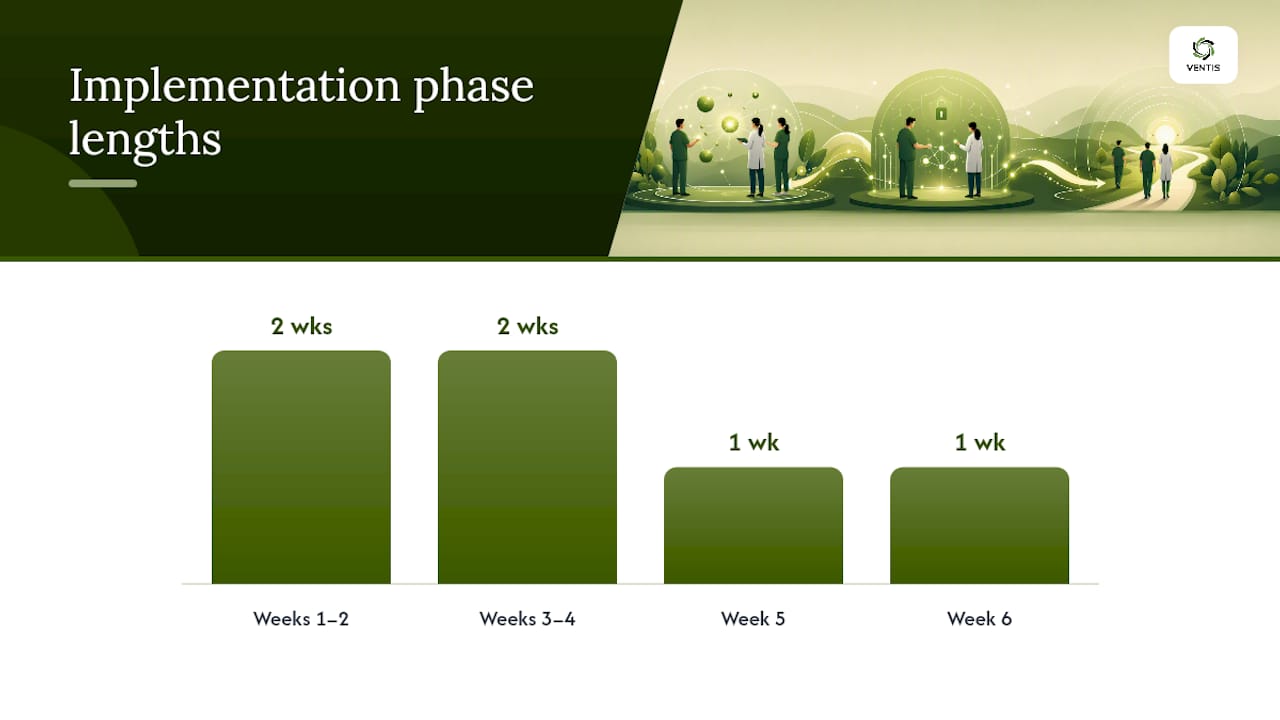
A realistic phased timeline for a small practice looks something like this. Weeks one and two: complete or update the Security Risk Analysis and confirm which model you're implementing. Weeks three and four: configure technical controls and get the BAA signed. Week five: train staff and run a pilot with a small group before full rollout. Week six: go live practice-wide and schedule your first quarterly audit log review.
Cost doesn't have to be a barrier. Many practices already own the tools they need. Google Workspace and Microsoft 365 both offer HIPAA-eligible tiers with a signed BAA at a price point most small practices already budget for elsewhere in their software stack. The expensive mistake isn't the platform cost. It's skipping the configuration work and assuming the subscription alone makes you compliant.
The Pattern We See Break Practices, and How to Fix It
Working with small practices across Pittsburgh and Western Pennsylvania, Ventis Consulting Group sees the same rollout sequence work every time: risk assessment first, model selection second, configuration third, staff training fourth, ongoing monitoring last. Practices that skip straight to "let's just turn on encryption" almost always discover gaps later, usually during an audit or after a near-miss.
The recurring failures are predictable. No signed BAA because someone assumed the platform's terms of service covered it. Shared logins because it felt faster during onboarding. MFA left optional because one physician complained about the extra step. Staff trained once at hire and never again. Each of these gets fixed the same way: documented policy, enforced technical setting, and a review cadence someone actually owns, not a task that lives in a drawer until the next audit reminds you it exists.
Clarifying who owns what between your practice and any managed provider matters here too, and Ventis Consulting Group's security responsibility framework lays out exactly where that line sits so nothing falls through the cracks.
— Greg
How Ventis Consulting Group Handles Secure Email for Practices
Some consulting providers offer Pittsburgh-area practices managed paths to compliant email instead of handing over just configuration settings. Rather than piecing together encryption plugins, BAA paperwork, and staff training on your own timeline, some providers handle the configuration, the vendor BAA process, and ongoing monitoring as one coordinated engagement to help ensure completion during busy clinic weeks.

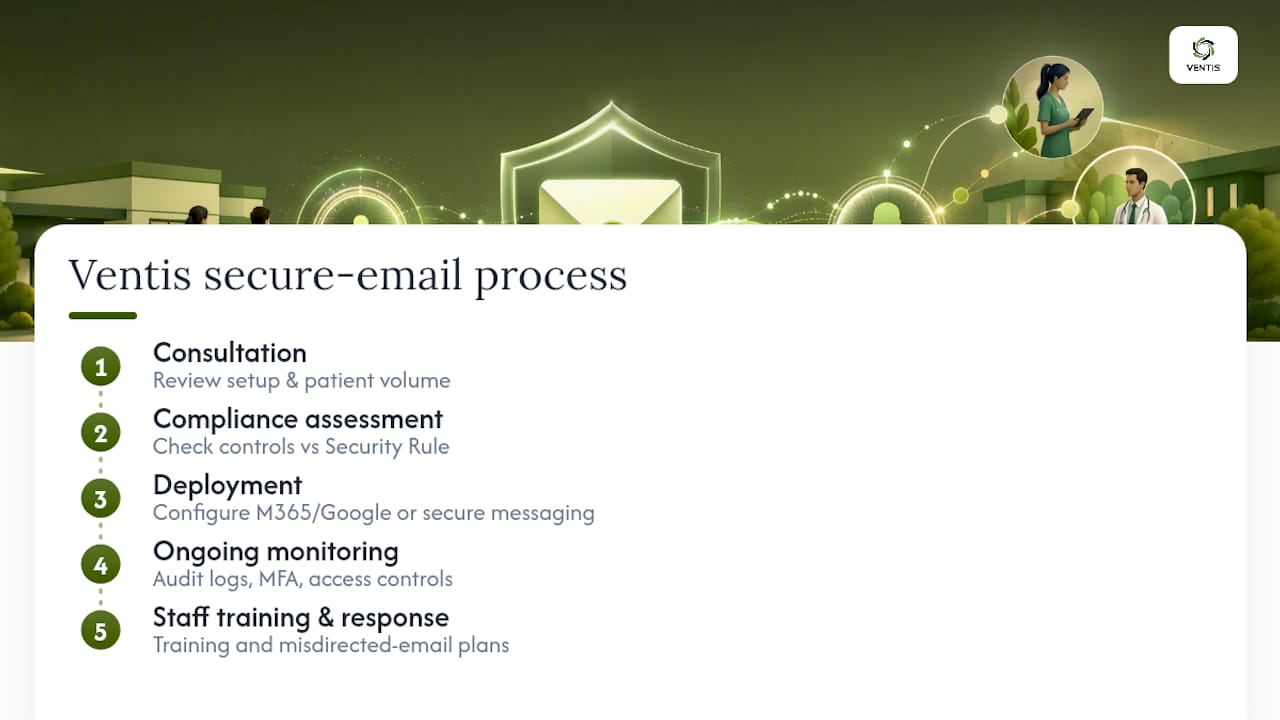
The process starts with a consultation to understand your current email setup and patient communication volume, followed by a compliance assessment that checks your existing controls against Security Rule requirements. From there, deployment may involve configuring an existing Microsoft 365 or Google Workspace tenant, layering in add-on encryption, or standing up dedicated secure messaging, followed by ongoing monitoring to help keep audit logs, MFA enforcement, and access controls compliant over time. Staff training and misdirected-email response planning are often included as part of comprehensive engagements.
For teams evaluating broader secure communication needs beyond email, Ventis Consulting Group's unified communications solutions extend the same compliance approach to phone and messaging systems. Practices that also want background on secure messaging workflows in clinical settings can review TrueColors International's healthcare communication resources for additional context.
To evaluate your current email setup, consider scheduling a compliance assessment with a provider to develop a plan for closing any gaps.
Where to Verify These Requirements Yourself
- HHS Security Rule overview
- NIST SP 800-66 Rev. 2 implementation guide
- 45 CFR §164.312 technical safeguards text
- Ventis Consulting Group: email security best practices
- Ventis Consulting Group: email encryption options
This article is general information, not a substitute for advice from a qualified doctor. Consult a qualified healthcare professional about your own circumstances before acting on anything here.
Sources
- Security Rule | HHS
- SP 800-66 Rev. 2, Implementing the HIPAA Security Rule: A Cybersecurity Resource Guide
- HIPAA Compliant Email Providers -Updated for 2026