

An IT support SLA is a concise, measurable agreement that sets responsibility, response, and restoration targets for your technology support. Draft one by copying the template below and running a single 60 to 90 minute stakeholder session to fill in a P1 through P4 priority matrix, service hours, and reporting cadence.
TL;DR:
- Clear response, resolution, and restoration targets are essential for high-priority issues, with response times around 15 minutes for critical incidents.
- Monthly SLA adherence reports should track response and resolution times separately to identify where delays occur.
- SLAs should define specific scope, service hours, priority tiers, uptime commitments, exclusions, reporting cadence, and escalation procedures upfront.
- Red flags include vague terms like "best effort," missing restoration targets, or service credits that do not trigger automatically.
- In negotiations, stakeholders must map services to priority levels and agree on realistic SLOs in a short, focused session to prevent prolonged back-and-forth.
Table of Contents
- What Is an IT Support SLA and Which Type Do You Need?
- What Belongs in Every SLA? A Component Checklist
- How Do You Turn SLA Promises Into Measurable Targets?
- What Response and Resolution Targets Are Reasonable by Priority?
- How Do You Draft and Negotiate an SLA Without Endless Back and Forth?
- What Does a Copyable SLA Template Actually Look Like?
- Which SLA Clauses Are Genuinely Useful and Which Are Red Flags?
- How Often Should SLA Performance Be Reported and Reviewed?
- Who Owns the SLA When Something Goes Wrong?
- How Ventis Consulting Group Applies SLAs With Real SMBs
- Get Help Turning Your SLA Into a Working Document
- Where to Go for Deeper SLA Standards
- Sources
- FAQ
What Is an IT Support SLA and Which Type Do You Need?
An IT support SLA is a written commitment between a provider and a business that spells out expected performance, response times, and what happens when targets get missed. NIST defines it as a document specifying responsibilities, performance levels, and reporting or termination requirements. That's different from an OLA (operational level agreement, which governs internal teams supporting each other) or a UC (underpinning contract, which covers a third-party vendor feeding into your support chain).
Most organizations pick from three structures:
- Customer-based SLA: one agreement covers everything a specific client or department receives.
- Service-based SLA: identical terms apply to every customer using a given service, like email or VoIP.
- Multi-level SLA: layers corporate, customer, and service tiers so a large organization can standardize baseline commitments while allowing department-specific carve-outs.
An internal IT team supporting one office typically runs a business-hours SLA. A managed IT support provider serving multiple clients around the clock usually needs a 24/7 tier for critical issues layered on top of standard business-hours coverage for everything else.
What Belongs in Every SLA? A Component Checklist
An IT support agreement without these pieces isn't really an SLA. It's a sales brochure with a signature line. Before you sign or renew anything, confirm the document covers each of these:
- Scope: which systems, applications, and locations are covered, and which are explicitly out of bounds.
- Service hours: business hours (e.g., 8 a.m. to 6 p.m. weekdays) versus 24/7/365, stated per priority tier if they differ.
- Priority tiers: P1 through P4 definitions, each with its own response and resolution targets.
- Availability commitments: uptime percentages for hosted or managed systems, plus scheduled maintenance windows.
- Exclusions: force majeure, third-party outages, client-caused issues, and anything outside the provider's control.
- Reporting cadence: how often SLA adherence gets reported, and in what format.
A practical SLA template built around these categories, plus a version number and effective date, keeps renewals from turning into renegotiations from scratch.
How Do You Turn SLA Promises Into Measurable Targets?
A service level objective is the measurable number sitting inside the SLA. IBM describes SLOs as baselines like latency, uptime, or error rate, and KPIs are what you track against them month over month. Vague language like "prompt support" isn't an SLO.
Three distinct clocks matter here, and providers often blur them on purpose:
- Response time: how fast someone acknowledges the ticket exists.
- Resolution plan deadline: how fast the provider commits to a documented fix path.
- Restoration target: how fast service actually comes back online.
Pro Tip: If a proposed SLA only names a "response time" and nothing else, ask directly what the restoration target is. A provider that answers a ticket in five minutes but takes three days to fix anything has technically met an SLA that means nothing.
Atlassian's SLA framework recommends exposing these numbers on a live dashboard, not just a monthly PDF, so both sides see drift before it becomes a dispute. Well-defined service level objectives also make it far easier to catch a provider quietly redefining "resolved" as "acknowledged."
What Response and Resolution Targets Are Reasonable by Priority?
A priority matrix is the single most useful page in any IT support SLA, because it converts subjective urgency into a number both sides agree on before anything breaks. P1 usually means a full outage or security incident affecting the whole business; P4 is a cosmetic issue or a feature request.
| Priority | Example | Response Target | Restoration Target |
|---|---|---|---|
| P1 (Critical) | Total network or server outage | a short response time | a restoration target within a few hours |
| P2 (High) | One department locked out, VoIP down | a moderate response time | a restoration target by the end of the business day |
| P3 (Medium) | Single user issue, non-critical app error | a longer response time | a restoration target within a couple of days |
| P4 (Low) | Cosmetic bug, feature request | 1 business day | Next scheduled release |
Adjust these numbers to your own risk tolerance and 24/7 versus business-hours coverage. Note in the SLA text that restoration targets exclude downtime caused by third-party carriers, cloud vendor outages, or client-side network failures, since those sit outside the provider's direct control.
As AtomSync's uptime breakdown shows, 99.9% still allows roughly 8.7 hours of downtime a year, which matters a lot more for a P1 system than a P4 one.*
How Do You Draft and Negotiate an SLA Without Endless Back and Forth?
Most SLA negotiations drag on because nobody defined success before the first draft went out. Follow this sequence instead:
- Identify stakeholders and inventory services. List every system, application, and communication tool that needs a support commitment, and name who owns each one internally.
- Run a facilitated priority workshop. Get IT, finance, and operations in one room for 60 to 90 minutes to map each service to a priority tier and agree on realistic SLOs. This single session prevents months of clause-by-clause haggling later.
- Draft the core clauses. Cover scope, service hours, priority definitions, escalation steps, service credit formulas, and change control for adding new systems mid-contract.
- Reference your master agreement. The SLA should point back to your broader MSA for legal terms like liability and confidentiality, rather than duplicating them.
- Set the review cadence before signing. Agree in writing on how often you'll revisit SLOs, using dashboards or monthly reports as the shared source of truth.
- Sign off with named approvers. Both the technical lead and a business decision-maker should sign, not just procurement.
This checklist mirrors the same discipline covered in our broader IT support checklist for small business, and it typically compresses a multi-week negotiation into two working sessions.
What Does a Copyable SLA Template Actually Look Like?
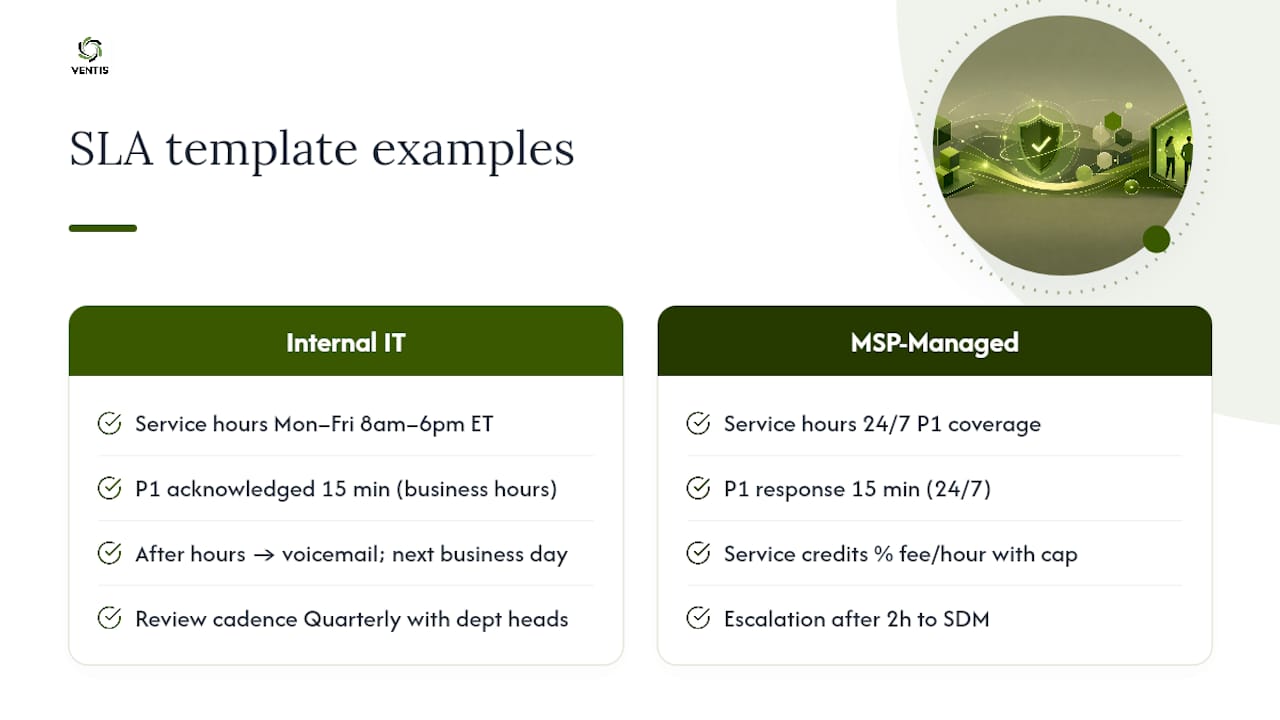
A usable SLA skeleton needs eight sections, no more: header (version and effective date), purpose and scope, service hours, priority classifications with targets, availability commitments, exclusions, reporting and escalation, and review cadence with service credits. Each section needs only one sentence of substance, not three paragraphs of legal filler.
Example A, internal IT team:
Support is available Monday through Friday, 8 a.m. to 6 p.m. Eastern. P1 incidents are acknowledged within 15 minutes during business hours; after hours, they roll to voicemail and are addressed at the start of the next business day. SLA performance is reviewed quarterly with department heads.
Example B, MSP-managed support:
P1 incidents receive 24/7 coverage with a 15-minute response guarantee. Missed P1 restoration targets may trigger service credits calculated as a percentage of the monthly fee per hour of delay, with a defined cap. Escalation beyond 2 hours automatically routes to the named Service Delivery Manager.
Managed providers typically build in three-part commitments per priority: response, resolution plan, and restoration, each with its own deadline. Compare this against how a managed IT support provider structures its own commitments before you sign anything.
Which SLA Clauses Are Genuinely Useful and Which Are Red Flags?
A good SLA ties its metrics to business outcomes, like keeping a point-of-sale system running during store hours, not to vanity numbers that look good on a dashboard but don't reflect what actually matters to the business. TOPdesk's best-practice guidance recommends building regular feedback loops into the agreement rather than treating it as a document you sign once and forget.
Watch for these red flags before you sign:
- "Best effort" language with no numeric target attached to it.
- No restoration target, only a response time, which lets a provider look responsive while a system stays down for days.
- Service credits that require you to file a claim instead of triggering automatically when a target is missed.
- No named escalation contact, just a generic support queue.
Pro Tip: Ask any prospective provider to show you a real monthly SLA report from an existing client, with names redacted. If they can't produce one, they probably aren't tracking the metrics they're promising you.
How Often Should SLA Performance Be Reported and Reviewed?
Monthly reporting works better than quarterly for most small and mid-sized businesses, because it catches drift before it compounds into a pattern. A useful monthly report includes SLA adherence percentage by priority tier, mean time to acknowledge (MTTA), mean time to resolve (MTTR), and a customer satisfaction score per closed ticket.
- Report SLA adherence percentage broken out by priority tier, not blended into one number.
- Track MTTA and MTTR separately since a fast acknowledgment can mask a slow fix.
- Exclude maintenance windows and documented third-party outages from adherence calculations, but list them separately so nothing gets hidden.
- Use ticketing automation to flag stale tickets before they quietly skew your monthly averages.
Quarterly reviews then step back and ask whether the SLOs themselves still match business reality, not just whether last month's numbers were hit.
Who Owns the SLA When Something Goes Wrong?
Every SLA needs named roles, not job titles buried in an org chart. Define an SLA owner (usually the account or delivery manager), a technical lead who owns the fix, and a named client contact who gets escalation calls.
- SLA owner: accountable for adherence and monthly reporting.
- Technical lead: owns the actual fix and restoration timeline.
- Client contact: receives escalations and approves major changes.
A sample chain: unacknowledged P1 at 15 minutes escalates to the delivery manager; unresolved at 2 hours triggers a call to the client contact and activates any service credit clause. Repeated breaches over a defined period should trigger a documented remediation plan or, in the agreement's most serious clause, termination rights.
How Ventis Consulting Group Applies SLAs With Real SMBs
Ventis Consulting Group builds IT and cybersecurity support around small to mid-sized businesses across Pittsburgh and the surrounding region, and SLAs are where that consultative approach shows up most concretely. Rather than handing every client an identical contract, Ventis works through priority tiers and response targets that match how each business actually operates, not a generic template.
One recurring pattern: a client with a vague "we'll get to it" support arrangement moved to a defined P1 to P4 matrix with a 15-minute critical response target. Escalations that used to sit in an inbox for hours started routing to a named contact immediately, and downtime during business hours dropped as a direct result.
— Greg
Get Help Turning Your SLA Into a Working Document
Ventis Consulting Group is the alternative to guessing your way through an SLA renewal. Writing a template is one thing; operationalizing it with real dashboards, monthly adherence reports, and a named escalation path is another, and that second part is where most small business agreements quietly fail.

Ventis Consulting Group helps small and mid-sized businesses in the Pittsburgh area draft SLAs, set up the unified communications systems those SLAs often cover, and build the reporting cadence that keeps both sides honest month after month. That includes reviewing an existing provider's SLA line by line to flag the "best effort" language and missing restoration targets covered above. Some providers maintain high client ratings built on this kind of practical, follow-through support. If your current SLA is more sales copy than contract, request a free SLA review from Ventis Consulting Group and get a version you can actually hold your provider to.
Where to Go for Deeper SLA Standards
For further reading, Atlassian covers SLA automation examples, IBM details SLO and KPI framing, and NIST provides the formal definition and recovery planning language referenced throughout this guide.
Sources
- What is an SLA? Service level agreement explained | Atlassian
- What Is an SLA? | IBM
- service level agreement (SLA) - Glossary | CSRC (NIST)
FAQ
What Is an SLA in IT Help Desk Terms?
An SLA in an IT help desk context is the written commitment defining how fast tickets get acknowledged and resolved by priority level, typically expressed as response time, resolution plan deadline, and restoration target for each tier.
What Is the SLA for Tech Support?
There's no universal number. A common structure sets a 15-minute response and 4-hour restoration target for critical (P1) issues, with longer windows for lower-priority tickets, but every provider should state its own targets explicitly.
What Does SLA Mean in the IT Industry?
SLA stands for service level agreement, a document that NIST defines as specifying responsibilities, expected performance levels, and reporting or termination requirements between a provider and a customer.
What Is an SLA for Support, Specifically?
An SLA for support covers the scope of systems supported, the hours support is available, priority definitions with response and resolution targets, exclusions, and how adherence gets reported and reviewed over time.
How Do Service Credits Work When an SLA Is Breached?
Service credits should trigger automatically once a target is missed, typically calculated as a percentage of the monthly fee per hour or day of delay, capped at a defined maximum rather than requiring the client to file a claim.