

A managed IT provider is a third-party company that takes full or partial responsibility for your business's technology infrastructure, support, and security. Choosing the right managed IT provider is one of the most consequential technology decisions a small or mid-sized business can make. The wrong choice costs you money, exposes you to security risk, and locks you into contracts that are hard to exit. This guide gives you a structured, scoring-based framework to evaluate providers on eight criteria that actually matter, so you make a confident, informed decision.
What are the key criteria to evaluate when choosing a managed IT provider?
The best way to select an IT service provider is to score each candidate against eight defined criteria before you ever discuss price. This removes gut-feel bias and gives you a comparable, objective picture of every provider you consider.
1. Response time and escalation protocols
Response time SLAs define how fast a provider must acknowledge and resolve issues. Ask for documented SLA tiers: what counts as a critical incident, how fast they respond, and who handles escalation if the first technician cannot resolve the issue. A provider without written escalation protocols is a risk.
2. Technical depth and certifications
Check staff-to-client ratios and ask which certifications the team holds. Relevant credentials include Microsoft certifications, CompTIA Security+, and vendor-specific networking qualifications. A low staff-to-client ratio means your tickets compete with hundreds of others.

3. Security stack
The security layer is non-negotiable. A credible provider deploys endpoint detection and response (EDR), a security information and event management system (SIEM), multi-factor authentication (MFA) enforcement, and regular security awareness training for your staff. Any provider missing two or more of these tools is not equipped for 2026 threats. Reviewing cybersecurity compliance requirements before your first provider meeting gives you a sharper set of questions to ask.
4. Contract flexibility
Exit clauses and auto-renewal terms matter more than most business owners realize. Contract exit terms are critical because bad MSP contracts lock clients into expensive, long lock-ins that make switching difficult. Read every termination clause before signing.
5. Industry-specific experience
A provider that has supported businesses in your sector understands your compliance requirements and your workflow. Ask for client references from companies of similar size and in the same industry.
6. Pricing transparency
Get a written breakdown of every included service. Hidden costs like monitoring fees, security tools, backup oversight, and vendor management can substantially increase total ownership cost when billed separately.
7. Onboarding process
A provider with no documented onboarding plan will disrupt your operations during transition. Ask for a sample onboarding timeline with milestones and deliverables.
8. Strategic alignment
The best providers offer virtual CIO (vCIO) services, meaning a senior advisor who reviews your IT roadmap quarterly and aligns technology decisions with your business goals. This separates a reactive help desk from a true technology partner.
Pro Tip: Ask every provider you interview to show you their onboarding checklist. If they cannot produce one in the meeting, that tells you everything about how organized their operations are.
How to apply a scoring method to shortlist your IT provider
A weighted scorecard removes price bias and forces an apples-to-apples comparison. Standard 2026 practice is to evaluate MSPs with a weighted scorecard across eight criteria, with providers scoring below 300 out of 500 disqualified regardless of price. That threshold exists because a low-scoring provider creates operational and security risk that no discount can offset.
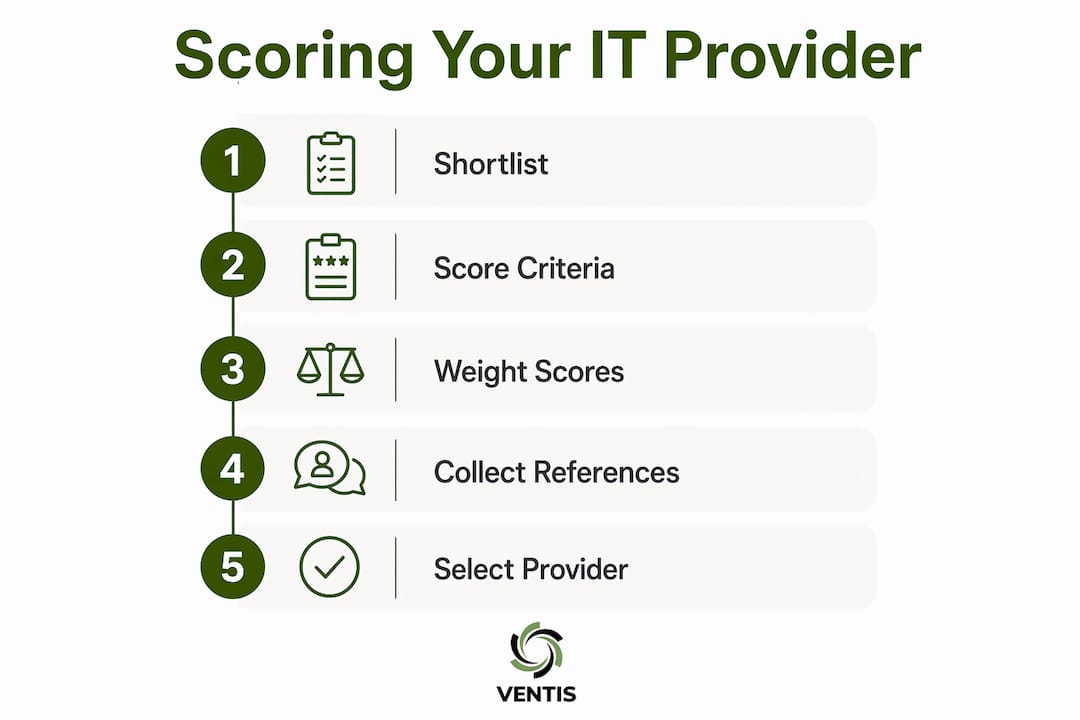
Start by creating a shortlist of three to five providers. Score each one on every criterion from 1 to 5, then multiply by the criterion weight. The table below shows a sample weighting structure.
| Criterion | Weight | Max Score |
|---|---|---|
| Response time SLAs | 15 | 75 |
| Security stack | 20 | 100 |
| Technical depth | 15 | 75 |
| Contract flexibility | 15 | 75 |
| Pricing transparency | 10 | 50 |
| Industry experience | 10 | 50 |
| Onboarding process | 10 | 50 |
| Strategic alignment | 5 | 25 |
| Total | 100 | 500 |
After scoring, collect references from each provider. Client tenure and churn rate are quality signals. Long client relationships with similar-sized businesses in your industry predict a reliable partnership. Ask references two direct questions: "Did the provider meet their SLA commitments?" and "Would you sign the same contract again?"
The most common evaluation mistake is eliminating providers based on price before scoring is complete. A provider charging 20% more but scoring 420 out of 500 delivers far better value than one charging 20% less and scoring 280.
Pro Tip: Run your scorecard before you ask for final pricing. Once price is on the table, it anchors your thinking and distorts the objective comparison you worked to build.
What pricing models exist for managed IT providers?
MSP pricing comes in four main structures. Understanding each one helps you interpret total cost of ownership rather than just the monthly invoice.
Per-user pricing charges a flat monthly fee for every employee covered. This model works well when your staff use multiple devices each. It scales predictably as you hire.
Per-device pricing charges per endpoint: laptops, servers, and network equipment. This model favors businesses with few users but many devices, such as manufacturing or retail operations.
Flat-rate pricing bundles all services into one monthly fee regardless of user or device count. It offers the most predictable budgeting but requires careful review of what is actually included.
Hybrid pricing combines a base flat rate with per-user or per-device add-ons. It is common among mid-market providers and can be cost-effective, but it also creates the most opportunity for hidden charges.
Outsourcing IT services can reduce operational expenses by up to 85% compared to maintaining an internal IT department. That figure assumes you are replacing a fully loaded internal team. For companies with 75–200 employees, a co-managed IT model with an internal IT leader plus an MSP handling tier-1 support reduces costs about 40% versus a full internal team.
Watch for these common hidden cost pitfalls:
- Emergency or after-hours support billed at premium rates not covered by the base plan
- Cybersecurity tools like EDR or SIEM listed as optional add-ons rather than included
- Backup monitoring and restore testing billed per event
- Vendor management for third-party software charged hourly
- Onboarding fees not disclosed until contract signing
For a deeper look at how outsourcing IT compares financially to keeping staff in-house, the 2026 decision guide on IT support versus in-house staff breaks down the numbers clearly.
What contract and compliance risks should you watch for?
Contract terms create more long-term risk than any technical shortcoming. A provider can improve their tools, but a bad contract traps you regardless of service quality.
Contract exit clauses often contain large buyout fees and lock-in terms that prevent clients from switching MSPs even when service is poor. Before signing, confirm the following:
- The notice period required to terminate without penalty
- Whether auto-renewal clauses exist and how much advance notice you must give to opt out
- The exact buyout calculation if you exit early
- Whether the contract is governed by law in your state or jurisdiction
Outsourcing to providers without local legal presence creates real risk. Enforced arbitration in a foreign jurisdiction complicates data processing agreements and makes contract disputes expensive to resolve. Always verify that your provider has a legal entity operating in your state before you sign.
Compliance requirements add another layer. If your business handles protected health information, you need a provider that signs a HIPAA Business Associate Agreement. If you process European customer data, GDPR data processing terms apply. Ask every provider directly: "Do you have experience with our regulatory environment, and can you provide documentation?"
Documented SLAs and a written onboarding plan are not nice-to-haves. They are the legal record of what the provider promised. If those documents do not exist before you sign, you have no recourse when commitments are missed.
What are the practical steps after you select your provider?
Signing the contract is the beginning, not the end. A structured onboarding process determines whether the transition strengthens or disrupts your operations.
- Build a complete asset inventory. Document every device, software license, and network credential before the transition starts. Gaps in this inventory cause delays and security blind spots.
- Set milestone-based onboarding. Agree on a written timeline with specific deliverables: network assessment complete by week one, endpoint agents deployed by week two, helpdesk access live by week three.
- Train your internal team. Your staff need to know how to submit tickets, who to call for urgent issues, and what the escalation path looks like. A 30-minute orientation session prevents weeks of confusion.
- Establish reporting cadence. Agree on monthly reporting that covers ticket volume, resolution times, and open security findings. This data tells you whether the provider is meeting their SLA commitments.
- Schedule a 90-day review. Sit down with your provider after three months and compare actual performance against the scorecard criteria you used to select them. Gaps identified early are far easier to address than problems discovered after a year.
Avoid assuming the transition will be invisible to your staff. Even well-managed onboarding creates temporary friction. Communicate the timeline to your team in advance and set realistic expectations. The providers who follow IT consulting best practices build this communication into their standard onboarding process.
Key takeaways
Choosing the right managed IT provider requires scoring candidates on eight defined criteria, verifying contract terms before signing, and running a structured onboarding process to protect your operations during transition.
| Point | Details |
|---|---|
| Use a weighted scorecard | Score providers on eight criteria with a 500-point max; disqualify any scoring below 300. |
| Prioritize security stack | Confirm EDR, SIEM, and MFA are included, not optional add-ons. |
| Read every contract clause | Exit terms and auto-renewal policies create more long-term risk than monthly price. |
| Verify local legal presence | Providers without a legal entity in your state complicate compliance and dispute resolution. |
| Run a 90-day performance review | Compare actual SLA performance against your original scorecard within the first quarter. |
What I have learned about choosing IT support the hard way
I have watched business owners spend weeks comparing monthly prices and almost no time reading contract terms. That is the wrong order of operations. The price you negotiate on day one matters far less than the exit terms you agree to on the same day. A provider charging $50 more per user per month with a 30-day termination clause is a better deal than a cheaper provider locking you into a 36-month contract with a buyout fee equal to six months of service.
The other pattern I see consistently: business owners treat the security stack as a secondary concern. They ask about response times and pricing, then accept whatever security tools the provider includes by default. EDR, SIEM, and MFA are not premium features. They are the baseline for any credible provider in 2026. If a provider presents those as upgrades, that tells you their standard offering is not adequate.
Local presence matters more than most guides acknowledge. A provider with a physical office and a legal entity in your state is accountable in ways that a remote-only provider simply is not. When something goes wrong, and eventually something will, you want a provider you can call, visit, and hold to a contract governed by your state's law.
The corporate IT solutions landscape has matured significantly, and business owners have more good options than ever. That also means more providers who look credible on paper but cut corners on security or bury punishing terms in contracts. Slow down. Ask firm questions. Walk away from any provider who pressures you to sign before you have reviewed the contract with your attorney.
— Greg
Ventis Consulting Group: IT support built for SMBs
Small and mid-sized businesses in Pittsburgh and surrounding areas have a direct option for managed IT support that does not require sorting through generic enterprise proposals.

Ventis Consulting Group provides managed IT services built specifically for SMBs, with transparent pricing, documented SLAs, and a security stack that includes the tools this article identifies as baseline requirements. The consultative approach means you get practical guidance aligned to your business, not a one-size-fits-all package. Ventis Consulting Group also offers unified communications solutions that integrate with your managed IT environment, reducing vendor complexity. Contact Ventis Consulting Group directly to review your current IT setup and get a clear picture of what a well-structured managed IT partnership looks like.
FAQ
What does a managed IT provider actually do?
A managed IT provider handles your technology infrastructure, helpdesk support, network monitoring, security, and strategic IT planning on an ongoing basis. The scope varies by contract, so always confirm which services are included versus billed separately.
How do I know if a managed IT provider is reliable?
Client tenure and low churn rates are the strongest reliability signals. Ask for references from businesses of similar size and in your industry, and ask those references whether the provider met their SLA commitments consistently.
What is the biggest red flag in an MSP contract?
Auto-renewal clauses combined with long notice periods are the most common trap. Exit clauses with large buyout fees prevent you from switching providers even when service quality drops.
How much does outsourcing IT services typically cost?
Pricing varies by model and scope, but outsourcing IT can reduce operational expenses by up to 85% compared to a fully staffed internal IT department. Always request an itemized quote to identify what is included and what costs extra.
Do I need a managed IT provider if I already have an internal IT person?
A co-managed IT model works well for businesses with 75–200 employees. Your internal IT leader handles strategic decisions while the MSP covers tier-1 support, reducing costs roughly 40% compared to building a full internal team.