

Most business owners assume managed IT support is just a fancier term for calling someone when a computer breaks. That assumption costs them time, money, and security. What is managed IT support, really? It's a proactive outsourcing model where a provider takes ongoing responsibility for your technology, monitors it continuously, and resolves problems before they disrupt your operations. The IT services market using this model is projected to reach $475.9 billion by 2030. That growth reflects a real shift in how businesses think about technology management.
Table of Contents
- Key takeaways
- What managed IT support is and how it works
- Key benefits of managed IT support for businesses
- Contract details that most businesses overlook
- How to evaluate and select the right provider
- Comparing managed IT support models
- My take on managed IT after years of working with SMBs
- See how Ventisconsulting handles managed IT
- FAQ
Key takeaways
| Point | Details |
|---|---|
| Managed IT is proactive, not reactive | Providers monitor and maintain your systems continuously, not just when something breaks. |
| SLAs define what you actually get | Response time and resolution time are different things. Negotiate both before signing. |
| Exit terms protect your business | Your contract must specify data ownership and access credentials if you ever switch providers. |
| Cost predictability is a real benefit | Flat-rate monthly pricing replaces unpredictable repair bills and emergency IT costs. |
| Provider fit matters as much as price | Evaluate experience, security practices, and scalability before choosing a managed IT partner. |
What managed IT support is and how it works
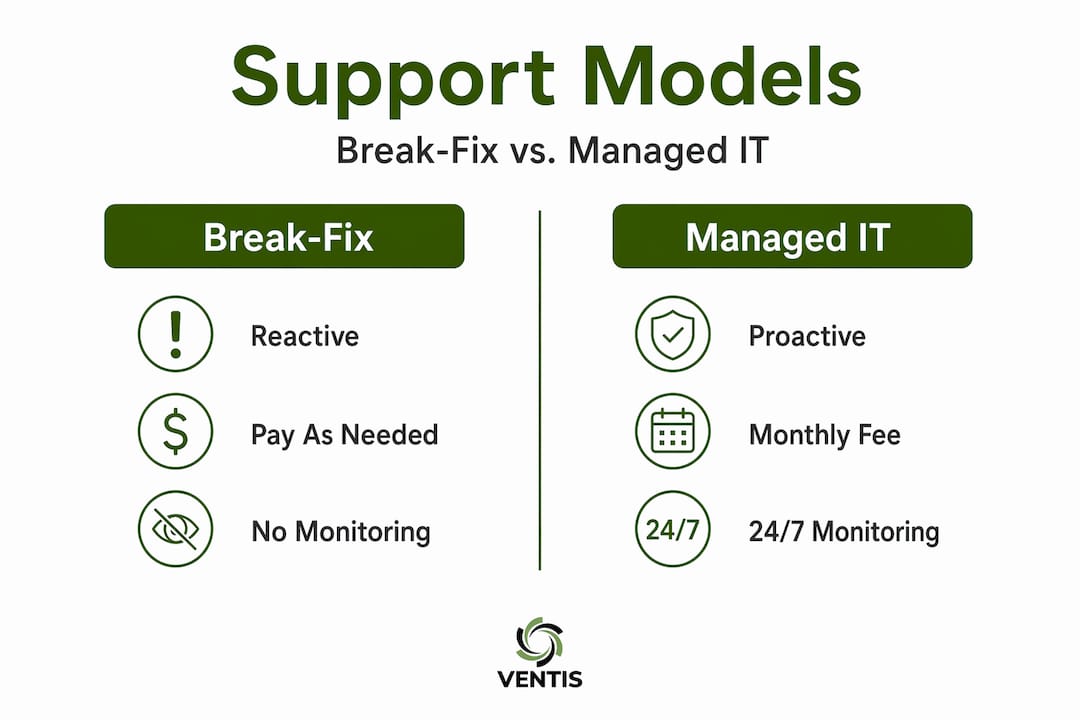
The managed IT services definition comes down to one core idea: your provider takes responsibility for your technology environment on an ongoing basis, under a formal agreement. This is the opposite of break-fix IT, where you call someone after a problem already exists and pay per incident.
Proactive monitoring of servers, networks, and devices is the engine behind managed IT. Your provider watches your systems around the clock, catches issues early, and resolves them before they become outages. That shift from reactive to preventive is what separates managed IT from traditional tech support.
Here is what a typical managed IT support package includes:
- 24/7 system monitoring across servers, endpoints, and network infrastructure
- Help desk support for employees with day-to-day technical questions or issues
- Patch management to keep operating systems and software updated and secure
- Endpoint security including antivirus, threat detection, and access controls
- Data backup and recovery with documented procedures and tested restore points
- Vendor management to coordinate with software and hardware suppliers on your behalf
Formal agreements govern all of this. A Master Services Agreement (MSA) defines the overall relationship, while a Service Level Agreement (SLA) sets specific performance expectations. Standard SLA response times for critical issues typically fall between 15 and 60 minutes. Knowing what your SLA guarantees before you sign is non-negotiable.
Key benefits of managed IT support for businesses
The benefits of managed IT support go beyond keeping the lights on. For small and mid-sized businesses especially, the advantages are strategic as much as operational.
Here is what you actually gain:
- Improved uptime and reliability. Because your provider catches problems early, you spend less time dealing with outages. Proactive management reduces downtime and its downstream impact on productivity and revenue.
- Predictable monthly costs. Instead of absorbing surprise repair bills, you pay a flat monthly fee. This makes IT budgeting straightforward and removes financial unpredictability from the equation.
- Access to a full team of specialists. Hiring an in-house IT director, security analyst, and network engineer would cost most small businesses far more than a managed services contract. You get that expertise without the payroll.
- Stronger security posture. Security is integrated into daily IT management, covering endpoint protection, email security, and access controls. It is not a separate project you get to eventually.
- Strategic technology guidance. Quality MSPs advise on technology selection, cloud transitions, and IT alignment with your business goals. You get a partner thinking about your technology roadmap, not just your current tickets.
- Freedom for your internal team. When IT issues are handled proactively, your staff focuses on work that moves the business forward instead of troubleshooting problems.
For a business owner or manager, the most underrated benefit is mental clarity. You stop worrying about whether your backups are running or whether your network has a vulnerability. That peace of mind has real operational value.
Contract details that most businesses overlook

Getting into a managed IT relationship is straightforward. Getting out of a bad one is not, unless your contract is written correctly. This is where many businesses make costly mistakes.
The MSA and SLA together define your entire relationship with a provider. The MSA covers the legal framework, liability, and termination conditions. The SLA specifies performance benchmarks, support hours, and escalation procedures. Both documents deserve careful review before you sign anything.
One of the most overlooked contract issues involves exit terms and data ownership. Your contract should clearly state that you retain ownership of all documentation, network configurations, and credentials when the relationship ends. Without that language, switching providers becomes a negotiation rather than a clean transition.
The second major oversight involves resolution times. SLAs often guarantee response times but not resolution times. Your provider might acknowledge a critical issue within 15 minutes and still take two days to fix it. For systems that are central to your operations, negotiate specific resolution time targets, not just acknowledgment windows.
Here are the contract elements to review carefully before signing:
- Response time commitments for different severity levels (critical, high, medium, low)
- Resolution time targets for your most business-critical systems
- Data ownership and documentation transfer rights upon termination
- Notice period required to exit the contract and any associated fees
- Scope of services and what falls outside the standard agreement
- Security responsibilities and who is accountable for a breach
Pro Tip: Ask any prospective provider to walk you through a real SLA they use with current clients. How they explain it tells you as much as what is written in it. A provider who cannot explain their own SLA clearly is a risk.
You can review how service level agreements are structured to understand what strong benchmarks look like before you negotiate.
How to evaluate and select the right provider
Choosing a managed IT provider is a business decision, not just a technology decision. The wrong provider creates dependency. The right one creates capability.
Start with your own needs before you talk to anyone. What are your most critical systems? What is your current pain point, whether that is security, reliability, or cost? What does your business look like in three years? The answers shape what you need from a provider.
Once you are ready to evaluate options, work through this process:
- Define your requirements in writing. List the specific services you need, your preferred response time expectations, and any compliance requirements your industry demands.
- Ask about security practices directly. Request details on how they handle cybersecurity compliance and what security controls are included in their standard offering versus add-ons.
- Verify certifications and experience. Look for providers with relevant industry certifications and ask for references from businesses similar to yours in size and sector.
- Evaluate scalability. Your provider should be able to grow with you. Ask how they handle onboarding new employees, adding locations, or migrating to cloud infrastructure as your needs evolve.
- Test their communication. How quickly do they respond to your initial inquiry? How clearly do they explain their services? Communication quality during the sales process reflects what support will feel like after you sign.
- Review the contract with the checklist from the previous section. Do not skip this step because you like the salesperson.
Pro Tip: Request a sample incident report from any provider you are seriously considering. It shows you how they document and communicate problems, which is a direct window into their operational discipline.
Comparing managed IT support models
Not every managed IT arrangement looks the same. Understanding the difference between IT support and managed services, and the variations within managed services itself, helps you match the right model to your situation.
| Model | Monitoring | Security | Help Desk | Pricing | Best For |
|---|---|---|---|---|---|
| Break-fix | None | None | On demand | Per incident | Very small, low-risk environments |
| Partial managed | Limited | Basic | Business hours | Partial flat fee | Businesses with some internal IT staff |
| Fully managed | 24/7 | Integrated | Full coverage | Flat monthly rate | SMBs without dedicated IT departments |
Fully managed IT support covers monitoring, security, help desk, patch management, and backups under a single monthly agreement. Partial management fills gaps around an existing internal IT person. Break-fix remains purely reactive and works only when your technology risk is genuinely low, which is rare.
The subscription pricing model of fully managed IT is worth understanding specifically. You pay a predictable monthly amount that covers a defined scope of services. Anything outside that scope, such as a major infrastructure project or a new office buildout, typically involves a separate statement of work. Knowing where the boundary sits prevents billing surprises.
For businesses considering whether to supplement internal IT staff with managed services, the answer often comes down to security. If your internal person handles day-to-day support but lacks security expertise, a managed IT provider with integrated security responsibility fills that gap without requiring a full-time hire.
My take on managed IT after years of working with SMBs
I have seen what happens when a business treats IT as a cost center to minimize rather than a function to manage well. The pattern is consistent. Something breaks at the worst possible time, the scramble to fix it is expensive and disruptive, and the business owner asks why no one saw it coming. The answer is almost always that no one was looking.
What I have learned from working with small and mid-sized businesses is that the real value of managed IT is not the technology. It is the accountability. When a provider has an SLA and a formal agreement, they have skin in the game. That changes how they operate.
The contract negotiation piece is where I see the most mistakes. Business owners focus on monthly price and skip the exit terms. They accept response time guarantees without asking about resolution times. Then when something goes wrong or they want to switch providers, they realize the contract does not protect them the way they assumed it did. Read the contract. Ask hard questions. A good provider will not be offended.
My honest advice is to approach managed IT the same way you approach hiring a key employee. Check references, understand the scope of the role, and make sure the relationship is structured so both sides are accountable. The businesses I have seen get the most from managed IT treat their provider as a partner, not a vendor.
— Greg
See how Ventisconsulting handles managed IT
If this article clarified what managed IT support actually involves, the next step is seeing how it applies to your specific situation. Ventisconsulting works with small and mid-sized businesses in Pittsburgh and the surrounding area, providing managed IT solutions built around proactive monitoring, integrated security, and clearly defined SLAs. There are no vague promises. You get documented response and resolution commitments, a team that knows your environment, and IT support that keeps pace with your business. Explore the full range of services and find out what a managed IT partnership looks like when it is done right.
FAQ
What is managed IT support in simple terms?
Managed IT support is a service where a provider takes ongoing responsibility for your technology, monitoring and maintaining it proactively under a formal agreement, rather than waiting for problems to occur.
What does managed IT support typically include?
Most managed IT packages include 24/7 monitoring, help desk access, patch management, endpoint security, and data backup. The exact scope depends on your agreement and the provider's service tiers.
What is the difference between IT support and managed services?
Traditional IT support is reactive, meaning you call for help after a problem happens. Managed services are proactive, with continuous monitoring and maintenance designed to prevent problems before they affect your business.
How does managed IT pricing work?
Most managed IT providers charge a flat monthly fee based on the number of users or devices covered. This predictable cost replaces unpredictable per-incident billing and makes IT budgeting straightforward.
How do I know if my business needs managed IT support?
If your business relies on technology to operate and you do not have dedicated, full-time IT staff with security expertise, managed IT support is worth serious consideration. The cost of a single major outage or breach typically exceeds months of managed service fees.