

Yes, your business should turn on multi-factor authentication now, and it should prefer phishing-resistant methods like security keys, passkeys, or authenticator push with number matching over SMS codes. Start with admin accounts, email, your identity provider, finance systems, and password managers. Pair enforcement with real employee support and a documented recovery path, because MFA that locks people out gets disabled within a month.
TL;DR:
- Using phishing-resistant MFA methods like security keys or passkeys is essential for high-risk accounts such as admin, finance, and identity systems.
- MFA deployment should prioritize admin and email accounts first, with phased enforcement over four to eight weeks to minimize disruption.
- Support for hardware tokens and passkeys provides the strongest security, but supported devices and planning are critical for smooth onboarding.
- Rushed MFA rollouts cause support issues; a staged approach with employee training and backup options reduces risks of lockouts and resistance.
- Software MFA costs are minimal, but helpdesk support and hardware tokens represent significant recurring expenses, especially during initial deployment.
Table of Contents
- What Is MFA for Business, Exactly?
- Why MFA Matters for Businesses
- Which MFA Methods Should You Choose?
- What Does "Phishing-Resistant" Actually Mean?
- How Do You Roll Out MFA Across Your Business?
- What Roadblocks Slow Down MFA Adoption?
- How Do You Verify MFA Enforcement Is Actually Working?
- What Does This Look Like in a Real SMB Rollout?
- How Long Does a Full MFA Rollout Take?
- What Does MFA Actually Cost to Deploy?
- A Realistic Take on MFA for Small Businesses
- Get Expert Help Rolling Out MFA
- Where to Learn More About MFA Standards
- Sources
What Is MFA for Business, Exactly?
MFA means requiring two or more independent factors before anyone gets into an account. CISA groups those factors into three categories, and understanding the split matters more than most business owners realize, because mixing categories is what actually stops attackers.
- Something you know: a password or PIN.
- Something you have: a phone, a hardware security key, or an authenticator app generating a time-based one-time password (TOTP).
- Something you are: a fingerprint, face scan, or other biometric marker.
A password plus a text message code counts as MFA. A password plus a fingerprint scan counts too. What doesn't count: two passwords, or a password plus a security question, because both live in the same "something you know" bucket. CISA specifically recommends requiring MFA for remote access points, administrative accounts, and any system touching sensitive data. That's the floor, not the ceiling, for how far most businesses should go.
Why MFA Matters for Businesses
MFA cuts off the single most common path attackers use to get into a company network: a stolen or guessed password. Once a credential is compromised, MFA stops the attacker from doing anything with it, which blocks the lateral movement that turns one phished employee into a full network breach.
Industry survey data shows MFA adoption climbing steadily as a baseline expectation, not a luxury add-on, driven largely by insurer requirements and client contract clauses.
The business case runs deeper than blocking hackers, though:
- Compliance support. Frameworks tied to client contracts, cyber insurance renewals, and industry standards increasingly list MFA as a baseline control, not an optional one.
- Insurance requirements. Insurers now routinely ask whether MFA is enforced on remote access and admin accounts before issuing or renewing a policy.
- Third-party risk reduction. Vendors and contractors with network access represent a real exposure point, and MFA closes off compromised third-party credentials as an entry route.
- Operational clarity. Once MFA is enforced, IT teams get a much clearer signal in the logs about who actually authenticated, which speeds up incident response instead of adding another sea of noise.
That last point gets overlooked. Businesses that skip MFA don't just take on more risk, they also lose the audit trail they need when something does go wrong. Phishing attacks targeting business email remain the top delivery mechanism for stolen credentials, which is exactly why email accounts belong near the top of any MFA rollout.
Which MFA Methods Should You Choose?
Not all MFA is equal, and the differences matter for both security and how much your helpdesk will hate you in six months. Here's how the common options stack up.
| Method | Security level | Usability | Admin overhead |
|---|---|---|---|
| SMS/voice codes | Weakest; vulnerable to SIM swap and interception | Easy, no app needed | Low, but recovery calls are frequent |
| TOTP authenticator apps | Moderate; still phishable via fake login pages | Good, works offline | Moderate; enrollment takes a few minutes per user |
| Push with number matching | Strong; resists basic phishing | Very easy, one tap | Low once deployed |
| Hardware security keys (FIDO2) | Strongest; resists AiTM proxy attacks | Requires carrying a physical key | Higher; procurement and replacement costs |
| Passkeys | Strongest; cryptographically bound to the real site | Excellent once set up, syncs across devices | Low, but rollout needs planning |
| Biometrics | Strong on modern devices | Seamless for the user | Depends on device fleet support |
SMS remains the weakest link because SIM swap attacks and basic interception can defeat it. TOTP apps close that gap but still fall to a well-built fake login page, since the code itself can be phished and replayed. Push with number matching and hardware keys resist most of that, and passkeys go a step further by binding the login cryptographically to the real website, so even a perfect phishing clone can't capture anything usable.
For BYOD environments, push notifications and passkeys tend to win because employees already carry the device. Shared workstations are trickier: hardware keys or TOTP apps assigned per person work better than anything tied to a single device.
Pro Tip: Don't force every employee onto the same method. Give finance and admin staff hardware keys, give general staff authenticator push, and let the risk level of the account, not convenience alone, decide the tool.
What Does "Phishing-Resistant" Actually Mean?
Phishing-resistant means the login can't be intercepted, replayed, or relayed to a fake site, even if an employee clicks the wrong link. CISA and Microsoft both point to this as the direction every business should be heading, since standard codes and push approvals can still be tricked by a convincing enough attack.
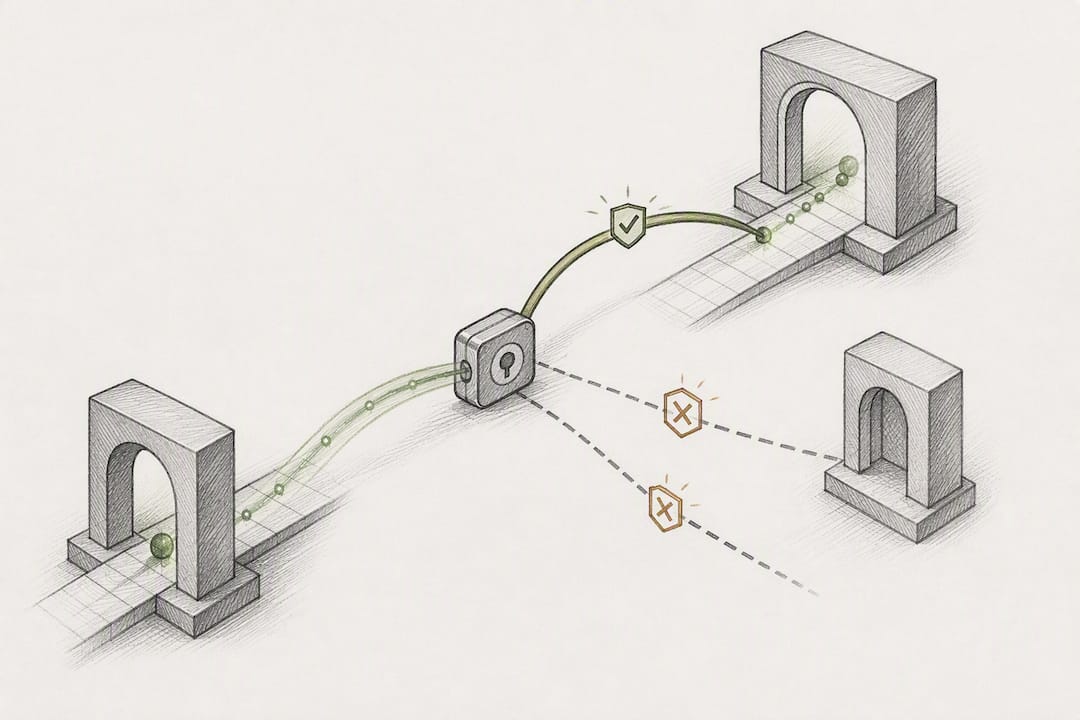
The technical reason matters here. Passkeys and FIDO2 hardware keys use cryptographic origin binding, meaning the login credential checks that it's talking to the real website before it responds. An adversary-in-the-middle (AiTM) proxy attack, which sits between the employee and the real login page to steal both password and one-time code, simply fails against this kind of binding. The fake site can't produce a valid response because it isn't the real origin.
Where should each method go?
- FIDO2 hardware keys: admin accounts, finance systems, anyone with domain-level access.
- Passkeys: general staff logins where the device supports them, especially for cloud apps.
- Number-matching push: a solid middle tier for employees not yet on passkeys.
SMS and basic TOTP codes can stay as a fallback for accounts where phishing-resistant options aren't yet supported, but they shouldn't be the primary method for anything touching sensitive data or admin privileges.
Pro Tip: If a vendor app only supports SMS, don't just accept it. Ask whether they support TOTP or FIDO2 as an alternative, since many platforms added it in the past year without publicizing it well.
How Do You Roll Out MFA Across Your Business?
A rushed MFA rollout creates more support tickets than security wins. A staged one gets adopted and stays enforced. Here's the sequence that works for most small and mid-sized companies.
- Inventory your accounts. List every system with login access, flag anything running legacy authentication protocols, and identify which apps don't yet support modern MFA.
- Pick a pilot group. Choose IT staff and a few cooperative department leads first, not the whole company, and run it for two to three weeks.
- Prioritize by risk. Enforce MFA on admin accounts, email, your identity provider, and finance systems before anyone else.
- Set the enforcement timeline. Move from pilot to company-wide enforcement in phases, department by department, over four to eight weeks.
- Build the support path. Train employees on setup before enforcement day, not after, and staff the helpdesk for a spike in enrollment calls.
- Plan recovery in advance. Document how a lost phone or device gets resolved, who approves resets, and how long that takes.
Legacy applications that can't support modern MFA need compensating controls instead of a blanket exception. Conditional access policies can block outdated authentication protocols outright, restrict access by network location, or require a VPN with its own MFA layer as a workaround.
Track adoption with a simple metric set:
- Percentage of accounts enrolled versus total accounts.
- Number of legacy protocol connections blocked per week.
- Helpdesk ticket volume tied to MFA, watched for a downward trend after week four.
What Roadblocks Slow Down MFA Adoption?
Usability complaints are the number one reason MFA rollouts stall, usually because employees weren't shown how easy the enrollment actually is before enforcement day arrived. A short training session, even fifteen minutes, cuts resistance dramatically. Employee security training that covers the "why" behind MFA, not just the click-through steps, tends to stick better.
Device loss is the second big friction point. Build a backup factor into every enrollment from day one, whether that's a secondary authenticator app or backup codes stored securely, so a lost phone doesn't turn into a locked-out employee waiting on IT.
- Legacy apps: apply conditional access or network restrictions instead of leaving them exempt indefinitely.
- Exception requests: require a named owner, a written justification, and an expiration date, never a permanent bypass.
- Shared devices: assign hardware keys or app-based codes tied to the person, not the workstation.
How Do You Verify MFA Enforcement Is Actually Working?
Enforcing MFA once isn't the same as keeping it enforced. Sign-in logs are where that gap shows up first, since they reveal whether accounts are actually completing MFA challenges or slipping through an exception.
- Review authentication logs weekly, watching for accounts that never trigger an MFA prompt.
- Configure conditional access for risk-based step-up authentication, so unusual sign-in locations or impossible-travel patterns trigger an extra challenge automatically.
- Set alerts for MFA bypass attempts or repeated failed challenges, which often signal an active attack in progress.
- Review exceptions quarterly, and remove any that have outlived their original justification.
Conditional access combined with security defaults gives most businesses this visibility without needing a dedicated security operations team to run it.
What Does This Look Like in a Real SMB Rollout?
A typical managed IT and cybersecurity engagement for a small or mid-sized business follows a familiar arc: inventory of accounts and legacy systems in week one, a pilot with IT and leadership in weeks two and three, then phased enforcement across departments over the following month. Admin and finance accounts get locked down first, general staff follow once the helpdesk has absorbed the initial wave of enrollment questions.
The checklist stays simple on purpose:
- Discover: map every account and flag legacy protocols.
- Prioritize: admin, email, identity provider, finance, password managers.
- Pilot: small group, two to three weeks, documented feedback.
- Enforce: phased by department, not all at once.
- Support: pre-trained staff, staffed helpdesk, documented recovery.
- Review: quarterly log audits and exception cleanup.
Businesses weighing broader threats beyond MFA alone should consider how evolving cybersecurity threats are shaping what "baseline security" means going into 2026.
How Long Does a Full MFA Rollout Take?
Most small businesses can move from decision to full enforcement in a matter of weeks, assuming leadership commits to a phased approach.
Weeks one and two cover discovery: inventorying accounts, identifying legacy systems that resist modern authentication, and deciding which platform features you'll rely on, whether that's Microsoft Entra security defaults or a Conditional Access policy set requiring Entra ID P1 or P2 licensing.
Weeks three and four run the pilot. A small group, usually IT staff plus a few department leads, enrolls in the chosen methods and reports back on friction points. This is where you catch the app that doesn't support your preferred method, or the workflow that breaks under enforcement.
Weeks five through eight handle staged enforcement. Admin accounts, email, identity providers, and finance systems go first. General staff follow in waves, department by department, so the helpdesk never faces the entire company's enrollment questions at once.
Weeks nine and ten close the loop: reviewing adoption metrics, cleaning up temporary exceptions, and locking in the recovery process documentation.
Businesses with heavy legacy application dependencies should expect this timeline to stretch, sometimes by several more weeks, while compensating controls get built for systems that can't support modern MFA directly. Rushing that step to hit an arbitrary deadline tends to create the exceptions that quietly undermine the entire rollout later.
What Does MFA Actually Cost to Deploy?
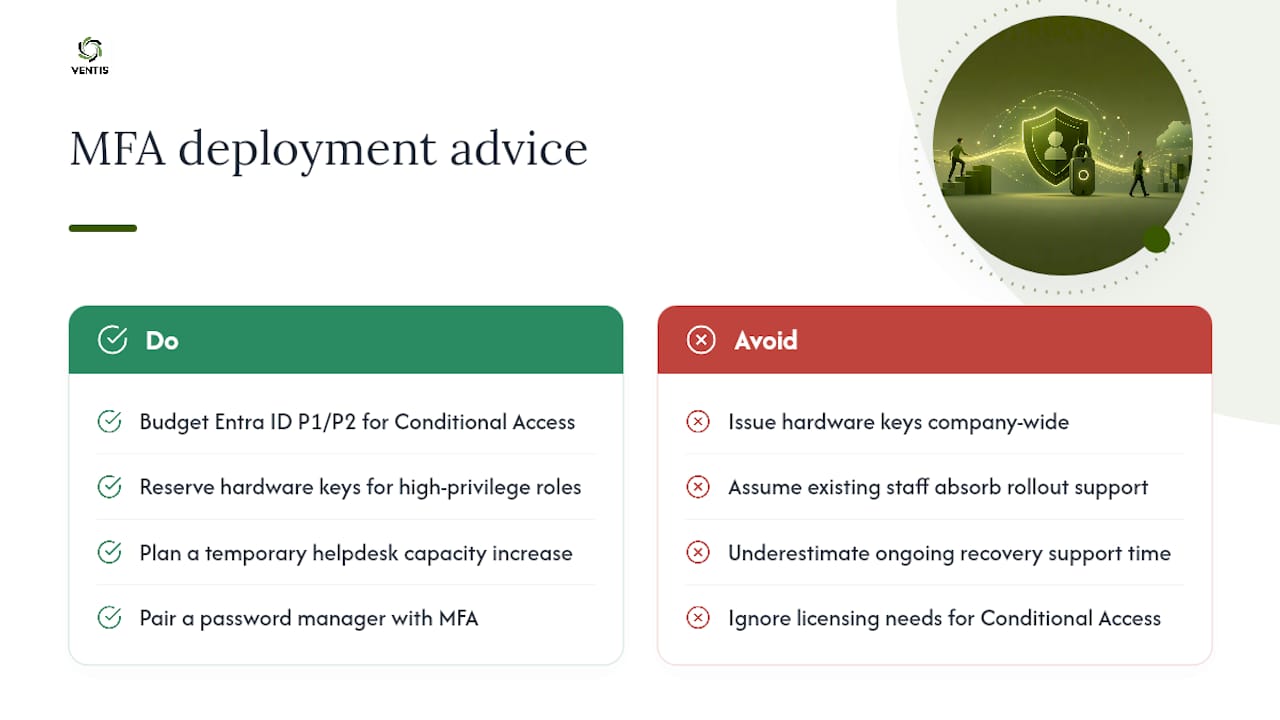
Software-based MFA, authenticator apps and push notifications through platforms like Microsoft Entra, carries little to no direct licensing cost beyond what most businesses already pay for Microsoft 365 or Google Workspace. Security defaults come built in. The real budget line shows up if you move to Conditional Access, which requires Entra ID P1 or P2 licensing for granular, risk-based policies.
Hardware security keys run the widest cost range depending on volume and vendor, and businesses should budget for both the keys themselves and a replacement pool, since keys get lost or damaged at a predictable low rate. Reserve them for admin, finance, and other high-privilege roles rather than issuing them company-wide, which keeps the hardware spend proportional to actual risk.
The line item businesses underestimate most is support time, not software. Helpdesk hours during the enrollment and pilot phases, plus ongoing recovery request handling, represent the real recurring cost of MFA. Budgeting for a temporary bump in helpdesk capacity during the rollout weeks, rather than assuming existing staff will absorb it, avoids the friction that leads to exception requests piling up.
Password managers paired with MFA can actually reduce total cost by cutting down password reset tickets, which is often the single biggest helpdesk expense before MFA gets deployed. Compliance-driven security investments tend to pay for themselves faster than businesses expect once that reset volume drops.
A Realistic Take on MFA for Small Businesses
Most SMBs treat MFA as a checkbox and stop there. That's the mistake. The businesses that actually reduce risk are the ones that prioritize admin, email, and password manager accounts first, plan the recovery process before enforcement day, and default to phishing-resistant methods wherever the app supports them. If you want hands-on help getting there without the trial and error, experienced IT and cybersecurity consultants can build these rollouts for a living.
— Greg
Get Expert Help Rolling Out MFA
Reading a rollout plan and executing one under deadline pressure, with a helpdesk that's already stretched thin, are two different problems. MFA deployments for small and mid-sized businesses are often run as managed engagements, not one-time projects left to maintain alone.

A typical engagement starts with a cybersecurity assessment to map your accounts and legacy systems, moves into a pilot with your highest-risk users, then phases into full enforcement with documented recovery flows and ongoing support built in. That's the same structure covered in this guide, run by a team that handles it for Pittsburgh-area businesses regularly. If your business is ready to move past the checkbox version of MFA, explore Ventis Consulting's unified communications and security solutions and get a rollout plan built around your actual account inventory.
Where to Learn More About MFA Standards
For the official recommendations behind this guide, start with CISA's MFA requirements for small and medium businesses and Microsoft's Entra MFA documentation. For a practical SMB deployment checklist beyond IT policy, this digital security checklist for business owners covers adjacent ground worth reviewing.
Sources
- Require Multifactor Authentication | CISA
- Multi-factor authentication (MFA) - Microsoft 365 documentation