

Network troubleshooting is defined as the systematic process of identifying, diagnosing, and resolving failures or performance problems in a computer network. IT professionals and business owners rely on it to restore connectivity, reduce downtime, and protect productivity. The industry recognizes two foundational frameworks for this work: the OSI model and Cisco's structured diagnostic methodology. Approximately 80% of all network connectivity problems are resolved by examining just the first three OSI layers. That single fact shapes every efficient troubleshooting strategy in use today.
What is network troubleshooting and why does it follow the OSI model?
Network troubleshooting is the practice of applying a structured, repeatable process to find and fix network faults. The OSI (Open Systems Interconnection) model divides network communication into seven distinct layers, from physical cabling at Layer 1 up to application protocols at Layer 7. Each layer has specific failure modes, which is why the model serves as the backbone of every credible network troubleshooting definition.
Starting at the lower layers is not just convention. Most network faults manifest at Layers 1–3, covering physical connections, data link framing, and IP routing. Checking cables, switch ports, and routing tables before diving into application logs saves hours of wasted effort.

| OSI Layer | Common Issues | Diagnostic Tools | Symptoms |
|---|---|---|---|
| Layer 1 (Physical) | Damaged cables, bad ports, hardware faults | Cable tester, interface counters | No link light, CRC errors |
| Layer 2 (Data Link) | VLAN mismatches, MAC table issues, STP loops | show mac address-table, Wireshark | Broadcast storms, intermittent drops |
| Layer 3 (Network) | Routing failures, wrong subnet masks, ACLs | ping, traceroute, route print | Packets not reaching destination |
| Layer 4 (Transport) | Port blocks, firewall rules, TCP retransmissions | netstat, packet capture | Slow transfers, connection timeouts |
| Layer 7 (Application) | DNS failures, DHCP exhaustion, misconfigured apps | nslookup, ipconfig /all | App errors despite network connectivity |
Physical layer problems are deceptively costly. A 0.01% CRC error rate on a 10GbE link causes measurable TCP throughput degradation because every corrupted frame triggers retransmissions. A single bad cable or SFP module can look like a server performance problem to anyone who skips Layer 1.
Application layer issues create a different trap. Many problems resembling network outages actually stem from failing DNS or DHCP scope exhaustion. Mapping application dependencies before assuming the network is at fault prevents misdiagnosis and wasted time.
What is the standardized methodology for effective network troubleshooting?
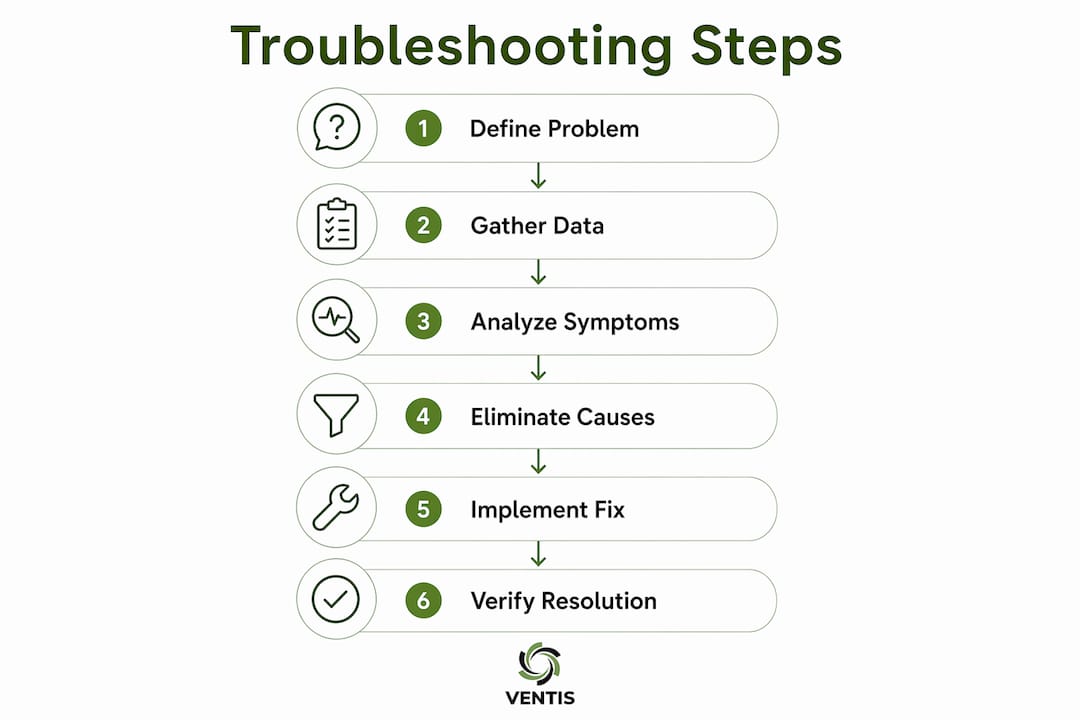
The industry-standard seven-step process reduces guesswork and cuts mean time to resolution. Each step builds on the last, so skipping one creates gaps that extend the outage.
- Define the problem. Write a specific problem statement. "Users in Building A cannot reach the file server" is useful. "The network is slow" is not.
- Gather information. Collect logs, interface statistics, and user reports. Ask what changed recently and who is affected.
- Analyze symptoms. Group symptoms by OSI layer. Determine whether the fault is isolated to one device, one segment, or the entire network.
- Eliminate causes. Rule out the most obvious causes first. Check physical connections, then move up the stack.
- Propose a hypothesis. Form one specific, testable explanation. "The default gateway on VLAN 20 is misconfigured" is a hypothesis. "Something is wrong with routing" is not.
- Test the hypothesis. Make one change. Verify the result. If the problem persists, revert and move to the next hypothesis.
- Document the resolution. Record what the problem was, what caused it, and how it was fixed. This log becomes your most valuable tool for the next incident.
Three approaches guide how you move through these steps. The bottom-up approach starts at Layer 1 and works upward. Use it when physical or link-layer faults are likely. The top-down approach starts at the application layer and works downward. Use it when users report app-specific failures with no obvious physical symptoms. The divide-and-conquer approach starts at Layer 3 and tests in both directions. Use it when the fault scope is unclear.
A vague problem definition is the leading cause of wasted troubleshooting time. Specific, actionable problem statements narrow the hypothesis space and speed up every subsequent step.
Pro Tip: Before running a single command, ask two questions: "What changed recently?" and "Does this affect all users or just one?" Those answers alone eliminate half the possible causes before you touch the keyboard.
How do modern tools and data analytics improve network troubleshooting accuracy?
Basic commands like ping and traceroute confirm reachability and measure round-trip time. They do not reveal why a link is degrading slowly over 72 hours or which application is consuming bandwidth at 2:00 AM. Modern troubleshooting uses flow-based data from protocols like NetFlow, sFlow, and IPFIX to fill that gap.
Flow-based analytics show you every conversation on the network: source, destination, protocol, volume, and duration. This visibility makes intermittent problems visible. A database server that spikes to 95% bandwidth utilization every night at midnight shows up clearly in NetFlow data. It is invisible to ping.
Continuous monitoring of packet loss and latency over time adds another layer of accuracy. A link that averages 2ms latency but spikes to 80ms for 30 seconds every hour points directly to a congestion or hardware problem. Spot-checking with ping at the wrong moment misses it entirely.
Key tools and techniques worth knowing:
- NetFlow, sFlow, IPFIX: Flow export protocols built into most enterprise routers and switches. They feed traffic data to a collector for analysis. Understanding how OSI layers connect to flow data helps you interpret what the collector reports.
- Wireshark: Full packet capture for deep inspection of Layer 2 through Layer 7 traffic. Use it when flow data points to a problem but does not explain it.
- SNMP polling: Pulls interface counters, CPU load, and memory usage from network devices at regular intervals. Useful for detecting hardware stress before it causes an outage.
- Synthetic monitoring: Simulates user transactions continuously to detect application-layer failures before real users report them.
Pro Tip: Set up flow collection and SNMP polling before you need them. Troubleshooting a live outage without historical data is like diagnosing a car problem with no dashboard gauges.
What are the critical best practices and common pitfalls in network troubleshooting?
The most common mistake in network troubleshooting is changing multiple things at once. Over-fixing by changing multiple variables concurrently creates new problems that mask the original fault. You end up with a network that works but no idea why, and no ability to prevent the same issue next time.
Equally damaging is the absence of a performance baseline. Failing to establish a baseline of normal network metrics like latency and throughput makes it impossible to distinguish real degradation from normal traffic variation. A baseline turns "the network feels slow" into "latency on this link is 4x above its 30-day average."
Best practices that separate fast resolutions from long outages:
- Change one variable at a time. Test, observe, and document before making the next change.
- Establish baselines proactively. Capture normal performance metrics during steady-state operation. Use them as your reference during incidents.
- Check application dependencies first. Verify DNS, DHCP, and authentication services before assuming the network fabric is at fault. A small business IT checklist that includes these dependency checks saves significant diagnostic time.
- Scope the problem before acting. Determine whether one user, one building, or the entire organization is affected. Scope drives your approach.
- Document every incident. Patterns across incidents reveal chronic problems that individual tickets hide.
Recognizing application-layer dependencies is a skill that takes time to develop. DNS failure looks exactly like a network outage to the end user. DHCP scope exhaustion produces the same symptom as a switch port failure. Mapping your network's service dependencies and keeping that map current is one of the highest-value investments an IT team can make.
Key Takeaways
Effective network troubleshooting requires a structured OSI-layer approach, precise problem definition, flow-based monitoring, and disciplined one-change-at-a-time testing to reduce mean time to resolution.
| Point | Details |
|---|---|
| OSI layers guide diagnosis | Start at Layer 1 and work up; 80% of faults resolve at Layers 1–3. |
| Define the problem precisely | Vague problem statements waste time; specific ones speed hypothesis testing. |
| Use flow-based analytics | NetFlow, sFlow, and IPFIX reveal issues that ping and traceroute miss entirely. |
| Change one variable at a time | Concurrent changes mask root causes and create new problems. |
| Establish performance baselines | Baselines make it possible to distinguish real degradation from normal variation. |
What I've learned from years of watching network outages unfold
The hardest lesson in network troubleshooting is not technical. It is behavioral. The pressure to fix something fast pushes even experienced engineers toward guessing. They change a firewall rule, restart a service, and swap a cable all in the same five-minute window. The network comes back up, and nobody knows which change fixed it. Three weeks later, the same problem returns.
I have seen this pattern repeatedly. The teams that resolve incidents fastest are not the ones with the most tools. They are the ones who slow down long enough to write a clear problem statement before touching anything. That discipline feels counterintuitive during an outage, but it consistently produces faster resolutions and fewer repeat incidents.
The shift to hybrid and cloud-connected networks has made this harder. Application-layer dependencies now span on-premises infrastructure, cloud services, and third-party APIs. A network that looks healthy at Layer 3 can still fail to deliver because a cloud authentication service is timing out. Building a layered security and network strategy that accounts for these dependencies is no longer optional for businesses of any size.
My honest recommendation: invest in monitoring before you need it. The businesses that call us in a panic during an outage almost always lack historical data. The ones with flow collection and SNMP baselines in place resolve incidents in minutes, not hours. That gap in outcome comes entirely from preparation, not from technical skill during the crisis.
— Greg
Network monitoring and troubleshooting support from Ventis Consulting Group
Diagnosing network problems is faster and less disruptive when you have continuous monitoring in place before an incident starts. Ventis Consulting Group provides managed IT services that include proactive network monitoring, flow-based analytics, and rapid response when issues arise.

Small and mid-sized businesses in Pittsburgh and the surrounding area work with Ventis Consulting Group because local expertise and direct communication make a real difference during an outage. You get a team that knows your network, tracks your baselines, and responds with context rather than starting from scratch every time. If your business needs reliable network support without building an in-house IT department, reach out to Ventis Consulting Group to discuss a managed service agreement built around your specific environment.
FAQ
What is the network troubleshooting definition in IT?
Network troubleshooting is the systematic process of identifying, diagnosing, and resolving failures or performance problems in a computer network. It follows structured methodologies like the OSI model to isolate faults layer by layer.
How do you troubleshoot networks step by step?
The standard seven-step process covers defining the problem, gathering data, analyzing symptoms, eliminating causes, proposing a hypothesis, testing it, and documenting the resolution. Asking "What changed?" and "Who is affected?" before running commands focuses the process immediately.
What are the most common network issues IT teams face?
The most common network issues occur at Layers 1–3 of the OSI model, including physical cable faults, VLAN mismatches, and routing failures. Application-layer problems like DNS failure and DHCP exhaustion also frequently mimic network outages.
What network troubleshooting tools should IT professionals use?
Core tools include ping, traceroute, Wireshark, and SNMP polling for real-time diagnostics. Flow-based protocols like NetFlow, sFlow, and IPFIX add historical visibility that basic commands cannot provide.
Why do network problems keep recurring after they are fixed?
Recurring problems usually result from fixing symptoms without identifying the root cause, or from changing multiple variables at once so the actual fix is never confirmed. Documenting each incident and its root cause is the most effective way to break the cycle.