

Small businesses need IT help because technology now underpins every core operation, from cloud storage and email to point-of-sale systems and remote access, yet most lack a full internal IT team to manage it. The industry term for this kind of ongoing support is managed IT services, which covers proactive monitoring, maintenance, cybersecurity, and helpdesk support under a predictable monthly cost. Without it, a single server failure or phishing attack can shut down operations for days. Understanding why small businesses need IT help is the first step toward protecting what you have built.
How does IT support improve small business efficiency?
Professional IT support is the difference between a business that recovers from a tech problem in minutes and one that loses an entire workday. Managed IT services include device care, cloud and email support, cybersecurity, and long-term technology planning. That coverage means problems get caught before they become outages.
Here is how proactive IT support translates directly into operational gains:
- 24/7 monitoring catches failures early. A managed provider watches your network around the clock. When a server starts showing warning signs at 2 a.m., a technician addresses it before your staff arrives at 8 a.m.
- Faster troubleshooting reduces lost productivity. Instead of waiting for a single in-house person to diagnose a problem, you get a team with documented system knowledge ready to act. Managed IT services enable faster detection and recovery, cutting incident impacts significantly.
- Documentation prevents single points of failure. When your IT setup is fully documented, any qualified technician can step in. Relying on one person who holds all the knowledge in their head is a real operational risk. Documented configurations and recovery processes prevent delays when key IT personnel are unavailable.
- Consistent maintenance keeps systems running clean. Patch management, software updates, and hardware health checks happen on schedule, not when something breaks.
Pro Tip: Ask any IT provider you consider whether they maintain a written runbook for your environment. If they cannot produce one within 30 days of onboarding, that is a red flag.
Relying on a single IT staff member creates a mismatch with growing complexity, leading to downtime and delayed projects. A managed approach spreads responsibility across a team, so no one person becomes a bottleneck.

Why is cybersecurity a critical reason to get IT help?
Cybersecurity is not optional for small businesses. Nearly half of all small businesses have suffered cyberattacks, and the threat is growing more targeted, not less. Small businesses are attractive to attackers precisely because they often lack the defenses that larger enterprises have in place.
The numbers are stark. Ransomware drives 88% of confirmed SMB breaches per the 2025 Verizon Data Breach Investigations Report. That figure means ransomware is not a rare event for small businesses. It is the dominant threat.
The financial exposure is real on two levels:
- Ransom payments have a median cost of $115,000, according to the same report.
- Total financial loss, including downtime and recovery, carries a median of $46,000 per incident.
- Reputational damage is harder to quantify but often outlasts the financial hit, especially in local markets where trust is everything.
- Regulatory exposure is growing. Depending on your industry, a breach can trigger compliance penalties on top of recovery costs.
The core protective measures every small business needs include multi-factor authentication (MFA), strong password policies, regular software updates, and employee security training. These are not expensive to implement, but they require consistent execution. That is where managed IT earns its keep.
Managed IT security reduces downtime by providing proactive monitoring, vulnerability management, incident response, and documented recovery plans. Backing up your data is not enough on its own. Backups must be verified and tested for recoverability on a regular schedule. Many businesses discover their backups were corrupted or incomplete only after a ransomware attack, which is the worst possible time to find out.
A solid cybersecurity assessment gives you a clear picture of where your vulnerabilities are before an attacker finds them first.
What cost advantages does outsourcing IT offer?
The cost comparison between outsourced IT and in-house IT is not close. Outsourcing IT is typically 40–60% cheaper than maintaining equivalent in-house IT staff. That gap exists because you eliminate salary, benefits, training, turnover costs, and recruitment overhead.
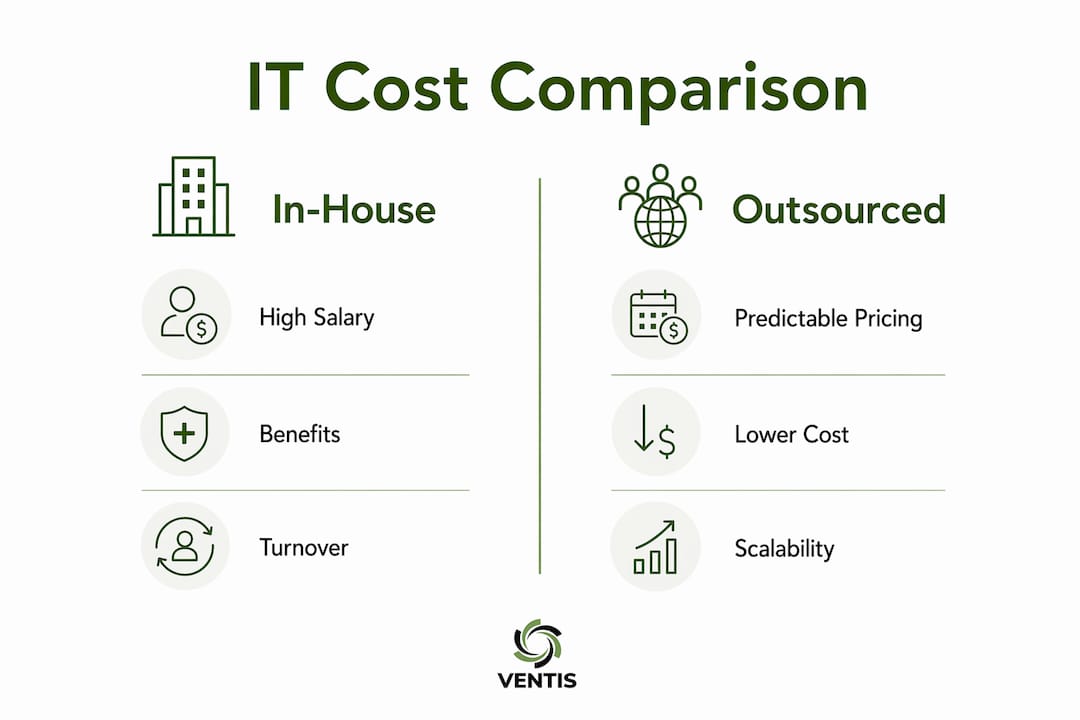
| Cost Factor | In-House IT | Outsourced IT |
|---|---|---|
| Annual salary + benefits | $70,000–$100,000+ | Included in monthly fee |
| Per-user monthly cost | Variable, often unpredictable | $100–$250 per user |
| Scalability | Requires new hires | Scales with your business |
| Expertise depth | Limited to one person's skills | Full team with specializations |
| Turnover risk | High, disrupts operations | Managed by provider |
Per-user pricing between $100 and $250 per month gives you a predictable line item in your budget. That predictability matters when you are managing cash flow as a small business owner.
Pro Tip: When comparing IT costs, factor in the cost of downtime, not just salaries. A single day of lost productivity for a 10-person team can easily exceed a full month of managed IT fees.
Evaluating IT outsourcing requires accounting for downtime risks, project delays, staff turnover overhead, and scalability needs beyond simple salary comparisons. Many businesses also use a hybrid model, keeping one internal IT coordinator while outsourcing specialized functions like cybersecurity monitoring and cloud management to a managed provider. That approach gives you the best of both worlds without the full cost of a complete internal team.
What are the signs your business needs professional IT help?
Most small businesses do not seek IT support until something breaks. That reactive approach costs more in the long run. The warning signs that you need managed IT are usually visible well before a crisis hits.
Watch for these indicators:
- Frequent downtime or slow recovery. If your team regularly loses time waiting for systems to come back online, your current IT setup is not keeping pace.
- No one owns security. If you cannot name the person responsible for your firewall, patch schedule, and backup verification, security is being neglected.
- Missed maintenance tasks. Skipped software updates, expired licenses, and unmonitored hardware are signs that IT is being managed reactively.
- Inconsistent or unverified backups. Backups that have never been tested are not reliable protection. You need proof of recoverability, not just proof of backup.
- Growing technology complexity. As you add cloud apps, remote workers, and new devices, the complexity of managing them safely grows. At some point, it exceeds what a non-specialist can handle.
- IT requests pile up. When your team waits days for basic helpdesk support, productivity suffers and frustration builds.
IT management is more than break/fix support. It integrates IT processes into business operations to reduce risk, improve uptime, and create smoother workflows. If your current approach does not include that integration, you are leaving efficiency and security on the table.
A small business IT needs assessment is a practical starting point. It maps your current technology, identifies gaps, and gives you a clear picture of what support you actually need.
Key takeaways
Small businesses that invest in managed IT support gain measurable advantages in uptime, security, and cost control compared to those relying on reactive fixes or a single in-house generalist.
| Point | Details |
|---|---|
| Managed IT prevents downtime | Proactive monitoring and documented recovery plans catch problems before they shut down operations. |
| Cybersecurity is non-negotiable | Ransomware drives 88% of SMB breaches; MFA, verified backups, and monitoring are the baseline defense. |
| Outsourcing cuts costs significantly | Outsourced IT runs 40–60% cheaper than in-house staff, with predictable per-user monthly pricing. |
| Warning signs are visible early | Frequent downtime, unclear security ownership, and missed maintenance all signal the need for professional IT help. |
| IT support is a business enabler | Aligned IT strategy reduces operational risk and supports growth, not just technical fixes. |
What i have learned after years of watching small businesses handle IT
Most small business owners I talk to treat IT the same way they treat insurance. They know they need it, but they do not think about it until something goes wrong. That mindset is expensive.
The businesses that get the most value from IT support are the ones that treat it as a business function, not a utility. They ask their IT partner about technology roadmaps, not just ticket resolution times. They want to know how their systems will scale when they add five more employees or open a second location.
The single biggest mistake I see is the "one IT guy" setup. One person who knows everything about your systems, holds all the passwords, and handles every request. When that person leaves or gets sick, the business is exposed in ways most owners do not realize until it is too late. Documented processes and a team-based support model fix that problem completely.
I also see a lot of false confidence around backups. Business owners tell me they back up every night. When I ask when they last tested a restore, the answer is almost always never. A backup you have never tested is not a backup. It is a hope.
The businesses that come out ahead are the ones that treat IT support as a strategic investment. The cost is predictable. The protection is real. And the peace of mind is worth more than most owners expect.
— Greg
How ventis consulting group supports small businesses
If any of those warning signs sound familiar, Ventis Consulting Group is built for exactly this situation. We work with small and mid-sized businesses in Pittsburgh and surrounding areas to deliver managed IT services, cybersecurity protection, and cloud solutions that keep your operations running without surprises.
Our approach is consultative, not transactional. We assess your current setup, identify the gaps, and build a support plan that fits your budget and your goals. Whether you need full managed IT services or targeted cybersecurity support, we have the team and the tools to back you up. Reach out to Ventis Consulting Group today and find out what the right IT support actually looks like for your business.
FAQ
What does managed IT support include for small businesses?
Managed IT services include device monitoring, cloud and email support, cybersecurity, helpdesk access, and long-term technology planning. The goal is proactive coverage that prevents problems rather than just fixing them after the fact.
How much does outsourced IT support cost per month?
Per-user monthly pricing for outsourced IT typically ranges between $100 and $250, depending on the scope of services. That cost is generally 40–60% lower than maintaining equivalent in-house IT staff.
Why are small businesses targeted by ransomware?
Small businesses are targeted because they often lack the security controls that larger organizations have in place. Ransomware accounts for 88% of confirmed SMB breaches, according to the 2025 Verizon Data Breach Investigations Report.
What is the first step in getting IT help for my small business?
A small business IT needs assessment is the right starting point. It identifies your current technology gaps, security vulnerabilities, and support requirements before you commit to any specific solution.
Can a small business afford professional IT support?
Yes. Outsourced IT support is specifically designed to be cost-effective for small businesses, with flat monthly fees that replace unpredictable repair costs and the overhead of full-time IT salaries.