

Reject gives you full protection: spoofed mail never reaches an inbox. Quarantine is the safer first enforcement step: failing mail lands in spam, where it's recoverable if something breaks. Most domains should follow the same path either way.
- Start at
p=noneand read your aggregate reports. - Move to
p=quarantineonce legitimate senders are authenticated. - Advance to
p=rejectonly when reports indicate no authentication issues.
The goal isn't picking a policy. It's earning the right to enforce it without breaking mail your business depends on.
Key Takeaways
Reject blocks spoofed mail before delivery, while quarantine routes it to spam, and the safest path to either runs through a report-driven rollout starting at p=none.
| Point | Details |
|---|---|
| Reject is stronger | It blocks failing mail at SMTP before it ever reaches a mailbox. |
| Quarantine is the safer first step | Failing mail lands in spam, giving you a recoverable buffer during rollout. |
| Rollout should be report-driven | Move from none to quarantine to reject only after aggregate reports confirm senders pass. |
| Forwarding and lists need special handling | ARC support and explicit sp= settings reduce breakage from indirect mail flows. |
| Ventis manages the transition | Ventis Consulting Group audits senders, monitors reports, and guides SMBs from quarantine to reject safely. |
Table of Contents
- What Do p=quarantine and p=reject Actually Do?
- How Do Mailbox Providers Actually Handle Each Policy?
- Should You Choose Quarantine or Reject?
- How Do You Roll Out DMARC Safely?
- Why Do Forwarding and Mailing Lists Break DMARC?
- What Should a DMARC DNS Record Look Like?
- How Do You Read DMARC Reports and Fix Failures?
- Get Help Moving From Quarantine to Reject
- Frequently Asked Questions
- Sources
What Do p=quarantine and p=reject Actually Do?
Both are enforcement policies published in your DMARC DNS record, and both tell mailbox providers what to do with mail that fails SPF and DKIM alignment. The difference is what happens next.
p=quarantine tells receivers to treat failing mail as suspect, typically routing it to spam or junk. The recipient can still dig it out. p=reject tells receivers to refuse the message outright at the SMTP level. It never reaches a mailbox, spam folder, or quarantine queue. It simply bounces.
For context, p=none is monitoring only. It asks receivers to change nothing about delivery but to send you aggregate reports on what's passing and failing. That's the standard starting point, not an enforcement policy at all.
p=none: monitor only, no delivery impact.p=quarantine: failing mail goes to spam, still recoverable.p=reject: failing mail is blocked before delivery, unrecoverable.
Quarantine buys you a safety net. Reject removes it. That trade-off is the entire decision.
How Do Mailbox Providers Actually Handle Each Policy?
The spec is consistent, but real-world receiver behavior varies more than most admins expect. A quarantine directive usually lands mail in the spam folder, visible to the recipient if they check. A reject directive usually triggers an SMTP-level bounce back to the sender, with no copy delivered anywhere.
Here's the wrinkle: some large receivers apply quarantine and reject almost identically for certain indirect mail flows, particularly when a message arrives through a forwarding path or a third-party relay rather than directly from the source domain. That means your p=reject policy might not behave exactly as the RFC implies once real infrastructure gets involved, according to Valimail's guidance on DMARC enforcement.
- Direct sends: behavior generally matches the spec closely.
- Forwarded or relayed mail: behavior can blur between quarantine and reject.
- Provider-specific quirks: worth testing rather than assuming.
Pro Tip: Send a small batch of intentionally unauthenticated test messages to accounts at Gmail, Microsoft 365, and Yahoo before you flip to reject. Watching what actually happens beats trusting the spec alone.
Should You Choose Quarantine or Reject?
The right policy depends on four things: how much protection you need, how much false-positive risk you can absorb, how much monitoring labor you can commit to, and how exposed your domain is to forwarding and mailing lists.
Parked domains, transactional-only senders, and high-risk brands in finance or the public sector usually belong at p=reject. There's a small, stable set of senders to authenticate, and the cost of a spoofed message getting through outweighs the cost of an occasional bounce. Domains with heavy forwarding, active mailing lists, or a long tail of loosely tracked third-party senders often do better staying at p=quarantine, sometimes permanently, per ShieldMarc's comparison of the two policies.
- Protection level: reject is absolute, quarantine is recoverable.
- False-positive risk: reject punishes misconfiguration harder.
- Operational overhead: both require monitoring, reject requires more precision first.
- Forwarding exposure: heavy forwarding favors quarantine.
| Dimension | Quarantine | Reject |
|---|---|---|
| Failing mail outcome | Delivered to spam folder | Bounced at SMTP, never delivered |
| False-positive risk | Low, recoverable by recipient | High impact if a legitimate sender is misconfigured |
| Best use case | Domains with forwarding, mailing lists, many senders | Parked domains, transactional mail, high-security brands |
| Operational overhead | Moderate, ongoing report review | Higher upfront, lighter once stable |
How Do You Roll Out DMARC Safely?
A rushed jump to p=reject is the single most common way admins break their own mail flow, according to dmarcian's guidance on policy modes. A staged rollout, driven by report data rather than a calendar, avoids that.
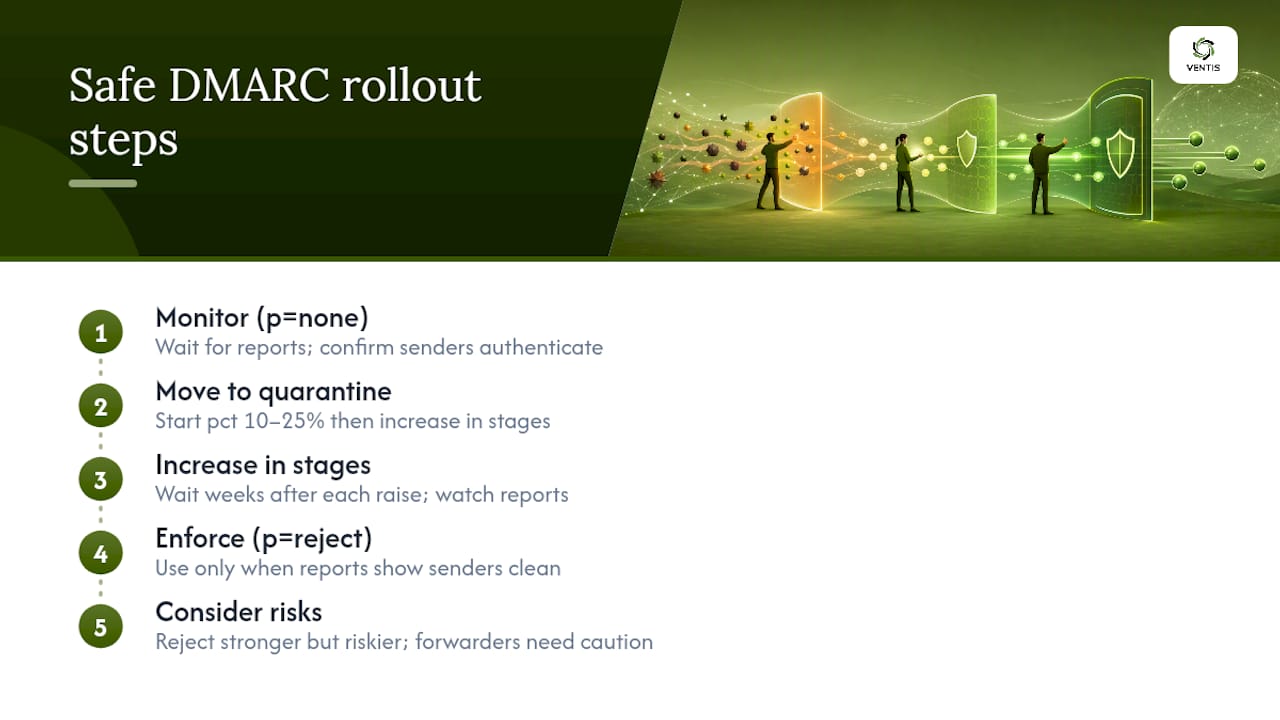
- Publish
p=nonewith aruaaddress and let reports accumulate for at least two to four weeks. - Review aggregate reports and fix SPF/DKIM gaps for every legitimate sending source, including marketing platforms and helpdesk tools.
- Move to
p=quarantine, optionally usingpct=10or a testing tag to limit exposure while you confirm behavior. - Ramp
pctupward in stages, watching reports after each increase. - Advance to
p=rejectonly after several consecutive reporting periods show zero legitimate failures.
Total timelines vary, but PowerDMARC's rollout guidance suggests a typical path from p=none to full p=reject for most mid-sized environments, usually spanning several weeks. Rushing that timeline is how support tickets pile up.
Watch for rollback triggers: a spike in legitimate failures, transactional mail like invoices or password resets bouncing, or a newly added SaaS tool that hasn't been authenticated yet. Any of those means pause the ramp, not push through it.
- Authenticate every sender, including shadow IT tools marketing or sales added without telling you.
- Set
sp=explicitly to control subdomain policy separately from the root domain. - Document a response path for user tickets about missing mail before you enforce.
Pro Tip: Keep a running list of every domain and subdomain that sends mail on your behalf. New SaaS tools are the number one cause of a clean rollout going sideways months later.
Why Do Forwarding and Mailing Lists Break DMARC?
Forwarding almost always breaks SPF alignment because the forwarding server, not your domain, becomes the sending IP. DKIM survives forwarding better since the signature travels with the message, which is why DMARC checks both and passes on alignment with either.
Mailing lists cause a different problem. Many list servers modify the subject line or footer, which invalidates the original DKIM signature entirely. ARC (Authenticated Received Chain) was built to preserve a record of authentication results through these hops, but support is inconsistent across providers.
- Forwarding: SPF usually fails, DKIM often survives.
- Mailing lists: message modification frequently breaks DKIM outright.
- ARC: helps where receivers support it, not universal.
Pro Tip: If your organization runs internal distribution lists that repost external mail, treat them as a known DMARC failure point and set expectations with staff rather than trying to engineer around every list platform's quirks.
What Should a DMARC DNS Record Look Like?
A monitoring record, a staged quarantine record, and a full reject record all use the same tags with different values.
| Tag | Purpose | Typical setting |
|---|---|---|
p | Policy for the domain | none, then quarantine, then reject |
pct | Percentage of mail the policy applies to | Start low (10-25%), ramp to 100 |
rua | Address for aggregate reports | A mailbox or parsing service you monitor |
ruf | Address for forensic (failure) reports | Optional, often skipped due to volume and privacy |
sp | Policy for subdomains | Set explicitly, don't assume inheritance |
adkim / aspf | Alignment mode (strict or relaxed) | Relaxed (r) unless you have a specific reason |
fo | Failure reporting options | 1 to report on any authentication failure |
A monitoring record looks like v=DMARC1; p=none; rua=mailto:reports@yourdomain.com. A staged record adds p=quarantine; pct=25. A full enforcement record reads v=DMARC1; p=reject; pct=100; rua=mailto:reports@yourdomain.com; sp=reject.
- DNS changes can take up to 48 hours to propagate fully across resolvers.
- Your DKIM selector must match exactly between your mail server config and DNS.
- A malformed tag (missing semicolon, wrong case) can invalidate the entire record.
How Do You Read DMARC Reports and Fix Failures?
Aggregate reports (rua) arrive as XML and summarize which source IPs sent mail claiming your domain, and whether each passed SPF, DKIM, and alignment. Forensic reports (ruf) contain per-message failure detail but are less commonly supported due to privacy concerns.
- Identify every source IP you don't recognize and trace it to a sending service.
- Check whether failures are SPF-only, DKIM-only, or both.
- Cross-reference failing DKIM selectors against your actual mail server configuration.
- Flag any high-volume sender still failing after two reporting cycles for direct remediation.
A parsing tool or dashboard service beats reading raw XML by hand once you're managing more than a handful of domains.
- Missing SPF entries: usually a forgotten marketing or helpdesk platform.
- DKIM selector mismatches: often caused by a provider rotating keys without notice.
- Alignment failures: check whether the "From" domain matches the authenticated domain, not just pass/fail status.
Pro Tip: Set up alerting for any drop in your pass rate, not just a spike in failures. A quiet decline often signals a sender that stopped authenticating weeks before anyone notices.
Pitfalls That Undo a Good Rollout
The most common mistake is enforcing before every legitimate sender is authenticated, which turns a security win into a support fire drill. Reaching p=reject isn't a finish line either, since new SaaS tools and migrations can quietly introduce unauthenticated senders months later.
- Assign one person to own report review on a recurring schedule.
- Require change control before any DNS or mail server config update ships.
Where Ventis Draws the Line on Enforcement
We recommend p=quarantine as a legitimate long-term policy for domains with heavy forwarding or legacy senders, and p=reject for transactional and high-risk domains once reports run clean. If your team lacks bandwidth to audit senders monthly, that capacity gap should shape the decision as much as the risk profile does.
Get Help Moving From Quarantine to Reject
Getting DMARC right isn't a one-time DNS edit. It's an ongoing discipline of reading reports, chasing down unauthenticated senders, and knowing when your domain is actually ready for p=reject instead of just assuming it. Ventis Consulting Group handles that discipline for small and mid-sized businesses across email security and managed detection and response, so a missed sender or a stale selector doesn't turn into a blocked invoice or a phishing email that got through.

Given that employees worldwide still click malicious links at meaningful rates, letting spoofed mail sit in an inbox is a real exposure, not a theoretical one. Ventis Consulting Group's approach starts with a consultative audit of your current senders, sets up continuous report monitoring, and manages the staged move from quarantine to reject on a timeline your business can actually absorb. If you're ready to stop guessing at your DNS records, visit our unified communications and email security services to schedule a review.
Frequently Asked Questions
Is p=reject always better than p=quarantine? Not always. Reject gives stronger protection, but it also raises the stakes if a legitimate sender is still misconfigured, so domains with heavy forwarding or many third-party senders often stay safer at quarantine longer.
Can I skip straight to p=reject? You can, but it's risky. Skipping the monitoring and quarantine stages means you find out about broken senders when customer mail starts bouncing instead of when a report flags it.
Does quarantine protect against phishing that spoofs my domain? Yes, functionally. Quarantine routes spoofed mail to spam instead of the inbox, which cuts click-through risk substantially even though the message technically still gets delivered somewhere.
What percentage should I use for pct when starting quarantine? Many teams start around 10 to 25 percent and increase in stages over several weeks, watching reports after each increase before moving higher.
How long should I stay at p=none before enforcing anything? An initial monitoring period is usually recommended before moving to enforcement, but the real trigger is data, not time: don't move to quarantine until your reports show every legitimate sender authenticating cleanly.
Sources
- RFC 7489 (IETF DMARC specification)
- DMARC policy modes: quarantine vs reject (dmarcian)
- How To Setup DMARC: Step-by-Step Guide (2026)
- DMARC p=quarantine vs p=reject | ShieldMarc