
A NOC service is 24/7 monitoring and managed remediation for your network, servers, and applications, run by a team dedicated to catching problems before your staff or customers notice them. The core outcome is uptime: fewer outages, faster fixes, and a lower burden on your internal IT team.
You probably need one if any of these sound familiar:
- Your IT team can't realistically staff nights, weekends, and holidays without burning people out.
- Routine work like patching and backup checks keeps eating time your team should spend on projects.
- You want predictable monthly costs instead of surprise emergency IT bills.
Done right, a noc service cuts your mean time to resolution, enforces patching and backup discipline automatically, and gives you clean reporting you can actually use for planning.
Key Takeaways
A NOC service works because it combines continuous monitoring with managed remediation, cutting resolution times while giving your internal team room to focus on higher-value work.
| Point | Details |
|---|---|
| Define scope before shopping | List every device, cloud tenant, and backup system a NOC would need to monitor before requesting quotes. |
| Match tier to actual need | Choose notification, Tier 1, or Tier 2/3 support based on your team's skill depth and coverage gaps. |
| Demand specific SLAs | Require numeric MTTR and response-time commitments, not vague coverage promises. |
| Pilot before full cutover | Run a limited-scope test to validate alert tuning and remediation quality before committing fully. |
| Choose a provider with governance built in | Ventis Consulting Group structures managed NOC engagements around measurable SLAs, quarterly reviews, and integration with your existing tools rather than a one-time setup and walk-away. |
Table of Contents
- What Does a NOC Service Actually Cover?
- How Does a NOC Handle Day-To-Day Operations?
- What Are the Different NOC Service Tiers and Delivery Models?
- NOC vs SOC vs Help Desk: What's the Difference?
- How Should You Evaluate a NOC Provider?
- What Happens During NOC Onboarding?
- What Tools and Technology Do NOCs Rely On?
- How Much Does a NOC Service Cost?
- What KPIs Should a NOC Report On?
- What Should a NOC Onboarding Checklist and Runbook Look Like?
- Why Governance Matters More Than the Tech Stack
- What Does a Managed NOC Engagement With Ventis Look Like?
- Frequently Asked Questions
- Sources
What Does a NOC Service Actually Cover?
A network operations center watches the infrastructure that keeps your business running, and it watches it constantly. That typically means your network devices, servers, cloud workloads, business applications, backup jobs, and increasingly, edge devices like branch routers and IoT sensors. The goal isn't just "watching a screen." It's catching a failing disk, a missed backup, or a spiking server before it becomes a call from an angry customer.
The best way to understand scope is to separate what a NOC monitors from what it's actually trying to achieve.
What gets monitored:
- Network infrastructure: routers, switches, firewalls, wireless access points
- Servers and virtual machines, whether on-premises or in the cloud
- Business applications and the databases behind them
- Backup jobs and disaster recovery systems
- Endpoints and edge devices, including remote office equipment
What the NOC is trying to accomplish:
Three goals anchor almost every NOC engagement: keep services available, keep performance within acceptable limits, and catch small problems before they become outages. Everything else, including patch tracking, backup verification, and compliance reporting, supports those three goals.
Standard NOC service functions include real-time performance monitoring, patch management, backup monitoring, security oversight, incident triage, and reporting for long-term network planning. That last piece, reporting, is where a lot of businesses get more value than they expect. A NOC that just fixes things and never tells you what it fixed is only doing half the job.
Before you talk to a provider, get your house in order first. Pull together a device and asset inventory, your cloud tenancy details (Microsoft 365, Azure, AWS, whatever you run), your backup software and schedule, and any ticketing system you already use. Providers can quote faster and scope more accurately when they're not guessing at your environment.
How Does a NOC Handle Day-To-Day Operations?
This is where the rubber meets the road. A NOC isn't a dashboard someone glances at once a day, it's a continuous cycle of detection, triage, and resolution running around the clock.
Core functions you should expect:
- Real-time performance monitoring across network, server, and application layers
- Event correlation to group related alerts instead of flooding a queue with noise
- Incident triage and first-level remediation (restarts, config rollbacks, service resets)
- Patch deployment support and compliance tracking
- Backup monitoring, including recovery verification, not just "job completed" checks
- Routine health checks and scheduled maintenance windows
- Reporting on what happened, what got fixed, and what's trending toward a problem
NOCs use real-time dashboards and diagnostic tools to monitor networks, servers, and applications, providing instant fault notification along with first- and second-level troubleshooting. When a threshold gets crossed, be it CPU usage, a dropped connection, a failed backup job, the monitoring system fires an alert. That alert becomes a ticket. A first-level technician looks at it, tries known remediation steps, and either resolves it or escalates it based on predefined rules. Every step gets logged, which matters more than it sounds like it should when you're trying to spot a pattern three months later.
Here's the typical lifecycle in plain terms:
Alert fires → Ticket auto-created → Tier 1 triage and remediation attempt → Resolved, or escalated to Tier 2/3 with documented context → Closure and incident notes logged for reporting
The weak link in most amateur monitoring setups is the very first step. Too many alerts, not enough filtering, and your technicians start ignoring notifications altogether. A well-configured NOC suppresses noise and prioritizes genuinely actionable events, and the design of that filtering is often the single highest-impact improvement a NOC provider makes to an environment struggling with false positives.
Pro Tip: Ask any prospective NOC provider how they handle alert suppression and thresholding during onboarding. If they can't describe a specific process for tuning out noise in the first 30 days, expect your team to keep getting paged for things that don't matter.
What Are the Different NOC Service Tiers and Delivery Models?
Not every organization needs the same depth of support, and pricing scales accordingly. Most providers structure NOC services into tiers, and it helps to know what each one actually includes before you sign anything.
Notification-only service means you get alerted when something breaks, but your own team does the fixing. It's cheap, but it doesn't reduce your workload much.
Tier 1 managed remediation adds a technician who handles routine fixes: restarts, basic config changes, password resets, and standard troubleshooting scripts. This is where most of the volume gets absorbed.
Tier 2/3 deep technical support kicks in for complex issues: network architecture problems, application-layer bugs, or anything requiring specialized engineering knowledge.
Outsourcing NOC services is often more cost-effective than building an in-house 24x7 operation, and providers typically resolve a large share of routine issues at Tier 1 without ever looping in the client's own staff.
On the delivery side, you're choosing between building your own NOC in-house, outsourcing entirely to a NOC-as-a-service provider, or running a hybrid model where your team handles strategic work while a partner covers monitoring and routine remediation. Some managed service providers also use white-label NOC arrangements, where a specialized NOC operates behind the scenes under the MSP's own brand.
| Tier | Typical Responsibilities | Best Fit |
|---|---|---|
| Notification | Alerting only; client team performs all fixes | Organizations with strong in-house staff needing extra eyes overnight |
| Managed Tier 1 | Alert triage, routine remediation, patch/backup monitoring | Most small to mid-sized businesses without 24/7 internal coverage |
| Managed Tier 2/3 | Complex troubleshooting, architecture-level fixes, escalations | Businesses with limited internal engineering depth or high-complexity environments |
Choosing between these comes down to three questions: how much can you afford to pay monthly, how many skilled hands do you actually have on staff, and how fast does your business need problems resolved. A ten-person office running basic cloud apps doesn't need the same depth as a 200-person manufacturer running legacy on-premises systems.
NOC vs SOC vs Help Desk: What's the Difference?
Confusing these three roles is one of the most common (and expensive) mistakes businesses make when buying IT support. Each one solves a different problem.
- NOC (Network Operations Center): focuses on availability and performance, keeping infrastructure running and catching operational failures.
- SOC (Security Operations Center): focuses on threat detection, investigation, and security incident response.
- Help desk: handles end-user requests, like password resets, software issues, and "my printer won't connect" tickets.
They overlap more than people expect. A suspicious login alert might start in the SOC, but if the fix requires disabling a network port or restarting a service, the NOC ends up handling the remediation. That handoff only works smoothly when SIEM alerts and security tools feed cleanly into the NOC's ticketing system, with clear rules for who owns what.
If you're evaluating providers, ask directly how they structure the relationship between NOC and support desk functions. A provider that can't clearly explain the escalation path between security, network operations, and end-user support is one that will leave gaps exactly when you need coverage most.
How Should You Evaluate a NOC Provider?
This is the part that actually determines whether you get value or headaches for the next three years. Vague promises about "24/7 support" don't tell you anything useful, so push for specifics.
Checklist for evaluating a provider:
- SLA definitions with clear response and restore time commitments, not just "we'll get to it"
- Hours of coverage: true 24/7/365, or business hours with an on-call rotation
- Escalation SLAs that specify how long before an unresolved issue moves to a senior technician
- Tooling and integration capabilities that match your existing ticketing and monitoring systems
- Security certifications and staffing model, including whether shifts are staffed domestically or offshore
- Onboarding support and how much heavy lifting falls on your team versus theirs
Key SLA terms to scrutinize:
- Response time vs. restore time. Response time is how fast someone acknowledges the ticket. Restore time is how fast the actual problem gets fixed. Providers sometimes blur these on purpose.
- MTTR commitments. Ask for a specific number, not a range so wide it's meaningless.
- Reporting cadence. Daily, weekly, monthly, and what format that reporting takes.
- Penalty or credit clauses. What happens contractually if they miss SLA targets repeatedly.
Before signing, ask providers directly about their runbooks and change control processes. Who owns a ticket once it's opened? How do they document remediation steps? What's their process for approving changes to production systems? A provider who hesitates on these questions probably doesn't have mature processes behind the marketing copy.
A properly governed NOC requires ongoing collaborative communication and refined SLAs that evolve as your business changes. It's not something you set up once and forget. Build in quarterly business reviews where you and the provider revisit SLA performance, adjust thresholds, and reassess whether the current tier still fits your growth. A NOC that isn't reviewed periodically tends to drift out of alignment with what your business actually needs six months later.
What Happens During NOC Onboarding?
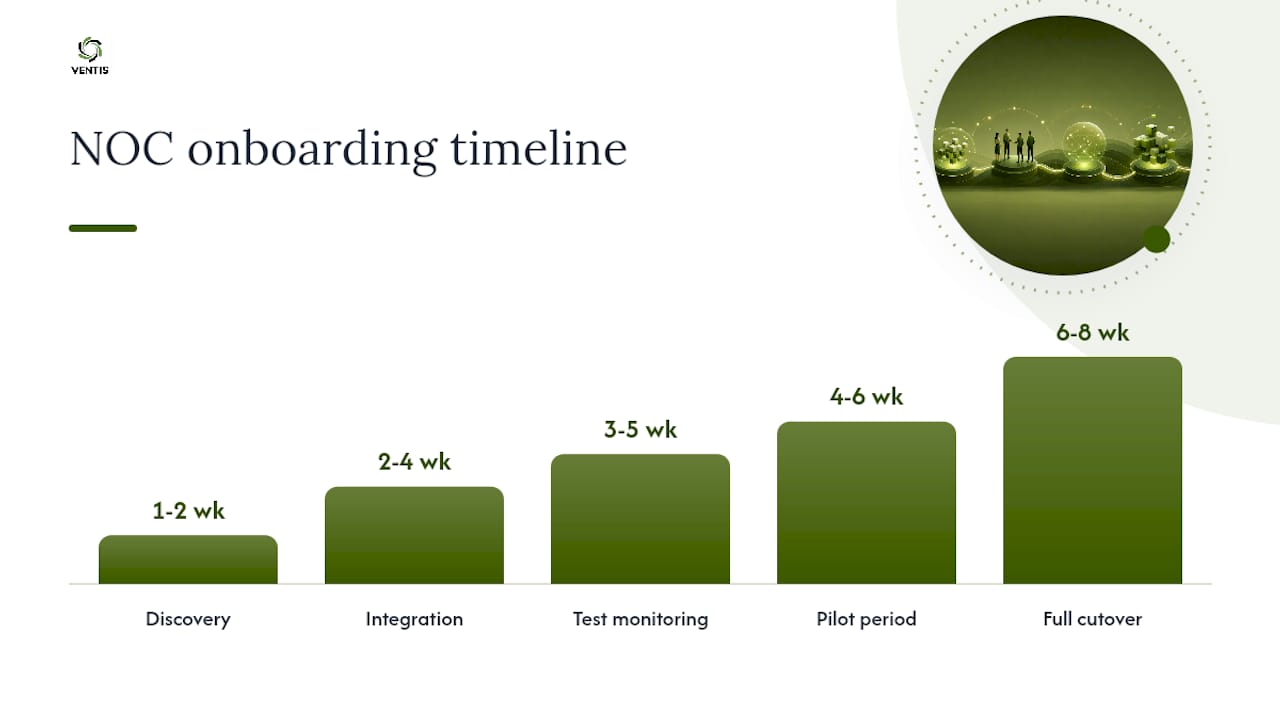
Setting realistic expectations here saves a lot of frustration. A reputable NOC provider doesn't flip a switch and start monitoring everything on day one, and you should be skeptical of anyone who claims they can.
A typical onboarding timeline looks like this:
- Discovery (week 1 to 2): The provider inventories your devices, applications, cloud tenants, and existing tools.
- Integration (week 2 to 4): Monitoring agents get deployed, ticketing systems get connected, and access credentials are provisioned securely.
- Test monitoring (week 3 to 5): Alerts start flowing, but the provider is tuning thresholds and confirming they're catching real issues without excessive noise.
- Pilot period (week 4 to 6): A limited scope, often one location or one system category, runs live to validate the process end to end.
- Full cutover (week 6 to 8): Complete monitoring goes live across the agreed scope.
Timelines shift based on environment complexity, but eight weeks is a reasonable benchmark for a mid-sized business without heavily custom infrastructure.
Who handles what during this process:
- The provider typically owns tool deployment, alert configuration, and initial documentation.
- Your team retains responsibility for credential approvals, defining maintenance windows, and naming internal escalation contacts.
- Patch approval authority is negotiable, some businesses want final sign-off, others delegate it fully.
Watch the first 30 to 90 days closely. This is when you'll see whether the provider actually tunes their alerting or just lets noise pile up, and whether their reporting starts showing meaningful trends instead of generic boilerplate.
What Tools and Technology Do NOCs Rely On?
Understanding the tool categories helps you ask sharper questions during vendor conversations, even if you never touch the software yourself.
- RMM / NMS (Remote Monitoring and Management / Network Management Systems): the backbone that collects device and network health data.
- Ticketing / ITSM platforms: where alerts become trackable, assignable work items with an audit trail.
- Monitoring and observability tools: deeper visibility into applications and infrastructure performance, not just up/down status.
- Dashboards: the visual layer technicians and executives use to see status at a glance.
- Automation and orchestration tools: scripts and workflows that execute routine fixes without waiting for a human.
- Backup monitoring and patch orchestration systems: confirm jobs actually completed and successfully, not just that they ran.
NOC monitoring software centralizes these functions and automates routine tasks like patching, restarting services, and pushing configuration changes, which is where a lot of the labor savings actually come from. Effective dashboards need to integrate tightly with your ticketing system to close the loop and preserve an audit trail, otherwise you end up with monitoring that sees problems but can't prove what was done about them. If reporting and cost tracking matter to your leadership team, tools built around FinOps dashboards can add another layer of visibility into how monitoring spend maps to business outcomes.
How Much Does a NOC Service Cost?
Pricing varies more than most first-time buyers expect, and the model matters as much as the number.
Common pricing structures:
- Per-device pricing: a flat fee per monitored endpoint, simple to budget but can add up fast in device-heavy environments.
- Per-user pricing: common when NOC services bundle with broader managed IT support.
- Per-sensor pricing: granular billing tied to specific monitoring points, common with larger network deployments.
- Flat monthly bundles: a set fee covering an agreed scope, popular for predictable budgeting.
- Staffed-shift pricing: billing based on dedicated coverage hours, more common for larger enterprises needing guaranteed staffing.
Guides on NOC cost breakdowns point to per-device and activity-based pricing as the most common starting points for small and mid-sized businesses.
What actually drives your cost up or down:
- Number of monitored endpoints and their complexity
- Service tier (notification-only costs far less than Tier 2/3 support)
- Coverage hours: true 24/7 costs meaningfully more than business-hours-only
- Integration complexity with your existing tools
- Required SLA tightness and on-call responder availability
- Licensing for third-party monitoring or ticketing tools
If you're negotiating a first contract, ask about a pilot period covering a limited device count or single location before committing to full scope. It's the cleanest way to measure actual ROI before you're locked into a broader spend.
What KPIs Should a NOC Report On?
Reporting is where you find out whether you're actually getting what you're paying for. A NOC that can't produce clear metrics isn't managing your infrastructure, it's just watching it.
KPIs worth requiring:
- Uptime and availability by service, not just a blended average
- Mean time to resolution (MTTR) and mean time to acknowledge (MTTA)
- SLA compliance rate
- Ticket volume and backlog trends
- Patch compliance percentage and backup success rate
Reporting cadence to expect: daily dashboards for operational visibility, weekly summaries for IT management, and monthly executive reports with trend analysis your leadership team can actually use in planning conversations.
Use MTTR as your anchor metric in SLA negotiations. A provider unwilling to commit to a specific MTTR target, tied to severity level, is one you should keep negotiating with before you sign.
What Should a NOC Onboarding Checklist and Runbook Look Like?
Real operational readiness shows up in the details, not the sales pitch. Before full cutover, confirm the provider has assembled a complete onboarding checklist covering credential handoff, network maps, backup verification procedures, and defined escalation contacts for every severity level.
A sample runbook excerpt should include:
- Initial triage sequence: which checks run first when an alert fires (connectivity, service status, resource utilization)
- Escalation contacts by severity, listed by name and role, not just a generic queue
- Standard remediation actions for common failure types (restart service, roll back config, fail over to backup)
- Documentation requirements: what gets logged, by whom, before a ticket closes
Operational runbooks that specify exact remediation commands, escalation contacts, and rollback criteria reduce decision time during incidents and are one of the primary levers a NOC uses to hit its MTTR targets consistently.
Pro Tip: A runbook that hasn't been updated in six months is a liability, not an asset. Push your provider to run quarterly tabletop exercises where the team walks through a simulated outage using the current runbook. It's the fastest way to find gaps before a real incident does.
Why Governance Matters More Than the Tech Stack
Everyone gets excited about dashboards and automation when evaluating NOC providers, but the tooling is rarely where engagements go wrong. It's governance. I've seen the pattern play out the same way more than once: a business signs a NOC contract, monitoring goes live, alerts start flowing, and six months later nobody on the client side can say whether SLA targets are actually being hit.
The fix isn't more technology. It's a standing quarterly review where SLA performance, ticket trends, and escalation patterns get discussed openly, with both sides adjusting thresholds as the business changes. A NOC that monitored your five-person startup correctly last year may be misconfigured for the fifty-person company you've become. Nobody catches that drift without a scheduled conversation.
I'd also push back on any provider who wants to go straight to full cutover. A pilot, even a two-week one covering a single location or system category, tells you more about how a provider actually operates than any sales deck will. You see their alert tuning in real conditions. You see how fast they actually respond, not how fast their contract says they will.
What Does a Managed NOC Engagement With Ventis Look Like?
If you'd rather not manage this in-house, Ventis Consulting Group runs managed NOC services built around measurable SLAs and straightforward integration with the tools you already use, no lengthy rebuild of your existing stack required.

A typical engagement starts with an assessment of your current environment, followed by tool integration, runbook creation specific to your infrastructure, and a pilot period before full cutover, generally within the same six-to-eight-week window covered earlier in this piece. Coverage runs 24/7, with reporting cadences and escalation paths defined upfront rather than negotiated after something breaks. Ventis also handles the unified communications and network needs that often run alongside NOC monitoring, so your infrastructure and your team's ability to communicate through it stay in sync. If you're ready to see what SLA-backed monitoring looks like for your business, get in touch through the unified communications solutions page to start an assessment.
Frequently Asked Questions
What is the difference between a NOC service and a help desk? A NOC service focuses on infrastructure availability and performance, monitoring networks, servers, and applications around the clock. A help desk handles end-user requests like password resets and software troubleshooting. Many businesses need both, working together through a clear escalation process.
How quickly should a NOC respond to a critical alert? Response time commitments should be defined explicitly in your SLA, and providers typically offer faster response tiers for critical severity incidents than for low-priority ones. Ask for numeric commitments by severity level rather than accepting a blanket promise.
Can a small business afford NOC services, or is this only for enterprises? Small businesses often benefit the most, since outsourcing 24/7 coverage is typically far cheaper than hiring and staffing an internal team around the clock. Pricing models like per-device or bundled flat-rate plans make it accessible for smaller environments.
Does a NOC service replace the need for an internal IT team? No. A NOC handles monitoring and routine remediation, but internal IT typically retains responsibility for strategic decisions, patch approvals, and vendor management. Most businesses run a hybrid model where the NOC absorbs routine work and internal staff focus on higher-value projects.
How is a NOC different from a SOC? A NOC focuses on network and infrastructure performance and availability. A SOC focuses on security threat detection and incident response. They frequently hand off work to each other, particularly when a security alert requires an infrastructure-level fix.
Sources
- NOC Monitoring Tools | NOC Monitoring Software — ManageEngine OpManager
- What Are Network Operations Center (NOC) Services? (2026)
- Network Operations Center (NOC) | NOC As A Service | ConnectWise
- Network Operations Center (NOC) Monitoring Software - N-able