

IT support is the architect of your backup infrastructure, the first responder when systems fail, and the validator that proves your data can actually come back. When a ransomware attack hits or a server crashes, the difference between a two-hour recovery and a two-week disaster usually comes down to what your IT team built and tested before anything went wrong.
Here is what a capable IT support team owns in the recovery process:
- Design and maintain backup architecture using the 3-2-1 principle: three copies, two media types, one offsite or cloud location
- Define RTOs and RPOs with you, the business owner, based on how long each process can realistically be down before it costs customers or revenue
- Run documented restore tests that validate data at the application layer, not just confirm a backup job completed
- Coordinate external specialists for physical media failures, forensic investigations, or large-scale disaster recovery events
Ventis Consulting Group treats all four of these as core deliverables, not optional add-ons. That is the standard worth holding any IT support partner to.
Table of Contents
- Why data loss is a business problem, not just a tech problem
- What IT support does before an incident happens
- What IT support does during a recovery incident
- Data recovery versus disaster recovery: what is the difference?
- Types of data recovery your business might face
- How do you evaluate an IT support provider for data recovery?
- A practical recovery-readiness timeline for small businesses
- Key Takeaways
- What most small businesses get wrong about backup and recovery
- Ventis Consulting Group helps you recover with confidence
- Useful sources and further reading
Why data loss is a business problem, not just a tech problem
Data loss stops operations. Orders cannot be processed, customer records become inaccessible, and employees sit idle while the clock runs. The financial hit compounds quickly: direct revenue loss, recovery costs, potential regulatory exposure, and reputational damage that does not show up on a balance sheet until customers leave.
The causes vary, and each one demands a different recovery approach:
- Ransomware and cyberattacks: Attackers encrypt or exfiltrate data, often targeting backup systems first
- Human error: Accidental file deletions, misconfigured systems, or overwritten databases are among the most common loss events
- Hardware and media failure: Hard drives fail, SSDs degrade, and RAID arrays can fail in ways that corrupt data across multiple disks
- Logical corruption: Software bugs, failed updates, or interrupted writes leave files or databases in an unreadable state
- Site-level events: Fire, flooding, power surges, or building loss can take out on-premises infrastructure entirely
Recovery planning must account for all of these, and the RTO and RPO targets your IT team sets should reflect which processes are most time-sensitive for your specific business.
What IT support does before an incident happens
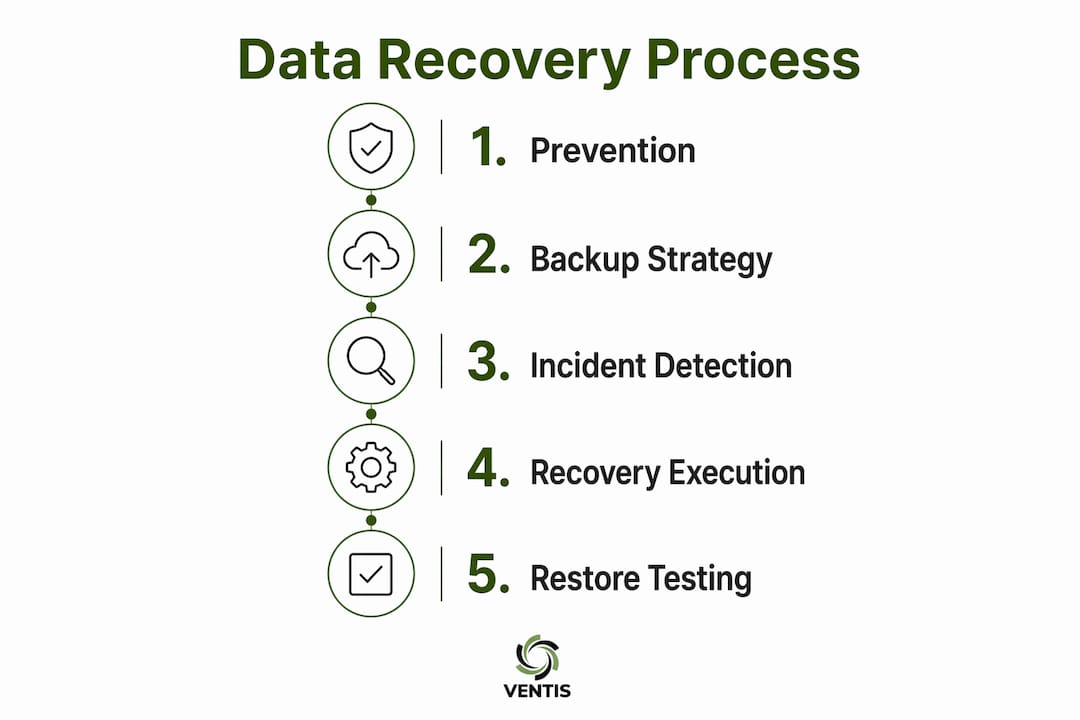
Prevention and preparation are where IT support earns its value. By the time an incident occurs, the outcome is largely determined by what was built and tested beforehand.

Backup architecture and retention
A solid backup strategy follows the 3-2-1 principle and adds immutability. Immutable backups cannot be altered or deleted, even by an administrator using production credentials. That matters because ransomware frequently targets backup systems before encrypting production data. Offsite and cloud copies add geographic separation so a site-level event does not eliminate all recovery options. Replication alone is not enough: if corrupted data replicates instantly, you have copied the problem, not preserved a clean recovery point.
RTO/RPO defined by the business, not IT
Your IT team should not be setting recovery time objectives in a vacuum. The right question is: how long can your order entry system be down before you lose customers? How much data can your accounting team afford to recreate? Those answers, documented by process owners, become the targets that IT maps to technical options and costs. Recovery objectives set this way are defensible and tied to real business impact.
Hardening backup systems
Backup infrastructure needs its own security posture. That means:
- Least-privilege access: production admin accounts should not be able to delete backup data
- Segmented admin credentials for backup systems, separate from domain admin accounts
- Encryption at rest and in transit
- Logging and alerting on backup job failures and access events
- Immutability features enabled and verified
Runbooks, restore tests, and documentation
A documented recovery playbook defines who declares an incident, who runs the restore, and who validates success. Without it, recovery under pressure becomes improvised and slow. Restore tests should happen on a scheduled basis, use isolated infrastructure, and include application-layer validation: can a user log in? Can a transaction complete? A backup job showing green is not proof of recoverability. Only a completed restore test proves the data is usable.
Pro Tip: Have someone other than the person who manages backups run the restore drill. Single-point-of-failure dependency on one technician is itself a recovery risk. Run the test into isolated infrastructure and start the clock at formal declaration, not when the first file copies.
What IT support does during a recovery incident
When something breaks, the response sequence matters as much as the technical capability.
- Detection and declaration: Identify the scope of the incident, confirm it matches a known scenario in the playbook, and formally declare the incident to start the RTO clock.
- Containment: Isolate affected hosts, revoke compromised credentials, and stop the spread before beginning any restore work. Restoring into a still-infected environment wastes time and data.
- Forensic preservation: Where legal or insurance requirements apply, preserve logs and affected systems before wiping. IT support coordinates this step but may hand it off to an external incident response team.
- Triage and sequencing: Restore business-critical systems first, in the order defined by your RTO mapping. Not everything comes back at once.
- Restore execution: Mount verified backup data into isolated infrastructure, then validate at the application layer before reconnecting to production.
- Monitoring and clearance: Watch restored systems for signs of residual malware or integrity issues before declaring recovery complete.
Role boundaries matter here. IT support manages the restore workflow and vendor coordination. Deep forensics, malware eradication, and legal hold procedures often require external incident response specialists. A good IT support team knows when to escalate and has those vendor relationships in place before an incident occurs.
| Recovery phase | IT support owns | May require external specialist |
|---|---|---|
| Detection and containment | Yes | Threat intelligence feeds |
| Forensic evidence preservation | Coordination | IR firm or legal counsel |
| Restore execution | Yes | Cloud/storage vendor support |
| Malware eradication | Coordination | Dedicated IR team |
| Application validation | Yes | App vendor for complex systems |
| Post-incident review | Yes | Optional third-party audit |

Data recovery versus disaster recovery: what is the difference?
These two terms get used interchangeably, and that creates real confusion about what to expect from your IT support team.
Data recovery means restoring specific files, databases, mailboxes, or system states to a usable condition after a loss event. A deleted file, a corrupted database, or an accidentally overwritten configuration all fall into this category. IT support handles these restores using backup tools and documented procedures.
Disaster recovery is broader. It means restoring full IT operations after a catastrophic event: servers, network services, authentication, storage, and business applications, often by failing over to a secondary site or cloud environment. Disaster recovery requires pre-defined failover protocols, runbook-driven orchestration, and often vendor coordination across multiple platforms.
A simple decision guide:
- Deleted file or corrupted database? That is a data recovery event. Expect IT support to handle it from existing backups within a defined RTO.
- Office building inaccessible or primary data center offline? That is a disaster recovery event. Expect IT support to invoke a DR runbook, coordinate failover, and potentially bring in additional vendor support.
- Ransomware across multiple systems? That sits between both. Containment and eradication come first, then a sequenced restore that may involve DR-level coordination.
Types of data recovery your business might face
Not all recovery events look the same, and the timeline and cost signals differ significantly by type.
- Accidental deletion and simple restores: Usually the fastest and least expensive. IT support retrieves the file or mailbox item from backup within minutes to hours, depending on backup frequency and tooling.
- Logical corruption and point-in-time restores: A database or application in a corrupted state requires rolling back to a clean snapshot. Timelines range from hours to a full business day depending on database size and complexity.
- Ransomware and integrity recovery: Requires clean, isolated restore points that predate the infection. Validation must confirm the restored environment is free of malware before reconnecting to production. This is where immutable backups prove their value.
- Physical and media failure: A mechanically failed drive or damaged storage array typically requires escalation to a specialist recovery lab. These labs work in controlled cleanroom environments and commonly offer "no data, no charge" pricing models with emergency turnaround options available at a premium. IT support coordinates the escalation and manages the chain of custody.
- Site-wide disaster recovery: A full failover or infrastructure rebuild after a catastrophic event. Timelines are measured in hours to days and depend heavily on whether DR infrastructure was pre-provisioned and tested.
"When data loss affects your business, time and precision are critical." — Ontrack
IT support should advise you on which category an event falls into and have vendor relationships in place for physical recovery and IR escalation before you ever need them.
How do you evaluate an IT support provider for data recovery?
Choosing or auditing an IT support partner for recovery readiness comes down to documented evidence, not promises. Here is what to look for.
Checklist of what a provider should have:
- A written backup and DR plan with defined scope, retention, and recovery procedures
- Evidence of regular, documented restore tests with signed records
- RTOs and RPOs mapped per business process, not a single blanket SLA
- Immutable and isolated backup copies that production credentials cannot delete
- Role-based access controls for all recovery assets
- A written incident escalation path with named external vendors for physical recovery and IR
Questions to ask any candidate:
- When did you last run a full restore test, and who ran it?
- Can a production administrator delete our backup data?
- How are our RTOs and RPOs set, and how do you measure against them?
- Which recovery scenarios require external escalation, and who are those vendors?
- What does a restore test record look like, and can we see a sample?
Red flags to watch for:
- No documented restore tests or test records
- Reliance on replication as the primary backup strategy
- Backup systems managed by the same accounts that manage production
- No defined recovery SLAs tied to specific business processes
- Vague answers about escalation procedures
For a practical IT support checklist that covers these points and more, Ventis Consulting Group has published a small-business-focused resource worth reviewing alongside any provider evaluation.
A practical recovery-readiness timeline for small businesses
Getting from unprepared to recovery-ready does not happen overnight, but a structured 90-day plan makes it manageable.
Days 1–30: Inventory and foundation
- Inventory all systems, data stores, and applications that need backup coverage
- Conduct a business impact analysis: ask each process owner how long their function can be down before it causes customer or revenue loss
- Document RTOs and RPOs per process based on those conversations
- Identify gaps between current backup coverage and documented targets
Days 31–60: Architecture and documentation
- Implement or remediate backup architecture: 3-2-1 structure, immutable offsite copies, encrypted retention
- Harden backup system access: segment credentials, enable immutability, configure alerting
- Write recovery runbooks covering declaration criteria, restore sequencing, application validation steps, and escalation contacts
- Create communication templates for internal stakeholders and external vendors
Days 61–90: Testing and validation
- Run a full restore test into isolated infrastructure, starting the clock at formal declaration
- Validate at the application layer: log in, complete a test transaction, confirm data integrity
- Complete a one-page restore test record: scope, who ran it, measured recovery time, integrity check results, and any remediation items
- Remediate gaps found during the test and schedule the next drill
Pro Tip: Keep the restore test record to one page. It forces clarity: scope, who ran it, measured time against RTO, integrity check result, and any open remediation items with owners and due dates. A signed one-page record is more useful than a 20-page report nobody reads.
Ventis Consulting Group structures client engagements around this kind of phased readiness program, starting with an initial assessment and delivering at least one documented restore test as a concrete output.
Key Takeaways
IT support's role in data recovery is defined by what gets built, tested, and documented before an incident, not just what happens during one.
| Point | Details |
|---|---|
| Restore testing is the only real proof | A backup job completing successfully does not confirm recoverability; only an application-layer restore test does. |
| RTOs and RPOs must be business-led | Process owners, not IT, should define how long each function can be down before it causes real damage. |
| Immutability stops ransomware from winning | Backup copies that production credentials cannot delete are the last line of defense in a ransomware event. |
| Role clarity speeds recovery | Knowing in advance who declares, who restores, and who escalates cuts recovery time under pressure. |
| Ventis Consulting Group delivers readiness | Ventis provides managed backup architecture, documented restore testing, and RTO/RPO facilitation for SMBs in Pittsburgh and surrounding areas. |
What most small businesses get wrong about backup and recovery
The most common mistake is treating a green backup log as proof that recovery will work. It is not. A backup job can complete successfully every night and still fail to restore when you need it most: expired credentials, missing dependencies, corrupted archives, or a restore process nobody has ever actually run under pressure.
The fix is straightforward but requires discipline. Run restore tests on a schedule. Have someone other than the backup administrator run the drill. Document the result on a single signed page. When a provider cannot show you that record, or when the same person who manages backups is also the only one who knows how to run a restore, those are process failures that no amount of backup tooling can compensate for. Recovery is mostly a process problem, not a product problem.
Ventis Consulting Group helps you recover with confidence
Losing data without a tested recovery plan is one of the most avoidable crises a small business faces. Ventis Consulting Group gives Pittsburgh-area SMBs a concrete alternative: managed backup architecture built to the 3-2-1 standard with immutable offsite copies, documented restore testing with signed records as a deliverable, and RTO/RPO facilitation that starts with your business priorities, not an IT default.

An engagement with Ventis starts with a readiness assessment that identifies gaps in your current backup coverage, access controls, and documentation. From there, you get a prioritized remediation plan and at least one documented restore test before the engagement closes. You will know your data can come back because you will have watched it happen. To get started, visit Ventis Consulting Group's managed IT services page or reach out directly to schedule your initial assessment.
Useful sources and further reading
- Ready.gov — Business Continuity and Recovery Planning: The federal guidance on setting RTOs, RPOs, and recovery plan structure. A practical starting point for any business impact analysis.
- IBM — What Is Data Recovery?: Clear definitions of data recovery versus disaster recovery, useful for setting expectations with stakeholders.
- Google Cloud — What Is Disaster Recovery?: Covers failover protocols, DR architecture, and the scope of full operational recovery.
- The Data Experts — How to Prove Your Backups Will Actually Restore: The most practical resource available on restore test methodology, including the five-step validation framework and one-page record format.
- ITU Online — Best Practices for Server Backup and Disaster Recovery Planning: Covers layered recovery strategies and why replication alone is not a backup.
- ITU Online — Best Practices for Data Backup and Recovery for New IT Support Specialists: Operational guidance on runbooks, restore workflows, and documentation discipline.
- Ventis Consulting Group: Service descriptions for managed IT, backup architecture, and recovery readiness assessments for SMBs in Pittsburgh and surrounding areas.