

An IT support provider is a dedicated partner responsible for managing, maintaining, and protecting your business technology so operations stay stable and productive. The role of IT support provider extends well beyond fixing broken computers. It covers user and device management, Microsoft 365 administration, security controls, backup oversight, and ongoing system maintenance. For small to mid-sized businesses, the difference between a reactive break-fix vendor and a provider who owns your IT baseline is the difference between constant firefighting and actual business growth.
What are the primary responsibilities of an IT support provider?
The core IT support responsibilities include troubleshooting hardware, software, and network issues, assisting users with daily technology problems, and maintaining system performance through regular updates and patching. These tasks keep your business running without disruption. But the functions of IT support go deeper than reactive fixes.
A well-structured IT support provider handles:
- Hardware and software troubleshooting: Diagnosing malfunctions, resolving connectivity issues, and preventing system slowdowns before they become outages.
- User management and training: Setting up accounts, managing permissions, and helping staff use tools like Microsoft 365 effectively.
- System maintenance: Applying patches, managing updates, and running scheduled backups to protect data integrity.
- Security management: Enforcing access controls, deploying endpoint protection, and responding to threats before they escalate.
- Monitoring and incident response: Watching infrastructure around the clock and acting fast when anomalies appear.
Each of these functions connects directly to business continuity. When patches slip or backups go unverified, small gaps turn into expensive incidents. IT support delivered through IT Service Management (ITSM) frameworks improves productivity and security by standardizing how issues are identified, escalated, and resolved. That structure prevents small problems from compounding into productivity losses.
Pro Tip: Ask any prospective IT provider to show you their patch compliance reports and backup verification logs. If they cannot produce those documents on demand, they are not managing your baseline. They are just answering tickets.

How are IT support responsibilities structured and escalated?
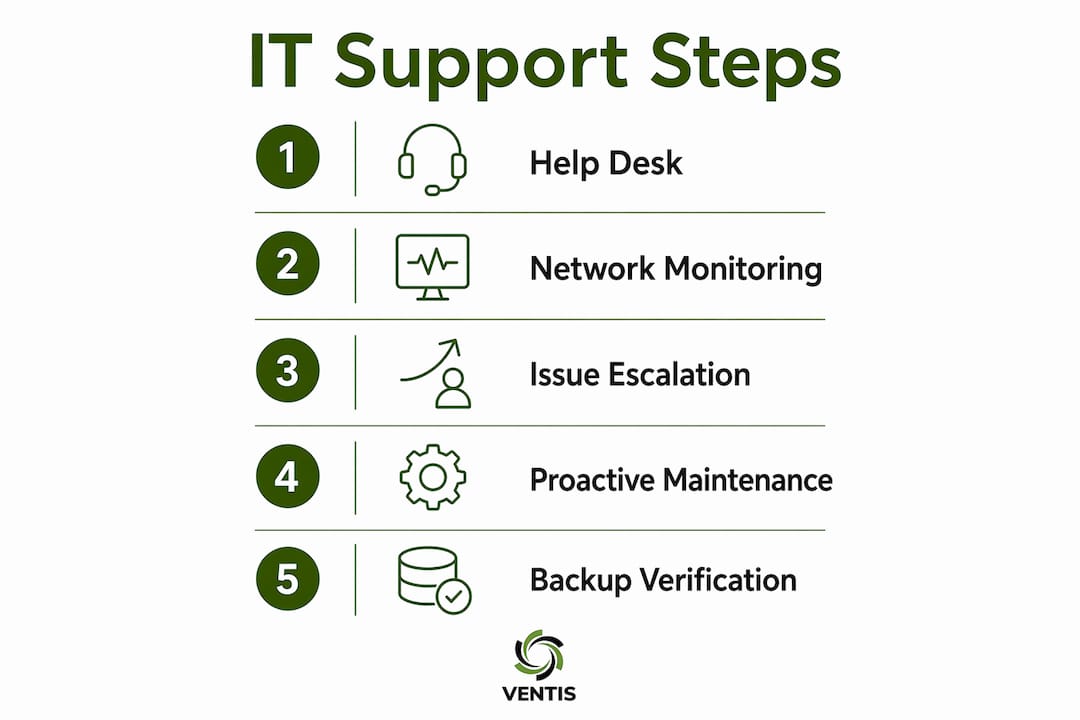
IT support roles are organized into tiers, and understanding this structure helps you set realistic expectations with any provider. The three-tier model is the industry standard for managed IT environments.
- L1 (Help Desk): Handles password resets, basic connectivity issues, software installation, and common user errors. L1 resolves 70-80% of tickets promptly, which means most of your staff's daily frustrations get addressed quickly without pulling in senior engineers.
- L2 (Advanced Support): Manages more complex troubleshooting, including network configuration, application errors, and device-level diagnostics. L2 engineers take over when L1 cannot resolve an issue within a defined timeframe.
- L3 (Infrastructure and Root Cause): Addresses deep infrastructure problems, root-cause analysis, and architecture-level changes. This tier works on issues that affect entire systems rather than individual users.
This tiered model matters for SMBs because it prevents expensive senior engineers from spending time on password resets while also making sure complex problems get the right expertise. Structured escalation reduces internal coordination overhead and speeds up resolution times across the board.
Managed IT support providers typically bundle help desk, a Network Operations Center (NOC) for 24/7 infrastructure monitoring, and L2/L3 escalation paths into a single service. When evaluating a provider, confirm that their internal escalation process aligns with your business's priority expectations. A mismatch between how you define "urgent" and how they categorize tickets creates friction and delays.
Pro Tip: Request a sample escalation matrix from any provider before signing. It should clearly define response time targets for each tier and the criteria that trigger escalation from L1 to L2 to L3.
What do contracts and SLAs actually protect you from?
Outsourcing IT support does not transfer your risk. Organizations retain ultimate responsibility for security and compliance even when a third party manages their systems. This is one of the most misunderstood aspects of working with external IT providers, and it catches SMBs off guard during audits or after incidents.
NIST 800-53 SA-9 guidance makes this explicit: documented agreements must define how external providers implement and monitor security controls, and organizations must enforce those requirements through contracts. That means your service agreement is not just a billing document. It is a risk management tool.
The table below compares what a weak contract leaves undefined versus what a strong contract should specify:
| Contract element | Weak agreement | Strong agreement |
|---|---|---|
| Incident notification | No timeline defined | Provider notifies within 24 hours of confirmed incident |
| Data protection standards | General "best efforts" language | Specific encryption standards and data handling protocols |
| Audit rights | Not mentioned | Client retains right to audit provider controls annually |
| Scope of responsibility | Vague or verbal | Explicit list of managed systems, users, and services |
| Remedies for non-performance | None | Defined SLA credits or termination clauses |
The chain-of-trust principle from NIST means your provider's security practices become part of your security posture. If they fail to patch a system or log an access event, that gap belongs to your organization in the eyes of regulators and insurers. Clear contracts with audit rights and incident notification requirements are your primary defense against that exposure. For a practical starting point, Ventis Consulting Group's master service agreement outlines how these responsibilities are defined and documented for SMB clients.
What operational and security benefits do proactive IT providers bring?
Proactive IT support produces measurable business outcomes that reactive support simply cannot match. The benefits of IT support shift dramatically when a provider moves from answering tickets to owning the health of your environment.
The operational gains are direct. Monitoring and maintenance reduce unplanned downtime by catching hardware degradation, network congestion, and software conflicts before they cause outages. One documented example: a retailer reduced checkout crashes by 15% after implementing L2 support with proactive monitoring. For a business processing transactions, that improvement translates directly to revenue protection.
The security benefits are equally significant. Proactive providers enforce patching schedules, run phishing simulations, manage endpoint detection tools, and maintain access control logs. These controls reduce the probability and impact of breaches. Data breaches average $4.5 million in costs, a figure that dwarfs the annual cost of managed IT support for most SMBs. Compliance support for frameworks like HIPAA and GDPR also falls within the IT support provider role when the provider actively manages documentation, access controls, and audit trails.
Proactive backup management deserves specific attention. Backup logs and recovery tests are operational artifacts that prove your data is actually protected, not just theoretically backed up. A provider who monitors backup jobs daily and tests recovery quarterly gives you genuine protection. One who simply sets up a backup tool and moves on gives you false confidence. For SMBs, understanding how cybersecurity supports continuity is a core part of evaluating any IT support relationship.
How can SMBs evaluate and select the right IT support provider?
Selecting the right provider starts with one question: does this provider react to problems, or do they take ongoing responsibility for maintaining your IT environment? That distinction separates a break-fix vendor from a managed IT support partner.
Use these criteria when evaluating candidates:
- Baseline ownership: Can they demonstrate active management of your devices, users, and Microsoft 365 environment with documented evidence?
- Monitoring capabilities: Do they operate a NOC or use automated monitoring tools that alert them before you notice a problem?
- Escalation transparency: Is their L1/L2/L3 structure clearly defined, and do they share ticket resolution data with you?
- Reporting and communication: Do they provide monthly reports showing patch status, backup health, and open issues?
- Security alignment: Can they map their services to your compliance requirements, whether that is HIPAA, GDPR, or a cyber insurance policy?
A provider who cannot answer these questions with documentation is operating reactively, regardless of what their marketing says. For SMBs without a dedicated internal IT team, the provider's accountability for baseline operations is not optional. It is the entire value proposition. If you are also thinking through how IT support fits your broader technology spend, the 2026 tech budget guide from Ventis Consulting Group offers a practical framework for aligning costs with outcomes.
Key takeaways
An IT support provider's value to an SMB is determined by whether they own your technology baseline or simply respond when things break.
| Point | Details |
|---|---|
| Baseline ownership matters | Providers who manage users, devices, and backups proactively deliver far more value than break-fix vendors. |
| Tiered support improves efficiency | L1 resolves most tickets fast; L2 and L3 handle complexity without wasting senior engineer time on routine issues. |
| Contracts define your risk exposure | Clear SLAs with incident notification, audit rights, and data protection terms protect you when something goes wrong. |
| Proactive support reduces breach costs | Monitoring, patching, and phishing controls reduce the risk of incidents that average $4.5 million in damages. |
| Evaluate providers on documentation | Ask for patch reports, backup logs, and escalation matrices before signing any agreement. |
What I've learned about IT support providers after years in the field
The single biggest mistake I see SMBs make is treating IT support as a commodity purchase. They compare monthly prices, pick the lowest number, and assume the service is roughly equivalent across providers. It is not. The gap between a provider who owns your baseline and one who just answers tickets is enormous, and it only becomes visible when something goes wrong.
Ownership clarity is the hardest thing to verify before you sign a contract. Every provider claims to be proactive. Very few can show you a backup verification log from last Tuesday or a patch compliance report from last month. I always tell business owners: ask for the artifacts, not the pitch. If a provider hesitates or cannot produce operational documentation on short notice, that tells you everything about how they actually work.
The other thing I have seen consistently is that SMBs underestimate how much their IT provider's security practices affect their own risk profile. Your cyber insurance carrier does not care that your provider "handles security." They want to know whether multi-factor authentication is enforced, whether patches are applied within a defined window, and whether access logs exist. Those answers come from your provider's documented processes, not their sales deck.
IT support done right is not a cost center. It is the infrastructure that keeps your business running, your data protected, and your team productive. The providers who understand that distinction are worth paying for.
— Greg
How Ventis Consulting Group delivers the IT support provider role
If you are evaluating what a well-structured IT support provider should look like in practice, Ventis Consulting Group is built around exactly the model described in this article.
Ventis Consulting Group serves small to mid-sized businesses in Pittsburgh and surrounding areas with managed IT services that include baseline operations oversight, tiered escalation, 24/7 monitoring, and security management. Every engagement starts with a clear scope of responsibility, documented in a service agreement that defines what is managed, how incidents are handled, and what reporting you receive. You get a provider who owns your environment, not one who waits for your call. Explore managed IT services from Ventis Consulting Group and see what proactive IT support actually looks like for your business.
FAQ
What is the role of an IT support provider?
An IT support provider manages and maintains a business's technology environment, covering troubleshooting, user management, security controls, system updates, and backup oversight. The role extends beyond fixing issues to owning the ongoing health of your IT baseline.
How does tiered IT support work?
Tiered support organizes IT responsibilities into L1 (help desk), L2 (advanced troubleshooting), and L3 (infrastructure and root cause). L1 resolves roughly 70-80% of tickets, with complex issues escalating to higher tiers for specialized expertise.
Does outsourcing IT support transfer my security risk?
No. Organizations retain ultimate responsibility for security and compliance even when using an external IT provider. NIST 800-53 SA-9 requires documented agreements that define how providers implement and monitor security controls on your behalf.
What should an IT support contract include?
A strong IT support contract should specify incident notification timelines, data protection standards, audit rights, a defined scope of managed services, and remedies for non-performance. Vague "best efforts" language leaves you exposed.
How do I know if an IT provider is truly proactive?
Ask for operational artifacts: patch compliance reports, backup verification logs, and monitoring alert histories. A genuinely proactive provider produces these documents routinely and shares them with clients as part of standard reporting.