

Secure remote access means continuously verified, identity based entry to company systems from outside the corporate network, not a one-time login that grants free rein once inside. The right approach is a zero-trust, least-privilege model built on multifactor authentication and device posture checks, layered over encrypted connections. The rest of this guide covers the risks that model defends against, how VPN, ZTNA, and SASE compare, the controls that matter most, and a rollout checklist you can actually follow.
TL;DR:
- Most remote access failures stem from credential compromise, unpatched endpoints, and broad network access that enables lateral movement.
- ZTNA offers application-specific access with continuous verification, reducing risks compared to VPN's broad network-level access.
- Starting with MFA, endpoint security, and limited application access provides the most effective risk reduction for SMBs with limited resources.
- Implementing remote access controls gradually and with leadership support ensures a smoother transition and avoids rollback failures.
- Engaging a cybersecurity specialist can streamline deployment, provide tailored guidance, and help manage ongoing monitoring and response efforts.
Table of Contents
- What Is Secure Remote Access and Why Does It Matter?
- What Are the Biggest Risks in Remote Access Setups?
- VPN vs. ZTNA vs. SASE: Which Architecture Fits Your Business?
- Which Technical Controls Actually Reduce Remote Access Risk?
- How Do You Roll Out Secure Remote Access Without Disrupting the Business?
- What Should SMBs Prioritize First With Limited Resources?
- What I've Learned Watching These Rollouts Succeed or Stall
- How Ventis Consulting Group Helps You Execute This Roadmap
- Where to Go for Official Guidance
- Sources
- FAQ
What Is Secure Remote Access and Why Does It Matter?
Secure remote access ties together three things: who is connecting (identity), what device they're using (posture), and what they're allowed to touch once verified (least privilege). It's a shift away from treating a login as a one-time event and toward treating every session as something to keep checking. Modern implementations layer encryption with MFA, device posture checks, and continuous monitoring instead of relying on a VPN tunnel alone to do the job.
Hybrid work expanded the attack surface in ways most security stacks weren't built for. Employees connect from home routers, coffee shop networks, and personal devices that IT never provisioned. Contractors and vendors need access to specific systems, not the whole network. Cloud apps sit outside the traditional perimeter entirely, which means the old idea of a hardened office network with a soft, trusted interior no longer holds up.
The business stakes are concrete:
- A single compromised remote session can lead to data exfiltration before anyone notices.
- Ransomware frequently enters through exposed remote access points rather than email alone.
- Regulated industries face compliance exposure when remote connections aren't logged or access isn't provably restricted.
- Downtime from a breach costs far more than the controls that would have prevented it.
Getting this right isn't just a technical exercise. It's the difference between remote work being a productivity win or a standing liability.
What Are the Biggest Risks in Remote Access Setups?
Most remote access failures trace back to a handful of repeat offenders, and they compound each other.
- Credential compromise. Phishing remains the easiest way into a network, and a stolen password with no MFA behind it is an open door.
- Lateral movement. Once an attacker is inside a flat network, they can often reach far more than the one system they breached.
- Unpatched or unmanaged endpoints. A personal laptop with an outdated operating system connecting over VPN brings its vulnerabilities with it.
- Exposed RDP and SSH services. Remote desktop ports left open to the internet are a favorite target for automated scanning tools.
- Unmanaged third-party access. Vendors and contractors often get standing credentials with no session limits or oversight.
- Logging blind spots. Without centralized visibility, a breach can sit undetected for weeks.
The architecture problem underneath most of this is what security analysts call the "castle-and-moat" model. Once a user authenticates to a traditional VPN, they typically gain broad network-level access rather than access scoped to what they actually need. That single weakness explains why so many breaches escalate quickly once the initial foothold is established.
VPN vs. ZTNA vs. SASE: Which Architecture Fits Your Business?
These three approaches aren't strictly competitors. Most organizations end up running some combination, and the right mix depends on what you're protecting and how fast you can move.
-
VPN (Virtual Private Network). A VPN builds an encrypted tunnel between a device and the network, granting access to everything inside that segment once authenticated. It still makes sense for short-term remote access needs and for legacy systems that can't easily support modern identity protocols. The tradeoff is the castle-and-moat exposure described above: once in, a user or attacker can often reach more than intended.
-
ZTNA (Zero Trust Network Access). ZTNA flips the model. Instead of granting network access, it grants per-application access based on verified identity and device posture, re-checking continuously rather than trusting a session indefinitely. This is the architecture most aligned with least-privilege principles, and it's why zero-trust and least-privilege models are increasingly treated as the standard for new remote access deployments.
-
SASE/SSE (Secure Access Service Edge). SASE combines networking and security services, including ZTNA, secure web gateways, and firewall functions, into a single cloud-delivered platform. It's built for scale and for organizations consolidating multiple point solutions into one management layer.
For most SMBs, the practical path is a pilot: start ZTNA on your highest-value applications (financial systems, customer data, admin consoles), keep VPN running for legacy tools that can't yet support modern authentication, and evaluate SASE once you're managing enough separate security tools that consolidation starts paying for itself. Vendors often pitch ZTNA as a full VPN replacement, but many organizations adopt hybrid patterns during the transition specifically to avoid disrupting operations.
Which Technical Controls Actually Reduce Remote Access Risk?
Not every control carries equal weight. These are the ones that move the needle first.
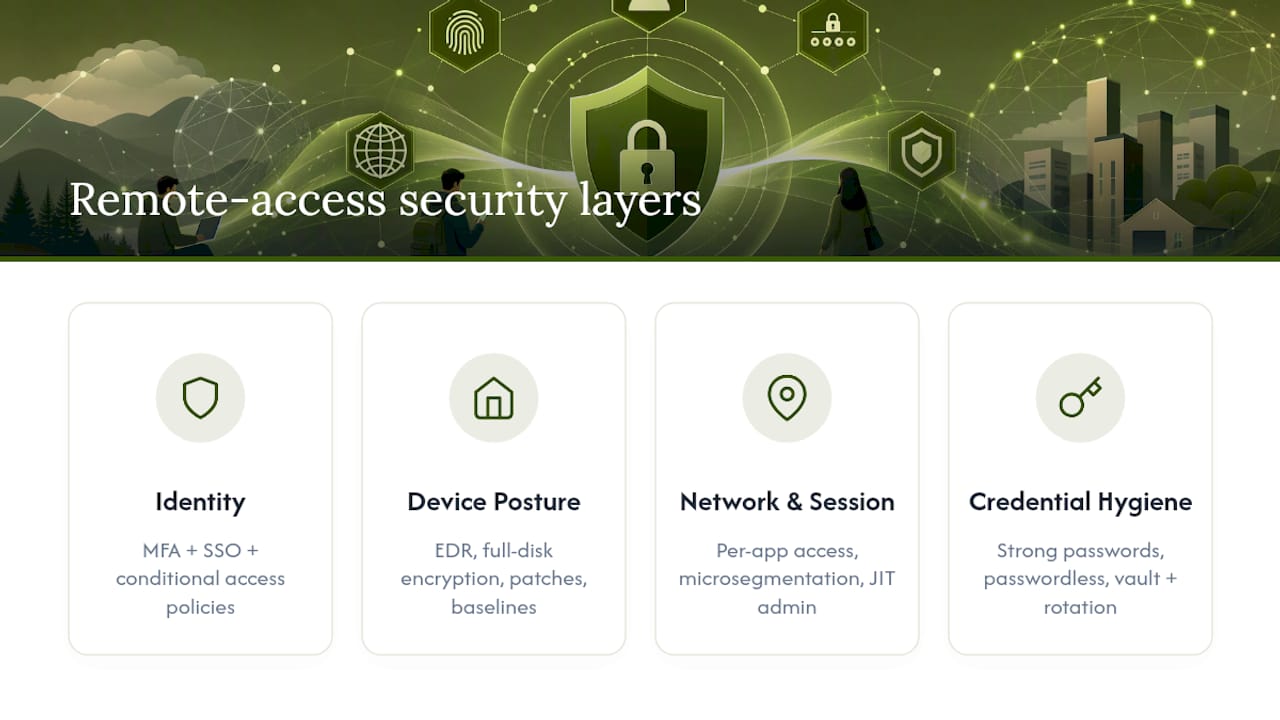
Identity controls come first. Multifactor authentication should be non-negotiable across every remote connection, paired with single sign-on to reduce password sprawl and conditional access policies that adjust requirements based on device, location, or risk signal. Our guide to conditional access policies walks through how to design rules that don't frustrate legitimate users while still blocking risky logins.
Endpoint and device posture checks matter just as much as identity. A verified user on a compromised device is still a risk. Endpoint detection and response (EDR), full-disk encryption, current patch levels, and approved configuration baselines should all factor into whether a device is allowed to connect at all.
Network and session controls narrow the blast radius. Per-application access, microsegmentation, and just-in-time privileged access all limit what a compromised session can actually reach. Standing administrator credentials are a common weak point. Shifting to just-in-time privileged access with session recording, rather than always-on admin rights, meaningfully reduces the attack surface for both internal staff and outside vendors.
Credential hygiene closes the gaps automation misses. Enforce strong password policies, move toward passwordless authentication where practical, and use a credential vault with automatic rotation for shared or service accounts.
Monitoring ties it all together. Centralized logging, SIEM or UEBA tooling, tuned alerts, and documented runbooks are what turn a breach from a multi-week discovery into a same-day response.
Pro Tip: Don't treat MFA as finished once it's enabled. Audit which accounts still have exceptions or bypass options. Those exceptions are exactly where attackers look first.
How Do You Roll Out Secure Remote Access Without Disrupting the Business?
Governance decides whether your technical controls actually get enforced or quietly erode over time. Start with ownership.
- Assign a specific owner for remote access policy, not a shared responsibility that nobody actually drives.
- Inventory every application accessed remotely and classify each by risk and sensitivity.
- Design conditional access rules and separate, tighter policies for third-party and vendor access.
- Select a pilot group: a small set of users and one or two high-value applications.
- Run the pilot, collect telemetry, and fix policy gaps before expanding further.
- Roll out in phases, training users at each stage and keeping fallback options for legacy systems that can't yet support the new model.
- Validate with a penetration test and an incident response drill before calling the rollout complete.
A few governance details are easy to skip and expensive to skip:
- Vendor and contractor access should always route through session controls, not standing VPN credentials.
- Every policy needs a defined enforcement point. Something that decides pass or fail, not just a written guideline.
- Pilots that start narrow, with a handful of high-value apps and full telemetry integration, tend to surface policy gaps early rather than after a full rollout has already exposed the whole organization.
Our cybersecurity risk assessment guide covers how to prioritize which applications belong in your first pilot wave.
What Should SMBs Prioritize First With Limited Resources?
Enterprise security guides assume budget and staff most small and mid-sized businesses don't have. Here's what to tackle in order.
Quick wins, achievable in weeks: Enable MFA everywhere, enforce SSO across cloud applications, patch known critical vulnerabilities on internet-facing systems, and close any public-facing RDP or SSH ports that don't need to be open.
Medium-term, over the next two or three months:
- Deploy EDR across all endpoints, including remote and personal devices where policy allows.
- Feed logs into a lightweight SIEM so you have centralized visibility instead of scattered device logs.
- Pilot ZTNA on your most sensitive application before attempting a full migration.
Know when a control genuinely needs outside help. Designing conditional access policies correctly, running managed detection and response around the clock, and closing gaps found in a security assessment are areas where an internal IT team of one or two people typically hits a wall. Budget-wise, spend first on identity and endpoint controls since they close the most common attack paths for the lowest cost, then layer in monitoring and architecture changes as resources allow. A cybersecurity assessment checklist can help you figure out exactly where your gaps sit before you spend on anything else.
What I've Learned Watching These Rollouts Succeed or Stall
The rollouts that fail almost always try to do everything at once. Teams flip on ZTNA for the entire company in a single weekend, skip vendor-specific access controls because they seem like a lower priority, and end up rolling back changes under user pressure within a month. The ones that work start narrow, get leadership visibly behind the policy changes, and measure something concrete, like time to detect an anomalous login, rather than declaring victory once a tool is installed.
— Greg
How Ventis Consulting Group Helps You Execute This Roadmap
A specialized consulting group can be an alternative to guessing your way through a remote access overhaul alone. Where larger providers hand you a generic playbook, Ventis brings local, consultative guidance that starts with your actual environment, not a template built for a different kind of business.

An engagement typically starts with a free cybersecurity assessment to map your current exposure, followed by a prioritized plan that sequences identity controls, endpoint hardening, and conditional access design in the order that reduces the most risk first. From there, Ventis can handle implementation directly, including managed detection and response for ongoing monitoring once the architecture is in place, and end-to-end IT and cybersecurity services if you'd rather hand off the whole rollout than manage it piecemeal. Since credential phishing remains one of the top entry points into remote sessions, pairing your access controls with managed email security closes a gap many rollouts miss entirely. If your team is ready to move past ad hoc VPN access and toward a real zero-trust plan, start with an assessment and let the roadmap take shape from there.
Where to Go for Official Guidance
- CISA's Guide to Securing Remote Access Software for checklists and testing steps.
- FTC guidance on securing remote access for practical small-business controls.
- Usa for broader federal cybersecurity resources.
Sources
FAQ
What Is the Difference Between a VPN and ZTNA?
A VPN grants broad access to a network segment once a user authenticates, while ZTNA grants access to individual applications based on continuously verified identity and device posture. Security analyses note that this difference is exactly why VPNs are more prone to lateral movement after a breach than zero-trust architectures.
Does Multifactor Authentication Really Stop Most Attacks?
MFA blocks the vast majority of automated credential-based attacks because a stolen password alone is no longer enough to gain access. It's considered a baseline control in CISA's remote access security guidance, not an optional add-on.
How Much Does Ventis Consulting Group Charge for Remote Access Security?
Pricing depends on your environment, so Ventis Consulting Group doesn't publish flat rates for managed IT and cybersecurity services. A free assessment is the starting point for scoping a plan and getting exact pricing for your business.
Can Small Businesses Realistically Implement Zero Trust?
Yes, if it's staged rather than attempted all at once. Start with MFA, SSO, and endpoint patching, then pilot per-application access controls on one or two high-value systems before expanding further, following the same phased approach CISA recommends for testing and validation.
What Should Vendor and Third-Party Access Look Like?
Vendors and contractors should never receive standing VPN credentials with unrestricted network access. Session-based, just-in-time access tied to specific applications, with recording and expiration built in, keeps third-party risk contained to only what that vendor actually needs to touch.