

Immutable backups are storage-enforced, read-only recovery copies, built on WORM or Object Lock technology, that guarantee at least one clean restore point after a ransomware attack or a malicious deletion. They work because the storage layer itself, not an administrator's good judgment, blocks changes or deletions for a set retention window. The sections below walk through how that enforcement actually works, how to architect it, and the operational habits that keep it from becoming an expensive mistake.
TL;DR:
- Retention windows should be limited to 30 to 90 days for operational recovery to prevent runaway storage costs and ensure regular review.
- Implementing strict access controls, including dedicated backup accounts with hardware MFA, is crucial to prevent attacker access from compromising backups.
- Regular restore tests, including simulations of domain compromises using isolated credentials, are essential to confirm that immutability defenses are operationally effective.
- Indefinite or untested retention policies can lead to exponential storage costs and reliance on outdated backups, undermining the purpose of immutability.
- Immutable backups protect data from alteration during a retention window but do not prevent breaches or detect intrusion, requiring separate security controls and proactive monitoring.
Table of Contents
- What Makes a Backup Immutable, Technically
- Architecting Immutable Backups for Real Recovery
- What Immutability Actually Fixes, and What It Doesn't
- Building an Immutable Backup Program That Actually Works
- The Storage Trap: Pitfalls That Turn Immutability Against You
- How Ventis Consulting Group Helps SMBs Get This Right
- Why Most Immutable Backup Advice Undersells the Hard Part
- Get Immutable Backups Set Up the Right Way
- Sources
- FAQ
What Makes a Backup Immutable, Technically
Immutability comes from Write Once Read Many (WORM) storage: once a file lands, the storage layer itself refuses any write, edit, or delete request until a retention clock expires. No admin password, not even a domain administrator's, can override that block while the policy holds. That is the entire point. It removes trust from the equation.
Cloud platforms implement this through policies that Azure Blob Storage documents in detail. You get container-level and version-level WORM policies, where container-level locks every object in a container and version-level locks individual blob versions, which is friendlier for workloads that update frequently.
Two policy types matter here:
- Time-based retention locks data for a fixed period, typically enough to cover common recovery windows, after which it becomes editable again.
- Legal hold locks data indefinitely until someone with authority explicitly removes the hold, typically for litigation or regulatory review.
Policies also move through a lifecycle: unlocked, where settings can still be adjusted, and locked, where they become permanent. Microsoft's own guidance recommends testing in unlocked mode first, then flipping to an enabled and locked immutable vault once you have proof the retention window actually fits your recovery needs. Locking too early, before you've validated the window, is how teams lock themselves into years of unnecessary storage costs.
Architecting Immutable Backups for Real Recovery
Immutability only matters if it produces a usable restore. That means picking an architecture that matches your recovery time and recovery point targets, not just the cheapest storage tier available.
- Cloud object-lock buckets for fast, operational restores. S3 Object Lock in Compliance mode and Azure immutable blob storage both give you sub-hour restore access for your most recent weeks to a few months of backups. A pragmatic strategy pairs this fast tier with longer-term offline storage for forensic retention.
- Hardened on-prem repositories. Keep the backup appliance off the production domain entirely. A repository joined to Active Directory shares its blast radius with everything an attacker compromises upstream. A standalone Linux repository with its own credentials survives a domain-wide compromise that would otherwise take out your backups along with production.
- Air-gapped or vaulted tape and disk. For disaster recovery, not day-to-day restores, physically disconnected media remains the gold standard. Nothing reachable over a network can be encrypted by ransomware.
- Credential and account separation. Dedicated backup service accounts, isolated from production identity, and hardware MFA on your cloud root account close the gap attackers exploit most: using stolen admin credentials to disable the very protection meant to stop them. A dedicated cloud account for backup storage, protected by hardware MFA, keeps a compromised production identity from ever touching your recovery copies. Pairing this with the IAM separation practices most cloud security guides recommend closes the loop.
What Immutability Actually Fixes, and What It Doesn't
Get the expectations right before you build anything. Immutable storage solves a narrow but critical problem: it removes the ability to alter or delete a backup within its retention window, even with stolen credentials.
That buys you real, specific benefits:
- A guaranteed clean restore point, even after a total domain compromise.
- Tamper-evidence that satisfies auditors asking whether records could have been altered.
- Regulatory retention support for frameworks like SEC 17a-4(f), which governs broker-dealer record retention, and HIPAA's data integrity requirements for health records.
But immutability does not detect an intrusion, and it does not fix a weak identity policy. IBM's guidance on immutable backups is blunt about this: the technology protects the copy, not the environment around it. If your detection tooling misses a breach for six months, immutability just guarantees you have a clean, six-month-old copy to restore from. It won't shrink that window. It won't stop an attacker from encrypting production data for the umpteenth time next quarter. Those problems need separate controls, which is why proactive risk management has to sit alongside your backup strategy, not underneath it.
Building an Immutable Backup Program That Actually Works
A policy that has never been tested against a real restore is a policy you're hoping works, not one you know works. Build the program in this order.
Scope first. Identify which systems actually need immutable protection. Not every file share needs a 7 year lock. Map retention windows to your recovery time objective, recovery point objective, and any forensic or legal holding requirements specific to your industry.
Policy discipline. Test every retention policy unlocked before locking it. Document who owns the policy and what the exception process looks like if a legal hold needs to be lifted early.
Access controls that matter. Use backup-only service accounts with narrowly scoped IAM permissions, never a shared admin credential. Enable multi-user authorization for any retention change, so no single compromised account can shorten a lock window.
- Monitor for policy edits and failed backup windows in real time.
- Alert on any attempt to modify retention settings outside change control.
- Schedule restore tests from the immutable copy itself, not from a live snapshot.
Pro Tip: Run at least one restore test per quarter that simulates a full domain compromise, meaning your team restores using only the isolated backup credentials, with zero access to production admin accounts. If that test fails, your immutability strategy fails with it, regardless of what your policy documentation says.
NIST and CISA-aligned checklists back this up directly: protected, isolated copies with documented restore-test evidence are what auditors and incident responders actually look for, not a policy screenshot. For SaaS workloads specifically, the scope and retention questions look different than on-prem file servers, so treat Microsoft 365 and similar platforms as their own line item in your assessment.
The Storage Trap: Pitfalls That Turn Immutability Against You
Immutability's biggest failure mode isn't a technical flaw. It's a policy mistake that compounds every day it goes unnoticed.
- Infinite or indefinite locks left unbounded will grow storage costs exponentially, since nothing in that policy ever ages out or gets deleted.
- Cloud account compromise or payment disruption can lock you out of your own immutable storage. If an attacker deletes the entire cloud account, or a lapsed payment method suspends it, "immutable" becomes "inaccessible," which defeats the purpose entirely.
- Treating immutability as the only control leaves gaps that a single storage feature was never designed to close. Storage growth patterns from misconfigured retention are a well-documented risk across both hardware and software WORM implementations.
Bound every retention policy to a defined window, tier older immutable data to cheaper archival storage, keep backup billing on a separate account from production, and put a policy review on your calendar. A locked policy that nobody revisits for three years is a cost problem waiting to surface at the worst possible budget meeting.
How Ventis Consulting Group Helps SMBs Get This Right
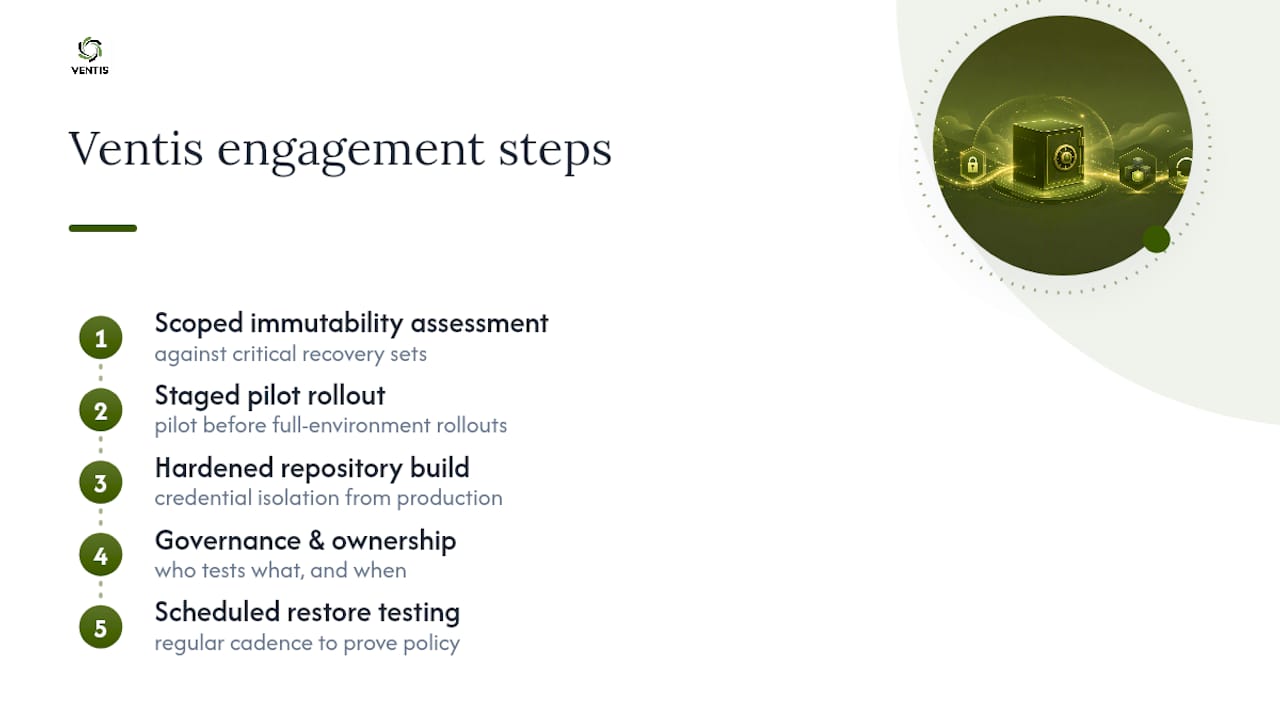
Most small and mid-sized businesses don't have a dedicated backup architect on staff, which is exactly where immutable backup projects tend to stall. A practical approach is working through a structured engagement: a backup and disaster recovery assessment first, then a hardened repository build with credential isolation from production, then a scheduled restore-testing cadence so the policy gets proven, not just deployed.
That ownership model mirrors the governance approach outlined on the security responsibility page, where clear accountability for who tests what, and when, replaces vague assumptions about who's watching the backups. For a business that has never run a real restore drill, the practical starting point is a scoped immutability gap assessment against your most critical recovery sets, followed by a staged pilot rather than a full-environment rollout on day one.
Why Most Immutable Backup Advice Undersells the Hard Part
The technical primitives get plenty of coverage: Object Lock, WORM, retention locks. What gets skipped is the part that actually determines whether any of it works when it matters, the operational discipline around testing and account separation.
A locked policy with no restore-test evidence is a hypothesis, not a recovery plan. The Decryption Digest research makes a point worth repeating in plainer terms: if restoring your immutable copy requires production credentials, you haven't built a ransomware defense at all. You've built a backup that feels safe until the day it isn't.
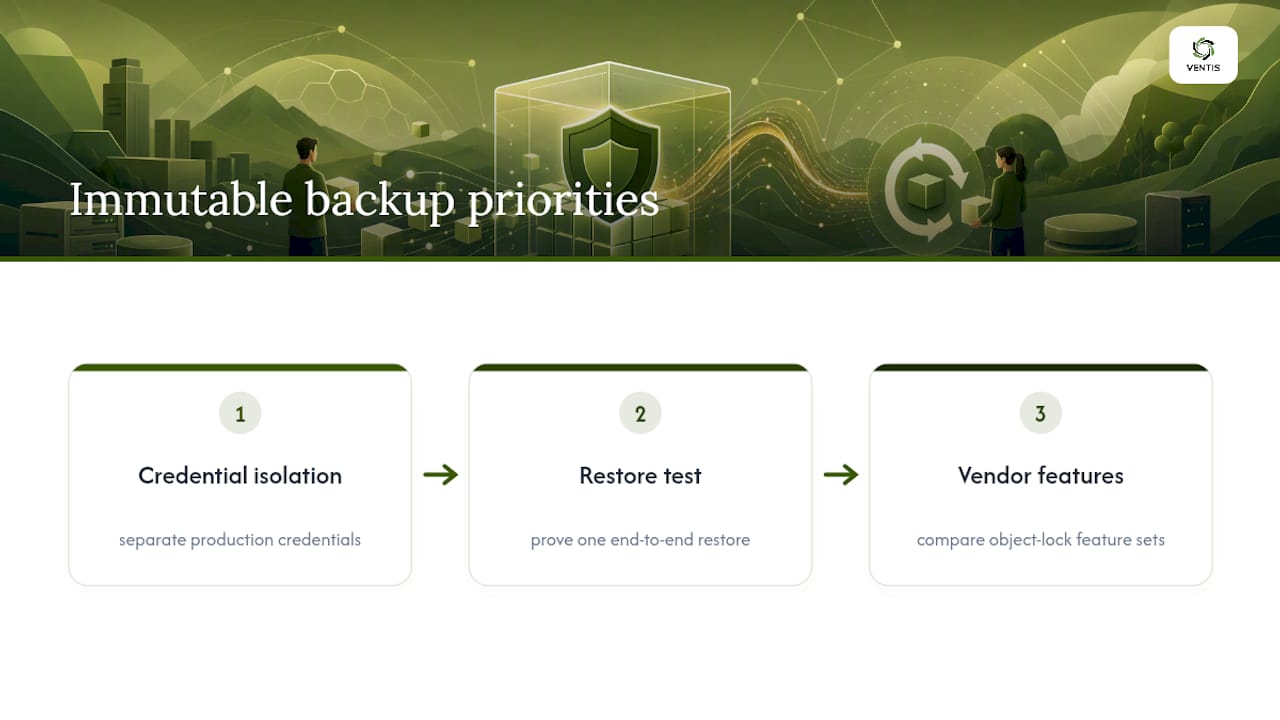
If you're prioritizing where to start, skip the vendor comparison spreadsheets. Fix credential isolation first, prove one restore works end to end, then worry about which cloud object-lock feature set looks best on paper.
— Greg
Get Immutable Backups Set Up the Right Way
Ventis Consulting Group is the practical alternative to piecing together a backup strategy from vendor documentation and hoping it holds under pressure. We build hardened, credential-isolated backup architectures for small and mid-sized businesses, then prove they work with scheduled restore testing instead of leaving that step for the day of an actual attack.

That same hands-on approach carries into how we design unified communications and infrastructure solutions around your business, so recovery planning fits the systems your team actually depends on every day, not a generic template. If your current backup setup has never been tested against a simulated domain compromise, that's the gap worth closing first. Consider starting with an immutability gap assessment scoped to your critical systems.
Sources
- Azure Backup immutable vault concept
- What are immutable backups? | IBM
- Immutable Backup Strategy for Ransomware Defense Guide (2026)
- Backup Immutability Checklist | NIST Ransomware | Datapath
FAQ
What is the difference between immutable backups and regular backups?
Regular backups can be edited or deleted by anyone with the right credentials, while immutable backups are locked at the storage layer so no one, including a compromised administrator account, can alter them during the retention window.
How long should immutable backup retention windows last?
Retention should map to your recovery point objective and any legal or regulatory holding period, typically 30 to 90 days for fast operational recovery paired with longer offline retention for forensic needs, rather than an indefinite lock that drives runaway storage costs.
Can ransomware still affect immutable backups?
Ransomware cannot alter or encrypt data locked under an active immutable policy, but it can still compromise the surrounding environment, which is why restore testing from the immutable copy has to happen regularly.
Do immutable backups satisfy compliance requirements like SEC 17a-4 or HIPAA?
Immutable storage supports the tamper-evidence and retention requirements found in SEC 17a-4(f) and HIPAA, but compliance also depends on documented policies, access controls, and audit trails beyond the storage feature itself.
What is the biggest mistake companies make with immutable backups?
Locking a retention policy before testing it, or leaving retention unbounded, which either fails to prove recoverability or drives storage costs up indefinitely as misconfigured infinite locks accumulate untested data.