

RTO measures how fast your systems come back online after an outage; RPO measures how much data you can afford to lose in the process. One looks forward at downtime, the other looks backward at data. Both are business decisions your leadership team sets per workload, not technical specs your IT vendor hands you.
TL;DR:
- RTO and RPO targets should be based on a formal Business Impact Analysis to accurately reflect each system's operational and financial risks.
- Achieving near-zero RTO or RPO requires significant investment in automation, replication, and standby infrastructure, which can rapidly increase costs.
- Regular testing of recovery times and data integrity is critical, as untested plans often overestimate actual recovery capabilities.
- Ransomware threats can compromise RPOs unless backups are immutable and air-gapped, requiring additional contingency planning.
- Combining workload tiering, real-world testing, and vendor SLAs ensures disaster recovery plans are practical, measurable, and financially justifiable.
Table of Contents
- RTO vs RPO: A Side-by-Side Comparison
- How to Set RTO and RPO Targets With a BIA
- RTO and RPO Calculation Examples by Workload
- Which Technologies Actually Deliver Your RTO and RPO Targets
- How Do You Actually Test and Validate RTO and RPO?
- Why Ransomware Breaks Your RPO Math
- BIA Workshop Checklist for Owners and Vendors
- What SMBs Get Wrong About RTO and RPO
- Get Your RTO and RPO Targets Tested, Not Just Documented
- Sources
RTO vs RPO: A Side-by-Side Comparison
RTO stands for recovery time objective. It answers one question: how long can this system stay down before the business takes real damage? RPO stands for recovery point objective, and it answers a different question: how much data created between backups can you afford to lose forever?
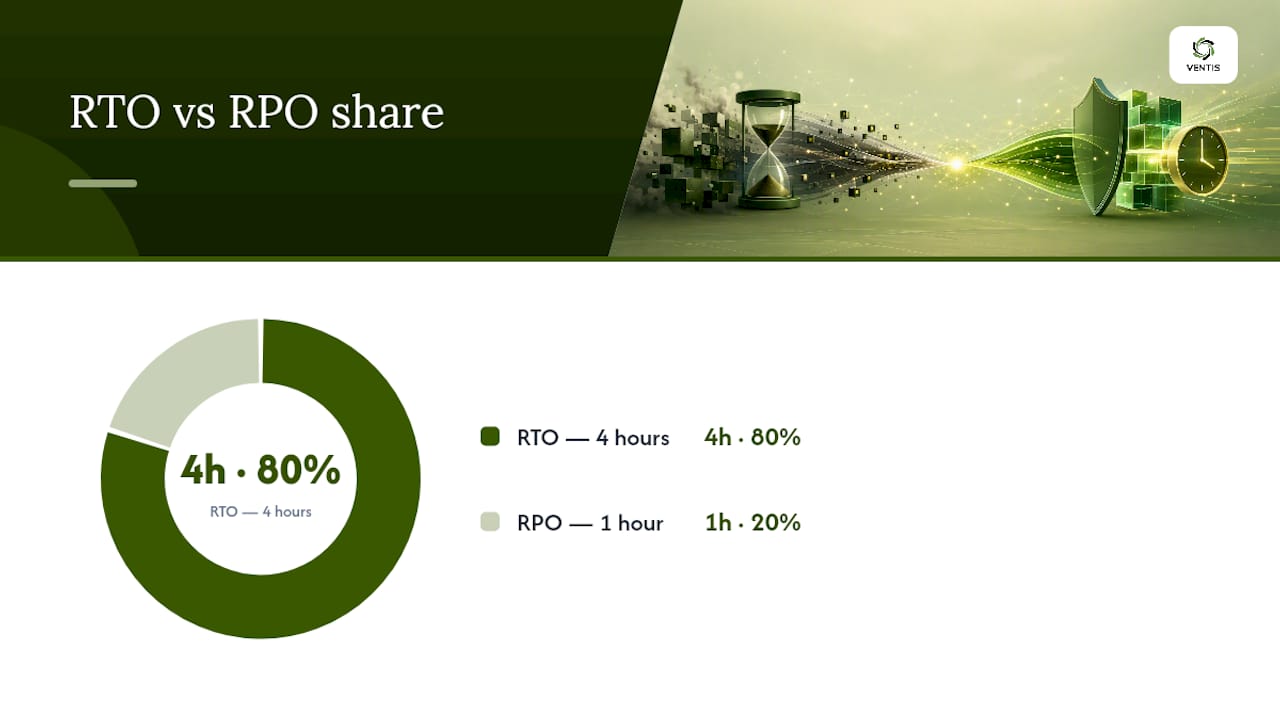
The direction of measurement is what trips people up. RTO points forward, counting the clock from the moment of failure until systems are usable again. RPO points backward, measuring the gap between your last good backup and the moment things broke. A four-hour RTO means your team has four hours to restore operations. A one-hour RPO means you'll never lose more than one hour of transactions, no matter how the restore goes.
Each metric drives a different set of engineering decisions. RPO is mostly a backup-frequency problem: snapshot every 15 minutes, and your worst-case data loss is 15 minutes, assuming the backup itself completes cleanly. RTO is a restore-and-failover problem: how quickly can you spin up replacement infrastructure, redirect traffic, and validate that the application actually works? Tightening RPO usually means buying more frequent, more granular backup capacity. Tightening RTO usually means investing in automation, standby infrastructure, and rehearsed runbooks.
Cost scales fast at the extremes of either metric:
- Near-zero RPO (continuous replication) demands synchronous writes to a secondary site, which adds latency and infrastructure cost.
- Near-zero RTO (active-active failover) means paying for duplicate, always-on compute you hope never gets used.
- Moderate targets, like a 4-hour RTO and 1-hour RPO, are achievable with standard backup and virtualization tools most SMBs already own.
- Aggressive targets on both metrics simultaneously multiply cost rather than add it, since they usually require different technologies stacked together.
RPO and RTO are also independent of each other, not two sides of the same coin. Real-world workloads prove it: a reporting cache might restart in 15 minutes but tolerate data that's eight hours old, while a data warehouse might need data no more than 30 minutes stale but take four hours to restore because of integrity checks that have to run before anyone trusts the numbers again, according to Datacamp's comparison of RTO and RPO. Treating them as a single "disaster recovery number" is the fastest way to overspend on the wrong protection.
How to Set RTO and RPO Targets With a BIA
You don't invent RTO and RPO numbers in a planning meeting. You derive them from a Business Impact Analysis (BIA), the formal exercise that maps each critical system to the financial, operational, and reputational cost of it being unavailable. Skipping this step is why so many disaster recovery plans list targets nobody can actually defend under audit or board review.
Here's the process that produces numbers you can stand behind:
- Inventory critical workloads. List every system that touches revenue, compliance, or customer-facing operations, from your ERP to your phone system.
- Calculate Maximum Tolerable Period of Disruption (MTPD) for each one. Ask finance and operations leaders how many hours of downtime turns into a material loss.
- Set RTO below MTPD with a buffer. If the business can survive 8 hours of an outage before real damage, set RTO at 6 hours to leave room for the unexpected.
- Quantify acceptable data loss separately. For each system, ask how much re-entered or lost data is tolerable, in dollars or in hours of work.
- Assign a tier. Group workloads into Tier 0 through Tier 3 based on the answers above.
- Get sign-off from business owners, not just IT. RTO and RPO are commitments the whole company has to live with, and treating them as signed business agreements rather than IT estimates changes how seriously they get funded.
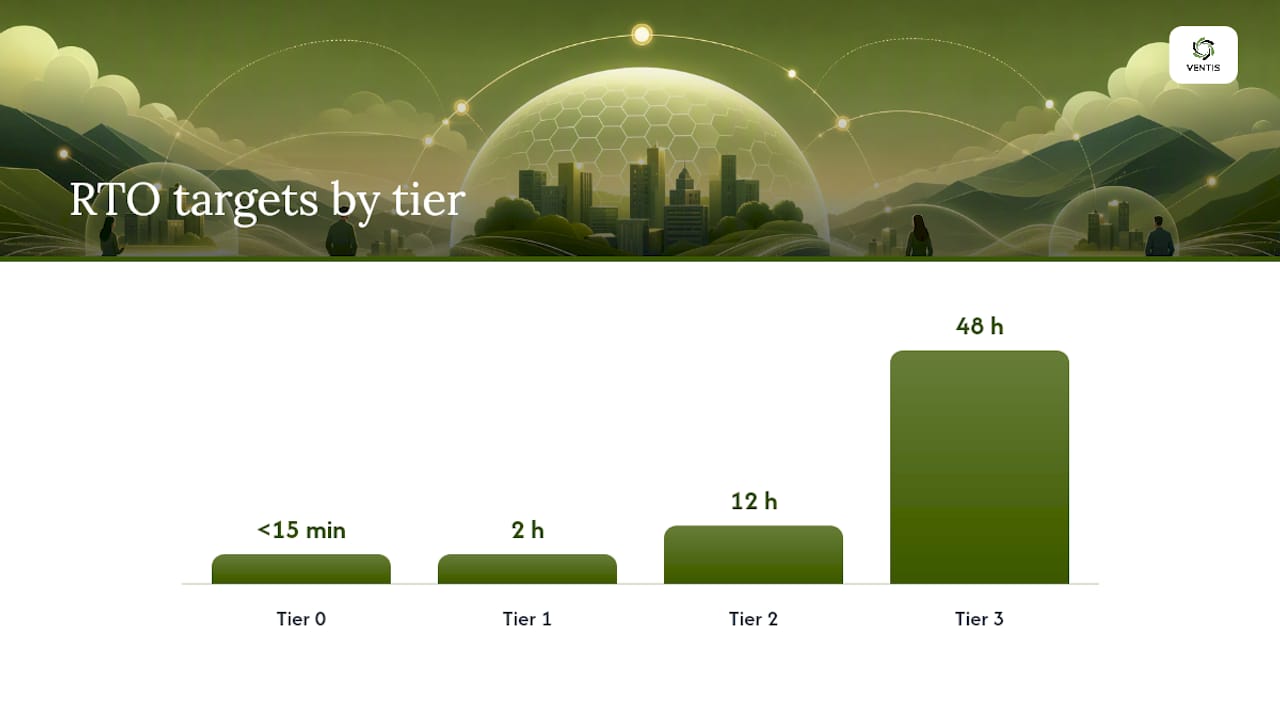
Tiering usually breaks down into four practical bands: Tier 0 mission-critical systems targeting under 15 minutes RTO and near-zero RPO; Tier 1 business-critical systems around a 2-hour RTO and 15-minute RPO; Tier 2 important systems around a 12-hour RTO and 4-hour RPO; and Tier 3 non-critical systems that can tolerate up to 48 hours RTO and 24 hours RPO, per the tiering framework outlined by Risk Publishing.
Pro Tip: Ask business owners "what would you tell a customer if this system was down for six hours?" instead of "what's your RTO?" You'll get a far more honest number, and it usually reveals that the system they thought was Tier 1 is actually Tier 2.
RTO and RPO Calculation Examples by Workload
Numbers make this concrete faster than definitions do. Say your e-commerce platform runs hourly database backups. Your theoretical RPO is one hour, but that's only true if the backup job actually finishes before the next one starts and nothing corrupts the file in transit. Measure the real restore, not the backup schedule, and you often find replication lag or backup-window overruns quietly stretching that "one hour" into two or three.
RTO works the same way. A restore-time measurement isn't the time the backup takes; it's the full clock from declaring an incident to the application being usable by real users, including DNS changes, dependency checks, and validation.
Rough starting ranges by workload type look like this:
- E-commerce platform: RTO of 1 to 4 hours, RPO of 15 minutes to 1 hour, because every minute of lost cart or order data has a direct revenue cost.
- CRM system: RTO of 4 to 12 hours, RPO of 1 to 4 hours, since sales data loss is painful but rarely stops the business cold.
- Analytics/BI platform: RTO of 12 to 48 hours, RPO of 4 to 24 hours, because historical data can often be reconstructed or is simply less time-sensitive.
- Email and productivity (Microsoft 365, file shares): RTO of 2 to 8 hours, RPO of 1 hour to a full day, depending on how collaborative the workflow is.
These targets aren't universal. A furniture retailer's analytics platform might tolerate 48-hour recovery just fine, while a logistics company running real-time route optimization off that same category of platform needs something closer to CRM-tier targets. The Veeam guide to RTO and RPO calculation walks through this kind of workload-by-workload math in more detail, and it's worth running your own numbers before a vendor hands you a generic SLA.
Which Technologies Actually Deliver Your RTO and RPO Targets
The architecture you choose has to match the numbers you set in your BIA, not the other way around. Buying continuous replication for a Tier 3 file archive wastes money; running nightly backups for a Tier 0 payment system is a liability waiting to surface.
Replication method sets your RPO ceiling. Synchronous replication writes to your primary and secondary site simultaneously, pushing RPO toward zero, but it demands low-latency links and costs more to run at scale. Asynchronous replication batches changes and sends them on a delay, which is cheaper and more forgiving over distance, but caps your best-case RPO at whatever that delay is, often minutes rather than seconds.
Continuous data protection (CDP) and point-in-time recovery (PITR) close the gap between "we back up nightly" and "we can restore to any second." They're the right tool when a workload's data changes fast enough that even hourly snapshots would lose meaningful work, think transaction databases or order systems.
Failover architecture sets your RTO ceiling:
- Cold standby infrastructure sits idle until needed, keeping costs low but stretching RTO to hours because everything has to be provisioned and configured on the fly.
- Warm/hot standby keeps a scaled-down replica running, cutting RTO to minutes at moderate ongoing cost.
- Active-active clusters run both sites live simultaneously, delivering near-zero RTO but doubling infrastructure spend indefinitely.
In cloud environments, tools like AWS Resilience Hub let you assign a resilience policy to each application, then assess every component against that target and estimate what remediation will actually cost before you commit budget. That kind of per-application accounting beats guessing at infrastructure specs.
How Do You Actually Test and Validate RTO and RPO?
An RTO you haven't tested is a guess with good intentions. The only way to know your real recovery time is to run a timeboxed failover exercise: declare a simulated outage, start the clock, and don't stop it until the application is genuinely usable by end users, not just "the server pinged back."
RPO validation works differently. It's not about speed, it's about integrity. Restore a backup to an isolated environment and check whether the data inside it is actually complete and usable, not just present.
A workable testing cadence looks like this:
- Run quarterly failover drills for Tier 0 and Tier 1 systems, measuring true mean time to recovery (MTTR) end to end.
- Run monthly restore-integrity tests on backup files for critical databases, verifying row counts and referential integrity, not just file existence.
- Document every gap between the tested number and the target number, and treat that gap as a funded project, not a footnote.
- Re-test after any infrastructure change, since a new firewall rule or DNS migration can quietly break a runbook that worked last quarter.
Untested RTOs are almost always optimistic, since real recovery drills routinely surface dependency issues that paper runbooks never catch, like a licensing server nobody remembered was a hard dependency.
Pro Tip: Time your test from the moment you'd realistically detect the outage, not from when you deliberately trigger it. Detection lag is often the single biggest hidden chunk of real-world RTO.
Why Ransomware Breaks Your RPO Math
Your stated RPO assumes the last backup is clean. Ransomware makes that assumption dangerous. If malware sat undetected for weeks before encrypting anything, your "one-hour RPO" backup might just be a pristine copy of already-compromised data.
That's the difference between the last backup and the last clean backup, and it's the distinction that matters most in a ransomware recovery. Recovering to the last backup can mean recovering the infection. Recovering to the last clean backup means rolling back further than your RPO ever promised.
Two defenses actually hold up here:
- Immutable backups that can't be altered or deleted, even by an attacker with admin credentials.
- Air-gapped copies physically or logically isolated from the production network, so lateral movement can't reach them.
Forensic validation after a ransomware event, confirming exactly when the compromise started and which backup predates it, typically adds 24 to 72 hours to recovery time for critical systems, on top of the restore itself. Build that contingency into your incident response plan, not into your regular DR runbook, so the two scenarios don't get conflated. A documented incident response plan that separates "normal outage" from "malware event" saves precious hours when it matters.
BIA Workshop Checklist for Owners and Vendors
Bring this into your next BIA workshop or vendor RFP conversation:
- Ask owners: What's the dollar cost of one hour down? One day down? Does regulatory exposure change after a specific threshold?
- Collect artifacts: data change rate per system, a dependency map showing what breaks if X goes down, and current backup completion logs.
- Set vendor minimums: demand a tested RTO figure (not a theoretical one), documented proof of RPO through actual restore logs, and an SLA that names financial penalties for missed targets, referenced against your service level objectives.
- Translate specs into cost: every hour you shave off RTO or every minute off RPO should come with a stated infrastructure price tag, so leadership approves numbers with eyes open.
What SMBs Get Wrong About RTO and RPO
Most small and midsize businesses I've seen approach disaster recovery treat RTO and RPO as numbers a vendor writes into a contract, not commitments the business actually tested. The runbook exists. Nobody's run it in eighteen months.
The gap that actually costs companies money isn't a bad target, it's the space between "backup completed successfully" and "we could actually restore from it under pressure." Reducing RTO is genuinely harder than reducing RPO, since it demands tested automation and dependency mapping that most SMBs never budget for. With constrained budgets, prioritize testing your Tier 0 and Tier 1 systems before chasing tighter numbers everywhere.
— Greg
Get Your RTO and RPO Targets Tested, Not Just Documented
A written disaster recovery plan means nothing if nobody's run the drill. Ventis Consulting Group works with small and mid-sized businesses across Pittsburgh and the surrounding region to turn BIA findings into tested recovery targets, not filed-away documents. That means managed backup configuration matched to the RPO your business actually needs, failover testing that measures real MTTR instead of a theoretical number, and cloud recovery architecture sized to your budget instead of a generic template.

A typical engagement starts with reviewing your critical workloads, tiering them, and running a failover exercise to see where the real gaps sit between your stated targets and your tested ones. If your team also relies on business phone and communication systems that need to stay live during an outage, our unified communications solutions get folded into the same recovery plan. Schedule an assessment call to find out where your current setup actually stands.
Sources
- RTO and RPO explained — AvePoint blog
- Establishing RPO and RTO targets for cloud applications — AWS Cloud Ops Blog
- RPO vs RTO — Eon blog