

A next-generation firewall combines stateful firewalling with deep packet inspection, application awareness, integrated intrusion prevention, TLS/SSL decryption, threat intelligence, and centralized policy control across on-prem and cloud environments. Cloud delivery and identity-based micro-segmentation are now standard expectations, not add-ons. The trade-off: every one of those capabilities usually comes with a subscription fee attached, and skipping renewals creates real security gaps.
TL;DR:
- Modern NGFWs require ongoing subscription fees for features like threat intelligence, sandboxing, and TLS decryption, which can significantly increase long-term costs.
- Effective deployment involves careful traffic discovery, phased rollout, and continuous tuning, especially to avoid TLS decryption issues caused by certificate pinning.
- Selecting an NGFW should be based on actual network needs, staff capacity, and risk profile, not just feature checklists, with vendor assessments including real-world performance demos.
- Cloud NGFW tiers differ in depth of inspection and threat detection, so it's essential to verify which tier provides the security features required for your environment.
- Outsourcing NGFW planning and management to a specialized provider helps align features with actual needs, reduces operational burdens, and ensures proper policy and security implementation.
Table of Contents
- What Next Gen Firewall Features Cover the Core Job?
- What Modern NGFW Features Go Beyond the Basics?
- Where Should Each NGFW Deployment Model Fit?
- How Should You Evaluate NGFW Features Before Buying?
- What Do NGFW Costs and Subscriptions Really Look Like?
- What Should You Actually Do Before Deployment?
- A Consultant's View on Choosing the Right NGFW
- How Ventis Consulting Group Supports Your NGFW Rollout
- Sources
- FAQ
What Next Gen Firewall Features Cover the Core Job?
A traditional firewall checks ports and IP addresses. A next-generation firewall (NGFW) looks inside the traffic itself, at the application layer, and decides what to do based on what's actually happening, not just where it's headed. That's the fundamental split behind "ngfw vs traditional firewall" comparisons you'll see across vendor sites and analyst reports.
Deep packet inspection (DPI) is the engine that makes this possible. Instead of stopping at header data, DPI reads the payload of a packet and identifies the application generating it, whether that's Salesforce, a rogue file-sharing tool, or a piece of malware pretending to be normal web traffic. Combined with Layer 7 (L7) application identification, this lets your firewall tell the difference between someone using Zoom for a client call and someone tunneling unauthorized traffic through the same port. NGFWs inspect traffic at the application layer, allowing identification of evasive or encrypted applications that a port-based firewall would simply wave through.
User and identity awareness builds on that visibility. Rather than writing policy against IP ranges, you write it against Active Directory groups or single sign-on identities. That matters more than it sounds. A policy tied to "Finance Team" survives a laptop swap or a DHCP lease change; a policy tied to an IP address does not.
Integrated intrusion prevention (IPS) is the next layer. Modern IPS engines combine signature-based detection, matching known attack patterns against a constantly updated database, with behavioral detection that flags traffic patterns that look wrong even without a known signature. Signature detection catches yesterday's malware fast. Behavioral analysis catches today's zero-day before a signature even exists.
SSL/TLS inspection is where a lot of the real security work (and a lot of the real headaches) happens. Since most business traffic is encrypted, an NGFW that can't decrypt and inspect TLS traffic is mostly blind to what's actually moving across your network. The firewall sits in the middle of the connection, decrypts it, inspects the contents against your security policies, then re-encrypts it before it reaches its destination. Businesses typically carve out exceptions for banking sites, healthcare portals, and other traffic where decryption creates legal or compliance friction.
Policy granularity is what separates a merely functional NGFW from a genuinely useful one:
- Function-level controls that allow Microsoft Teams chat but block its file-transfer feature
- Time-based rules that restrict social media access to lunch hours
- Bandwidth shaping that throttles non-business streaming without blocking it outright
- Group-specific rules that give IT admins broader access than the front-desk workstation
None of these features work in isolation. DPI feeds the application data that makes granular policy possible; identity awareness makes that policy stick to people instead of machines; IPS and TLS inspection close the gap that raw visibility alone can't cover.
What Modern NGFW Features Go Beyond the Basics?
Core inspection features get you into the game. What separates a genuinely modern NGFW from one that's just checking boxes on an old feature list is how it handles cloud traffic, encrypted threats, and the explosion of connected devices on business networks that were never designed with security in mind.
Cloud NGFW tiers typically follow a progression, moving from basic IP and port filtering up through full Layer 7 controls, threat intelligence, and advanced IPS. Cloud Next Generation Firewall documentation from Google Cloud describes this tiering as Essentials, Standard, and Enterprise levels, where each step up adds progressively deeper Layer 7 inspection and threat-detection features. If you're comparing quotes across vendors, check which tier a given price actually buys you. A quote that looks cheap at first glance sometimes only covers the essentials tier, with the features you actually need locked behind a higher one.
Advanced threat prevention has moved well past static signature matching. Sandboxing takes a suspicious file, runs it in an isolated environment, and watches what it actually does before deciding whether to let it near your real network. Machine learning and behavioral analytics layer on top of that, flagging traffic that deviates from a device's or user's normal pattern. Palo Alto Networks describes this as an expansion of core NGFW capability into advanced threat prevention, URL filtering, DNS security, CASB, and IoT controls, a fair summary of where the category has moved.
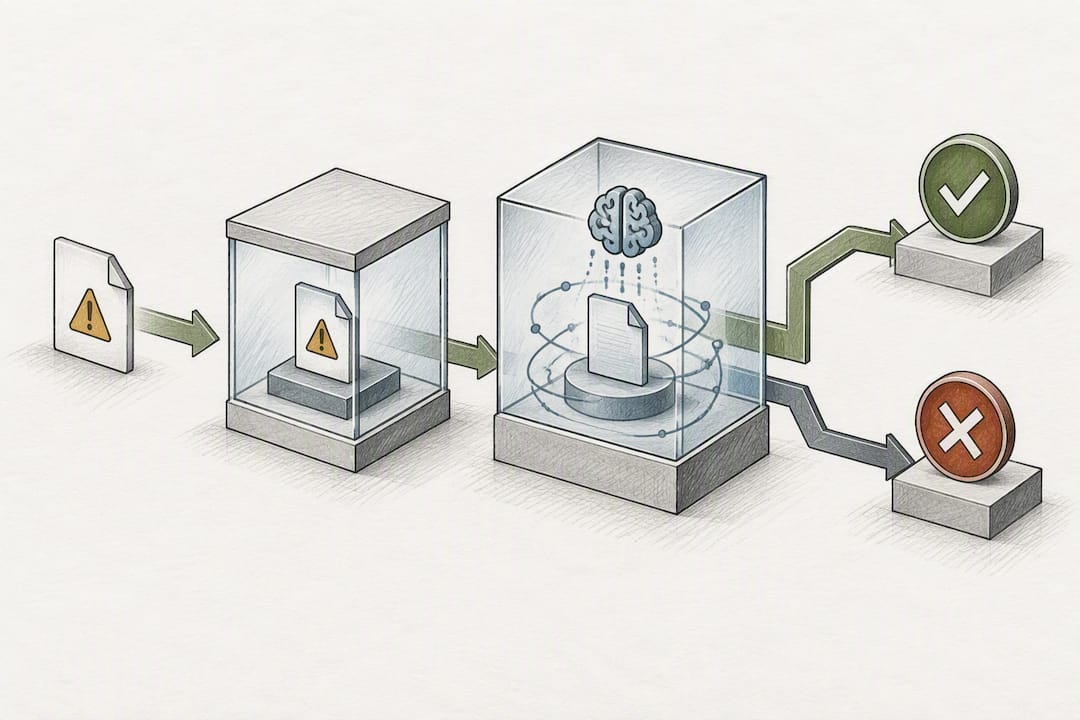
DNS-layer protections catch threats earlier than almost any other control. Malware frequently needs to resolve a domain name before it can phone home to a command-and-control server or download its next payload. Blocking that lookup at the DNS layer stops the attack before a connection is ever established, which is faster and cheaper than catching it after the fact at the packet-inspection layer.
Several modern-era capabilities work together to close gaps that used to sit outside the firewall's reach entirely:
- Advanced URL filtering that categorizes and blocks malicious or inappropriate sites in real time, not from a static list refreshed monthly
- CASB-style visibility into which SaaS applications employees actually use, sanctioned or not, including data movement between them
- IoT discovery and profiling that automatically fingerprints connected devices like cameras, badge readers, and smart thermostats
- Micro-segmentation that isolates device categories so a compromised smart thermostat can't reach your finance server
That last point deserves real weight. Micro-segmentation and identity-based rules are central to zero-trust approaches, using secure tags and hierarchical policy objects to enforce granular controls across cloud resources and on-prem networks alike. IoT devices are notorious for shipping with weak default credentials and rarely getting security patches, so isolating them by category rather than trusting them on the general network is one of the more practical zero-trust moves available to a small IT team.
Where Should Each NGFW Deployment Model Fit?
Choosing where an NGFW lives, on a physical box, as a virtual instance, or entirely in the cloud, shapes both your security coverage and your day-to-day management burden. NGFWs support flexible deployment options including on-premises hardware, virtual appliances, and cloud-native Firewall-as-a-Service, and most mid-sized businesses eventually end up running some mix of the three rather than picking just one.
-
On-premises appliances remain the right call when you need guaranteed throughput and low latency for a single physical site, especially one running latency-sensitive applications like VoIP or manufacturing control systems. A single-pass architecture, where the appliance inspects a packet once across all security functions instead of running it through multiple separate engines, reduces the processing overhead that TLS inspection and DPI otherwise create.
-
Virtual appliances fit private cloud and virtualized data center environments where you want NGFW-grade inspection without dedicated hardware. They scale up or down with your virtual infrastructure, though performance depends heavily on the underlying host resources you allocate to them.
-
Firewall-as-a-Service (FWaaS) and cloud NGFW push enforcement out to a distributed, cloud-delivered layer that protects branch offices, remote workers, and cloud workloads without a box at every location. This model applies global and regional policies consistently, supporting hierarchical policy objects and micro-segmentation across an organization's full footprint.
The trade-off across all three comes down to policy consistency versus latency. Cloud-delivered enforcement is easier to standardize but adds a hop into the traffic path. On-prem hardware is faster locally but harder to keep in sync with rules elsewhere. That drift is one of the most underestimated costs in a hybrid cloud environment, and centralized orchestration is usually the only thing that keeps it from becoming a real liability.
Most growing SMBs land on a hybrid mix: on-prem or virtual appliances at the main office, FWaaS covering remote staff and branch locations. That combination only works if your management plane can push one consistent policy across both sides. Ask any vendor demoing a hybrid setup to show you that single-pane view before you sign anything.
How Should You Evaluate NGFW Features Before Buying?
Run every NGFW candidate through the same six axes: security coverage, visibility, cloud support, manageability, performance, and total cost. Vendors are good at showcasing whichever axis they win on and quiet about the ones they don't, so a structured checklist keeps the comparison honest rather than letting the sales pitch set the agenda.
Ask every vendor these specific questions during evaluation, not after you've already signed:
- How does policy migration from our current firewall actually work, and what breaks during the cutover?
- What's the real performance hit when TLS inspection is turned on for full traffic, not just a demo subset?
- Does the platform expose an API for automation and integration with our existing tools, or is everything manual?
- What's the default log retention period, and what does extending it cost?
- What SLA applies to threat-intelligence feed updates, and how fast do new threats actually get pushed out?
Watch for a few specific red flags. A vendor who can't produce an independent, third-party throughput benchmark, and instead offers only their own lab numbers, is asking you to take their word for it. A vendor who won't run a live TLS inspection demo against your own sample of business-critical applications is hiding something about how much breakage to expect. And a vendor who can't explain where their threat intelligence actually comes from, meaning whether it's proprietary research, a licensed feed, or a mix, probably doesn't have great provenance to begin with.
Pro Tip: Build a one-page RFP checklist that lists "TLS inspection demo with our top 10 business apps" and "third-party throughput benchmark" as required line items, not optional extras. Vendors who balk at either request are telling you something useful before you've spent a dollar.
A short checklist you can paste directly into a vendor RFP:
- Confirmed throughput at full DPI and TLS inspection, not marketing-sheet numbers
- Policy migration plan with a rollback option
- API availability for SOAR or automation integration
- Log retention period and SIEM forwarding compatibility
- Threat feed source and update cadence
- Support SLA in writing, not verbal assurance
Cross-reference vendor answers against a broader comparison of network security solutions before you commit, since feature claims read very differently side by side than they do in a single vendor's own materials.
What Do NGFW Costs and Subscriptions Really Look Like?
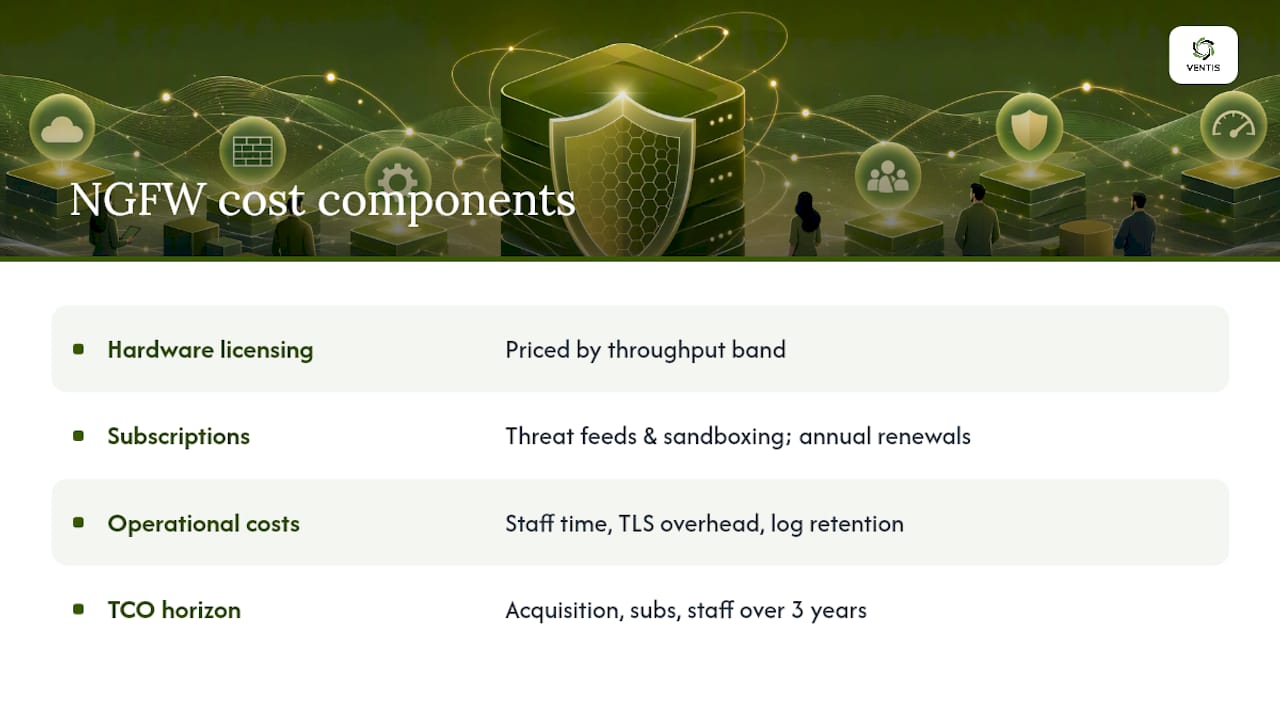
The sticker price on an NGFW appliance or virtual license is only the entry fee. NGFWs typically carry higher acquisition and operational costs than legacy firewalls, and subscription services for threat intelligence and sandboxing account for a real share of that gap. Budget for both, or your year-two costs will blindside whoever signed off on the year-one quote.
Three cost buckets deserve separate line items in any budget:
Hardware or virtual licensing, priced by throughput band, is the most visible cost and the easiest to compare across vendors. Subscription services, covering threat intelligence feeds, sandboxing, and URL/DNS database updates, are recurring and often renew annually, sometimes at a higher rate than the first-year promotional price. Failing to plan for that renewal timing is a common way businesses end up with a protection gap they didn't see coming.
Operational costs are less visible but just as real. Staff time spent tuning policies after the initial rollout, the CPU and storage overhead TLS inspection adds, and log retention requirements for compliance all add up in ways a line-item quote never captures. If your team is small, that operational load can eat more hours than anyone budgeted for.
Modeling total cost of ownership means adding acquisition cost, subscription renewals, and staff time together over a three-year horizon, not just the first year's invoice. A managed service model or a phased rollout, deploying full features at your headquarters first and extending to branch locations over subsequent quarters, spreads both the cost and the tuning burden instead of front-loading all of it. Budget for growth too: throughput needs climb as staff counts grow, and cloud egress and ingress charges scale with however much traffic you're routing through cloud-delivered enforcement.
What Should You Actually Do Before Deployment?
Rolling out an NGFW without a plan is how businesses end up with either a security gap or an outage. A structured rollout catches both.
- Discovery first. Map current traffic patterns, applications in use, and existing firewall rules before writing a single new policy.
- Baseline policies next. Start with conservative rules based on what discovery revealed, not a generic vendor template.
- Pilot TLS inspection on a limited group. Testing decryption against a small set of business-critical apps first catches breakage before it reaches your whole company, and keeping an explicit exception registry during that pilot saves real time later.
- Roll out in phases, not all at once across every site and department simultaneously.
- Monitor and tune continuously, since threat feeds, application signatures, and business needs all keep shifting after go-live.
Three pitfalls show up again and again. Decryption breaks applications that don't expect a man-in-the-middle inspection point, certificate pinning being the classic culprit. Under-sizing hardware for DPI and TLS inspection load turns a security upgrade into a performance complaint. And inconsistent policy between cloud and on-prem environments creates gaps attackers eventually find.
Pro Tip: Certificate pinning breaks TLS inspection silently; the app just stops working with no useful error message. Test your top ten business-critical apps against decryption before rollout, not after a help desk ticket tells you something's wrong.
For most small and mid-sized businesses without a dedicated security team, a managed approach to NGFW planning and tuning costs less in year two than the hours an internal team burns troubleshooting policy conflicts alone.
A Consultant's View on Choosing the Right NGFW
Most NGFW buying mistakes happen before the first packet is ever inspected. They happen in the RFP stage, when a business buys based on a feature checklist instead of matching capability to its actual network, staff size, and risk profile. A ten-person accounting firm and a fifty-person manufacturer with IoT-connected equipment on the floor need very different NGFW configurations, even if both fit comfortably under the "SMB" label.
That's the case for a consultative approach over a self-service one. A vendor selling appliances has no reason to tell you that your team lacks the hours to properly tune TLS inspection exceptions, or that your current staff can't realistically maintain a hybrid cloud and on-prem policy set without drift creeping in within six months.
A consultative approach works through that mismatch with clients by starting with the network they actually have, not a generic template. Some businesses need the full feature stack. Others need a phased rollout that starts with core protections and adds advanced threat prevention once staff comfort catches up. A free assessment is usually the fastest way to find out which category you fall into before committing budget.
— Greg
How Ventis Consulting Group Supports Your NGFW Rollout
A local consultative provider offers an alternative to guessing your way through vendor pricing sheets and feature checklists alone. Instead of buying an appliance and figuring out policy tuning after the fact, clients get planning from feature evaluation through deployment, so the NGFW they choose matches their network and staff's bandwidth to manage it.

Ventis handles the full arc: planning which NGFW features your business genuinely needs, managing the deployment itself, and pairing it with Network-as-a-Service for ongoing network management or Managed Detection & Response for 24/7 monitoring once the firewall is live. That combination matters more than the firewall alone. An NGFW generates alerts; something has to act on them, and most small IT teams don't have the hours to watch that queue around the clock.
If you're weighing NGFW options right now, start with a free cybersecurity assessment from Ventis Consulting Group. You'll walk away knowing exactly which features your network needs, and which ones you'd be paying for without ever using.
Sources
- Cloud Next Generation Firewall — Google Cloud documentation
- Next-generation firewall vs traditional firewall
- What is a next-generation firewall (NGFW)? - TechTarget
FAQ
What Are the Downsides of Using a Next-Generation Firewall?
The main downsides are cost and operational load. NGFWs typically carry higher acquisition and subscription costs than legacy firewalls, and features like TLS inspection demand real staff time to tune correctly without breaking business applications.
What Is the Difference Between an NGFW and a Standard Firewall?
A standard firewall filters traffic by port and IP address only. An NGFW adds deep packet inspection, application awareness, integrated intrusion prevention, and TLS decryption, letting it identify and control specific applications rather than just traffic destinations.
Is an NGFW the Same Thing as a UTM?
Not quite. A unified threat management (UTM) device bundles multiple security functions for smaller networks, usually with less depth in application-layer inspection, while an NGFW is built around Layer 7 visibility and identity-based policy as its core design, with UTM-style features layered on top in many modern products.
What Should a Small Business Look for First in an NGFW?
Start with application awareness, integrated IPS, and TLS inspection since those cover the most common attack paths for a small business network. From there, evaluate cloud support and centralized management, since a firewall that's hard to manage day to day often ends up misconfigured within months regardless of its feature list.
Does Ventis Consulting Group Help With NGFW Selection?
Yes. Ventis Consulting Group provides consultative NGFW planning and deployment as part of its managed IT and cybersecurity services, tailored to small and mid-sized businesses in the Pittsburgh area. Pricing is available on request after a free cybersecurity assessment.