
Plan for roughly 87 kbps per concurrent G.711 call, then add 20 to 30% headroom on top of that number so voice never eats past 75% of your WAN link. That's your working baseline. From there, the real work is counting your actual peak concurrent calls, not your headcount, and running a wired speed and quality test during your busiest hour before you commit to a circuit size.
TL;DR:
- Validating peak concurrent call counts during busy hours and testing with synthetic voice traffic ensures adequate bandwidth and call quality.
- Proper QoS setup, including marking RTP packets and reserving capacity with LLQ, is essential to prevent call quality issues during network congestion.
- Header overhead and packetization ptime significantly raise actual bandwidth needs, making payload-only calculations unreliable for circuit sizing.
- Small and mid-sized businesses should prioritize symmetrical bandwidth and continuous monitoring over static capacity estimates to maintain reliable VoIP performance.
Table of Contents
- VoIP Bandwidth Requirements: The Formula and Codec Table
- When Should You Choose a Different VoIP Codec?
- Why Header Overhead and Ptime Change Your Real Numbers
- What Latency, Jitter, and Packet Loss Thresholds Actually Matter?
- How Do You Test and Monitor VoIP Bandwidth in Practice?
- What Bandwidth Should Small and Medium Businesses Actually Buy?
- VoIP Deployment Checklist Before You Go Live
- Why Most Bandwidth Guides Undersell the Real Risk
- Get Your VoIP Bandwidth Validated by Ventis Consulting Group
- Sources
VoIP Bandwidth Requirements: The Formula and Codec Table
The formula behind every VoIP bandwidth requirement calculation is simpler than most IT vendors make it sound: total bandwidth equals concurrent calls, multiplied by per-call bandwidth (with overhead included), multiplied by two for the upload and download directions, plus your headroom buffer.
Concurrent calls × per-call kbps (with overhead) × 2 (bidirectional) plus additional headroom equals total bandwidth needed.
The variable most people get wrong is "per-call bandwidth." The codec's raw payload rate is not what travels your network. Every RTP packet carries IP, UDP, and RTP headers on top of the audio data, and that overhead can add 15 to 25 kbps per call depending on your packetization interval. SIPSymposium's bandwidth guide breaks down the "with overhead" figures that actually belong in your math, not the marketing-brochure codec rates.
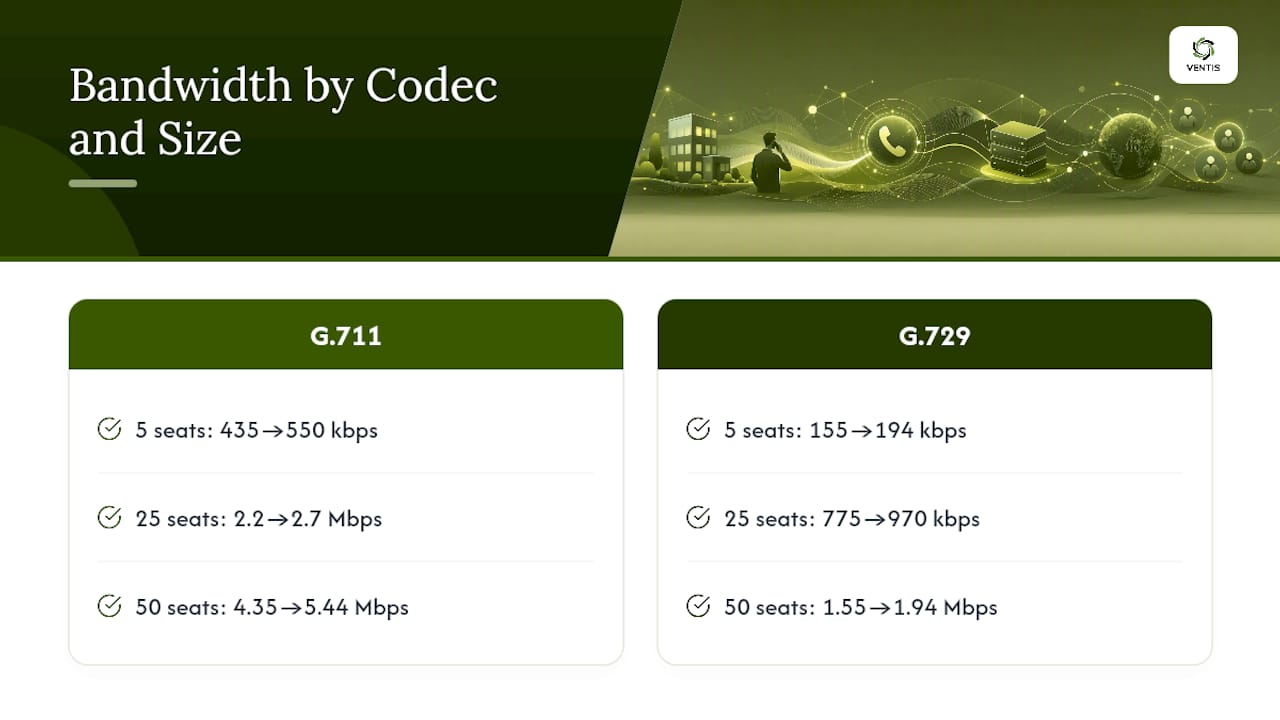
Here's how that plays out at different office sizes. A 5-person office running G.711 needs roughly 435 kbps of raw voice traffic (5 × 87 kbps), which becomes about 550 kbps once you add 25% headroom. The same 5 seats on G.729 need only about 155 kbps before headroom. Scale that up: a 25-seat call center on G.711 needs around 2.2 Mbps before headroom, or closer to 2.7 Mbps with a 25% buffer. Switch that same team to G.729 and you're looking at around 775 kbps, plus headroom, about 970 kbps. At 50 concurrent calls, G.711 requires roughly 4.35 Mbps before headroom while G.729 stays under 1.6 Mbps. That gap is exactly why codec choice matters as much as raw pipe size.
When Should You Choose a Different VoIP Codec?
Codec selection is a trade-off between call quality, bandwidth cost, and how forgiving the codec is when your network has a bad moment. There's no universal "best" choice, only the right fit for your link and your users.
- G.711: The industry default for a reason. It delivers the cleanest audio and the widest device compatibility, but it's also the heaviest at roughly 87 kbps per call with overhead.
- G.722: Wideband, HD-quality audio at the same bandwidth cost as G.711. Worth using if your handsets and provider support it and call clarity matters (think conference rooms, not warehouse floors).
- G.729: The bandwidth-saver, running as low as 24 to 31 kbps with overhead. The catch: it's more sensitive to packet loss and can degrade faster than G.711 when your connection gets rough.
- Opus: Adaptive by design. It adjusts bitrate on the fly based on network conditions, which makes it a strong fit for remote and hybrid teams on variable connections.
- Avoid compressed codecs on high-loss links, for fax-over-IP traffic, or in environments where transcoding between codecs will strain your session border controller's CPU.
Device compatibility and provider licensing also factor in. Some carriers charge more for G.722 support, and older desk phones may not support Opus at all. If you're mixing codecs across a hybrid workforce, budget for the transcoding overhead that creates on your SBC.
Why Header Overhead and Ptime Change Your Real Numbers
Payload-only math is the single most common mistake in VoIP bandwidth calculation, and it consistently under-sizes circuits.
A G.711 call at 20 ms ptime adds approximately 23 kbps of overhead on top of its 64 kbps payload, driven by the 40-byte IP, UDP, and RTP header stack riding on every packet, per Cisco's codec bandwidth documentation. Push ptime higher, say to 30 or 40 ms, and you send fewer, larger packets, which cuts overhead but adds latency you may not want on a call already dealing with jitter. Compressed RTP (cRTP) can shrink that 40-byte header down to as little as 2 to 4 bytes, but it only works on point-to-point WAN links like MPLS or leased lines, not general internet paths. Add SRTP for encrypted signaling and you'll tack on a few more bytes per packet. The practical rule: leave ptime at 20 ms unless you're bandwidth-constrained on a WAN, and only chase cRTP savings when your circuit is the bottleneck.
What Latency, Jitter, and Packet Loss Thresholds Actually Matter?
Bandwidth alone doesn't guarantee call quality. A gigabit connection with bad jitter still produces choppy calls, which is why VoIP network requirements always include timing thresholds alongside raw throughput.
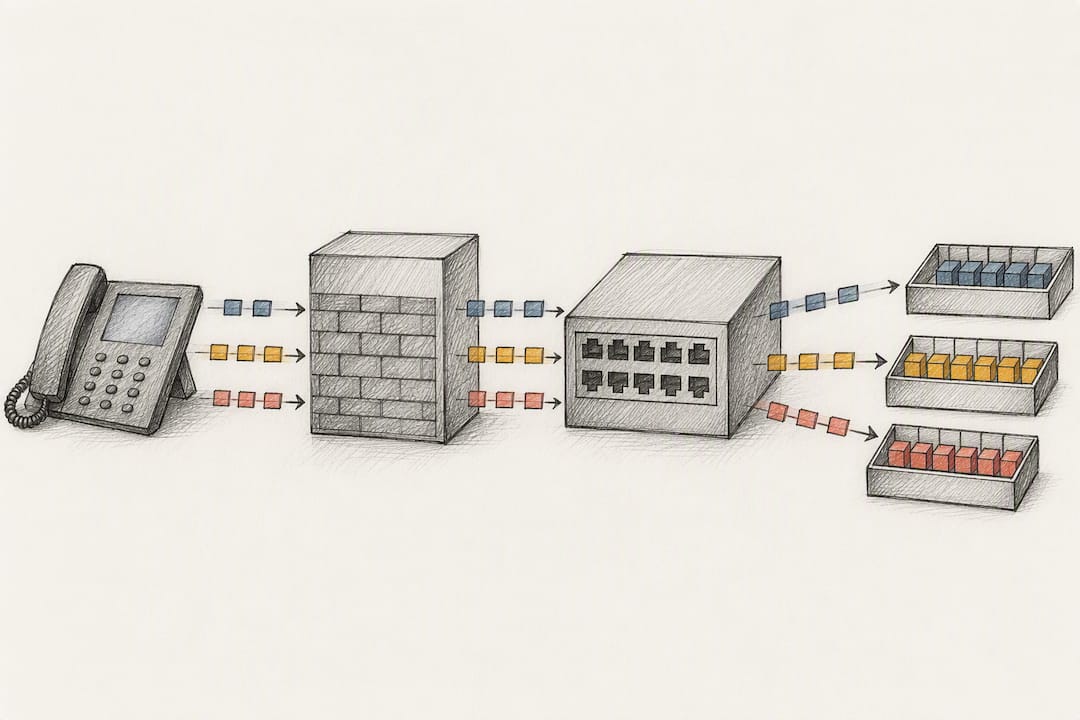
Recommended targets include one-way latency under 150 milliseconds, jitter under 10 milliseconds, and ideally packet loss well below 1%. Cisco's QoS guidance for voice recommends marking every RTP audio packet with DSCP EF (value 46) and signaling traffic with CS5, then enforcing that priority with Low Latency Queueing (LLQ) so large file transfers or backups can't starve your calls.
Turning that into a working configuration comes down to three steps:
- Classify traffic at the source, identifying voice RTP streams separately from signaling and data.
- Mark packets with DSCP EF (46) for audio and CS5 for call signaling, consistently at every hop.
- Shape traffic with a priority queue that reserves capacity for voice, but never allocate more than 75% of the interface to that reservation.
Our QoS for VoIP configuration guide walks through the router and firewall settings behind these values in more detail.
Pro Tip: Don't just mark packets at your router and call it done. If your firewall or switch strips DSCP tags on the way through, your priority queue is meaningless. Verify markings survive every hop between the handset and the internet.
How Do You Test and Monitor VoIP Bandwidth in Practice?
A speed test result of "50 Mbps down, 10 Mbps up" tells you almost nothing about whether your office can actually run 20 concurrent calls cleanly. Testing has to go further than a single number.
- Count your real peak concurrent calls during your busiest hour, not your total employee count.
- Run a wired speed test on a client plugged directly into the network, since Wi-Fi introduces its own jitter.
- Generate synthetic RTP test calls across the link to simulate real voice traffic under load.
- Measure latency, jitter, and packet loss during that test, not just throughput.
- Compare results against thresholds: under 150 ms latency, under 10 ms jitter, under 1% packet loss.
AT&T Business's bandwidth guidance points out that upload capacity, not download, is usually the hidden constraint during busy-hour testing. For ongoing monitoring, track SNMP interface utilization, pull RTCP quality stats directly from your call platform, and run scheduled synthetic test calls weekly rather than waiting for a complaint. If tests fail thresholds, check QoS marking first, then circuit utilization, before assuming you need more raw bandwidth. Our network troubleshooting guide and Mavericks Office Solutions' call-quality troubleshooting guide both offer step-by-step diagnostics for jitter and loss issues once you've isolated where the problem sits.
What Bandwidth Should Small and Medium Businesses Actually Buy?
Translating call counts into circuit orders is where most SMBs either overspend or under-provision. A few concrete mappings make the decision easier.
- 5 concurrent calls: about 550 kbps on G.711 with headroom, or roughly 200 kbps on G.729. Either fits comfortably on most business broadband.
- 20 concurrent calls: around 2.2 Mbps on G.711 with headroom, or about 775 kbps on G.729. A single decent business-class connection handles this.
- 50 concurrent calls: roughly 5.4 Mbps on G.711 with headroom, or about 1.9 Mbps on G.729. This is where symmetric fiber starts to matter, since most cable and DSL plans are asymmetric and starve on upload.
- 100 concurrent calls: north of 10 Mbps on G.711 with headroom. At this scale, dedicated fiber or a bonded circuit setup is worth the cost.
Prefer symmetric bandwidth over high-download, low-upload consumer plans, since upload capacity is consistently the constraint during busy hour, not download. Our WAN services guide covers when fiber makes sense versus a bonded connection. For resilience, layer in a dual-WAN setup or cellular failover through an SD-WAN appliance so a single circuit outage doesn't take your phones down with it.
VoIP Deployment Checklist Before You Go Live
Run through this list before flipping the switch on a new VoIP rollout, and again immediately after go-live while you're still watching closely.
- Reserve upload capacity equal to your calculated peak concurrent-call bandwidth, plus headroom.
- Configure a dedicated voice VLAN separate from data traffic.
- Set DSCP EF (46) marking for RTP audio and CS5 for signaling at every network hop.
- Enable LLQ or a priority queue on your router or firewall for voice traffic.
- Turn on cRTP for point-to-point WAN links where your carrier supports it.
- Configure SRTP if your compliance or security policy requires encrypted voice.
- Run a full busy-hour load test before declaring the rollout complete.
- Check MTU settings and disable fragmentation on voice VLANs; fragmented VoIP packets cause audible artifacts.
- Set up ongoing SNMP and RTCP monitoring, and define your SLA thresholds up front.
Session border controllers and NAT traversal deserve their own attention here too. Misconfigured NAT is one of the most common causes of one-way audio complaints in new deployments.
Why Most Bandwidth Guides Undersell the Real Risk
Most VoIP bandwidth advice online treats capacity as a math problem you solve once and forget. That's backwards. The formula gets a business to a defensible starting number, but the number that actually protects call quality is the one you re-check every time headcount changes, a new SaaS tool starts eating bandwidth, or someone adds a video conferencing platform on the same circuit.
The bigger blind spot is that businesses size for headcount instead of peak concurrent calls, engineering for a busy-hour reality that Erlang-style capacity planning captures far better than counting employees ever will. A 30-person office rarely has 30 people on calls at once, but if it has 12 at once during a Monday morning rush, that's the number that matters, not the roster.
Some IT providers measure this directly with clients rather than assuming a ratio, because assumed ratios are where most undersized deployments come from. That measurement, paired with the QoS configuration work described earlier in this article, is what separates a network that merely has enough bandwidth from one that actually delivers clean calls at 9 a.m. on a Monday.,. This work can be packaged as part of a managed Unified Communications service, so bandwidth validation and QoS tuning aren't a one-time project but an ongoing part of how the network gets maintained.
— Greg
Get Your VoIP Bandwidth Validated by Ventis Consulting Group
Running the formulas in this article gets you close. Getting it right for your actual network, your actual carrier link, and your actual busy hour is a different job, and it's one Ventis Consulting Group handles directly for small and mid-sized businesses.

Ventis Consulting Group measures your real peak concurrent calls, configures DSCP and LLQ settings on your existing hardware, and sets up ongoing monitoring so a bandwidth problem shows up on a dashboard before it shows up as a dropped call. That's a different starting point than buying a bigger circuit and hoping it holds. If your team has ever had a call drop during a Monday morning rush or a video meeting that turned choppy the moment someone in the next office joined a Zoom call, that's usually a QoS and capacity gap, not a hardware problem. Request a bandwidth and QoS assessment through our Unified Communications solutions page and get a clear picture of what your network can actually support before your next lease renewal or office move.
Sources
This article draws on Cisco's QoS guidance for voice, Cisco's codec bandwidth calculations, AT&T Business's VoIP bandwidth guide, the FCC's broadband speed guide, and SIPSymposium's codec overhead breakdown.
- VoIP Bandwidth Requirements — How Much Bandwidth Per Call? | SIPSymposium
- Bandwidth needed for VoIP | AT&T Business
- VoIP bandwidth consumption and codec calculations - Cisco TAC document