

The 3-2-1 backup rule means keeping three copies of your data, on two different types of storage media, with one copy off-site. In 2026, that baseline is no longer enough on its own. Ransomware now hunts down networked backups specifically, so you need at least one immutable or offline copy, plus scheduled restore tests, to actually trust that your data comes back when you need it.
TL;DR:
- Ransomware now targets networked backups, making immutable or offline copies essential alongside scheduled restore tests.
- Merely following the 3-2-1 rule may leave critical gaps, especially if backups are on the same network or lack verifiable integrity.
- Implementing the 3-2-1-1-0 strategy adds an immutable or air-gapped copy and rigorous testing to ensure reliable recovery.
- Small businesses often miss the immutable layer and the discipline of regular restore verification, which are crucial for effective protection.
- Proper backup planning involves data classification, automated monitoring, documented runbooks, and scheduled recovery drills to minimize downtime risks.
Table of Contents
- What Is the 3-2-1 Backup Rule, Exactly?
- Real-World Backup Setups by Household or Business Size
- Why Ransomware Breaks Naive 3-2-1, and What 3-2-1-1-0 Fixes
- Building Your Backup Plan Step by Step
- Setting RTO, RPO, and Actually Testing Your Restores
- Where 3-2-1 Plans Usually Fail
- Where Ventis Sees SMB Backup Plans Fall Short
- Get Your 3-2-1 Backup Strategy Built and Verified
- Where to Check the Standards Yourself
- Sources
- FAQ
What Is the 3-2-1 Backup Rule, Exactly?
The rule breaks into three distinct requirements, and small business owners often satisfy only one or two without realizing it. CISA's guidance on data backup treats 3-2-1 as the accepted floor for protecting data, and each number carries a specific job.
Three copies means your live, production data plus two separate backups. A file on your laptop, a copy on an external drive, and a copy in the cloud counts as three. A file that only exists on your laptop and a synced cloud folder does not, because that is really just two copies of the same working file.
Two different media means spreading those copies across storage types that don't share a failure mode. Modern interpretations extend "media" to different storage domains too, not just physical hardware.
- External hard drive plus cloud storage
- Network-attached storage (NAS) plus tape or a separate cloud account
- Internal server storage plus a dedicated backup appliance
One off-site copy protects against fire, theft, flood, or a ransomware attack that spreads across your local network. Cloud storage satisfies this automatically. A physically remote drive, kept at a second location, works too, but it depends on someone actually rotating and transporting it, which is where a lot of manual off-site plans quietly fail.
Real-World Backup Setups by Household or Business Size
The rule reads the same whether you're protecting a home computer or a 40-person company, but what you buy to satisfy it changes dramatically with scale.
- Home user. Keep your PC as the production copy, add an external hard drive for local backup, and enable a cloud backup service for the off-site leg. Check that the cloud tool is actually backing up your full file set on a schedule, not just syncing a "Documents" folder you forgot existed.
- Home office or freelancer. A small NAS device with scheduled snapshots handles the local backup and gives you fast recovery from accidental deletion. Add cloud replication from the NAS itself, which keeps the off-site copy current without manual drive swapping.
- Small to mid-sized business. Run a local on-premises image backup for speed, add a backup appliance or NAS for the second media type, and send a copy to an immutable cloud tier or a remote vault for the off-site leg. This is where dual WAN failover matters too, since a flaky internet connection can quietly stall your cloud replication for days without anyone noticing.
- SaaS environments like Microsoft 365. Treat your tenant as production data, not as a backup. Microsoft's own retention and recycle bin tools aren't full backups, and TechTarget's breakdown of the 3-2-1 strategy recommends a third-party backup tool for mail, files, and Teams data, ideally with an immutable copy layered on top. Ventis Consulting Group covers this exact gap in its guide to backing up Microsoft 365.
Why Ransomware Breaks Naive 3-2-1, and What 3-2-1-1-0 Fixes
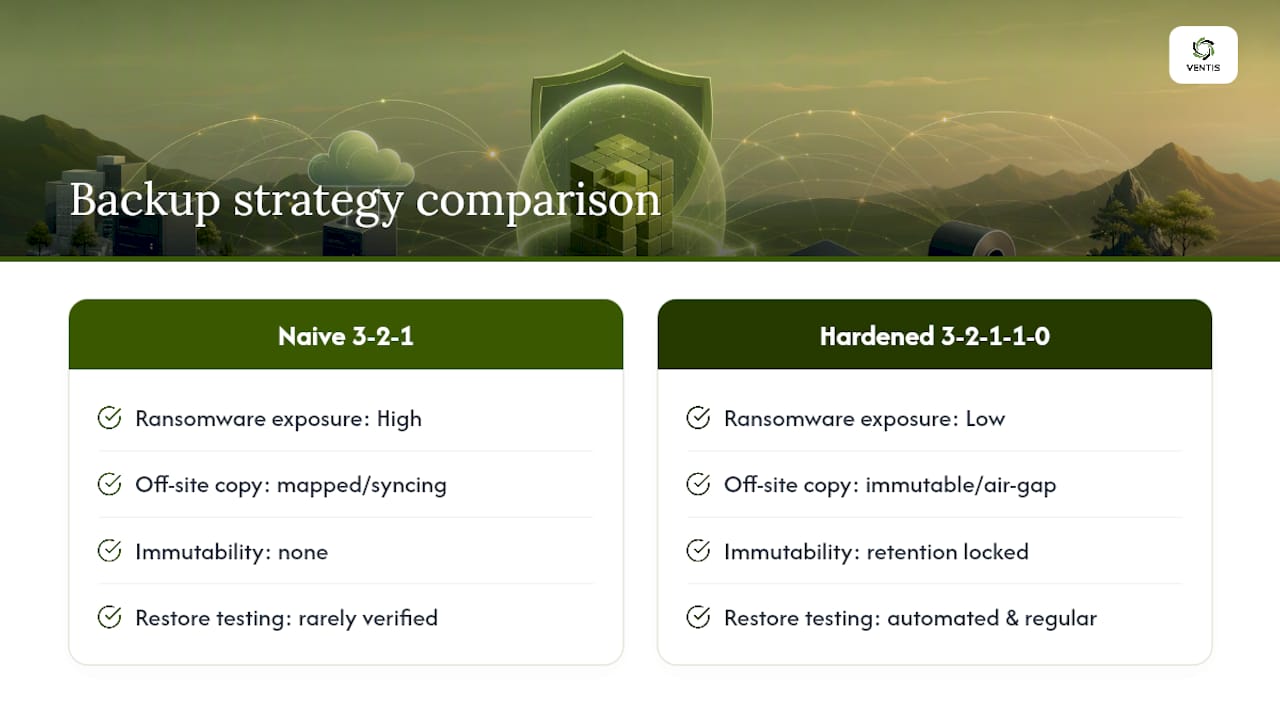
Ransomware doesn't just encrypt your working files anymore. It actively searches your network for backup servers, mapped drives, and NAS shares, because attackers know those are your recovery path. If your "off-site" cloud copy is just a mapped drive that syncs continuously, a well-targeted attack encrypts it right along with everything else. CISA's StopRansomware guidance exists largely because this failure mode became so common.
That's the gap 3-2-1-1-0 closes. The extra "1" stands for one copy that's immutable or air-gapped, meaning it cannot be altered or deleted even by someone with admin credentials, for a set retention window. Tape sitting in a drawer is air-gapped by definition. Cloud storage can achieve the same effect through immutable retention locks, where even the account owner can't overwrite the data early. The final "0" means zero errors on verified restores, confirmed through regular, automated testing rather than assumed.
Backups that live on the same network as your production systems are not a defense against ransomware. They're a second target.
A detailed take on cybersecurity's role in business continuity covers this overlap in more depth. As a general guideline, any business handling client data, financial records, or anything it couldn't rebuild from scratch in a week should move to 3-2-1-1-0 now, not after the first incident.
Pro Tip: Ask your backup vendor directly whether their "immutable" tier locks retention at the storage layer or just in a settings menu. If an administrator account can shorten the retention window, it isn't truly immutable.
Building Your Backup Plan Step by Step
Getting from "we have some backups" to a defensible 3-2-1-1-0 setup takes a sequence, not a single purchase decision.
- Inventory and classify your data. Sort systems into tiers based on how fast you'd need them back. Kaseya's tiering framework suggests mission-critical systems need sub-4-hour recovery, business-critical systems can tolerate same-day recovery, and archival data can wait several days.
- Match storage types to each tier. Tier 1 systems justify continuous replication or near-real-time backup. Tier 2 fits a daily image backup. Tier 3 archival data can sit on a weekly backup cycle without hurting the business.
- Set cadence, retention, and immutability. Decide how long backups are kept and lock at least one copy against deletion or encryption, whether through cloud immutability settings or a genuinely offline rotation.
- Automate monitoring and off-site replication. Manual backup checks get skipped when someone's busy, which is most weeks. Automated alerts for failed jobs catch problems while they're still fixable.
- Document runbooks and schedule restore drills. Write down who restores what, from where, and how long it should take. Then actually run the drill on a calendar, not "when we get a chance."
A guide on IT support's role in data recovery walks through how this documentation gets used during an actual outage, which is a useful gut check for whether your runbook is specific enough to follow under pressure.
Pro Tip: If your team can't name who owns the restore process without checking a document, the document isn't the problem. Assign the ownership out loud, in a meeting, before you need it.
Setting RTO, RPO, and Actually Testing Your Restores
Recovery Time Objective (RTO) is how long you can tolerate being down. Recovery Point Objective (RPO) is how much data you can afford to lose, measured in time since the last good backup. A Tier 1 system might carry a 4-hour RTO and a 1-hour RPO, while an archival file share can tolerate a multi-day RTO with a weekly RPO.
NIST's guidance on recovery objectives treats these numbers as design inputs, not afterthoughts. They should drive your backup cadence and technology choices, not get assigned after the fact to justify whatever you already bought. A breakdown of RTO versus RPO walks through how to set realistic numbers without overspending on infrastructure you don't need.
Testing itself needs to happen at three levels:
- File-level restores, confirming you can pull back a single deleted or corrupted document.
- Full VM or image restores, confirming an entire server comes back cleanly.
- Complete failover tests, confirming your business can actually run from the backup environment, not just that the data exists.
A companion NIST paper on verification practices points to automated verification tools that run scheduled test restores and flag checksum mismatches before you ever need the backup for real. That's the practical path to the "zero errors" goal in 3-2-1-1-0. Document every test result and feed it back into your runbook.
Where 3-2-1 Plans Usually Fail
Most backup failures trace back to one of a handful of avoidable mistakes, and they show up whether you're running a home office or a 30-person company.
- Treating cloud sync tools like Dropbox or OneDrive as a backup, when they're really just a second live copy that inherits accidental deletions and ransomware encryption just as fast as the original.
- Keeping every copy network-accessible with no immutable or offline layer, so one compromised admin account can wipe everything at once.
- Skipping restore tests entirely, or running them once at setup and never again as systems change.
If budget or time is tight, fix the immutable copy first. It's the single control that stops a bad week from becoming a business-ending one.
Where Ventis Sees SMB Backup Plans Fall Short
Most small businesses we talk to have some version of 3-2-1 in place already. What's usually missing is the immutable layer and the discipline to test restores on a schedule rather than trust that the software is working. Budget is almost always the stated constraint, but the real gap is often just nobody owning the verification step.
That's the part Ventis Consulting Group adds: designing the storage tiers, locking in immutability at the retention layer, and automating the restore drills so nothing depends on someone remembering to check. Our post on building a cybersecurity incident response plan covers how backup verification fits into a broader response plan once you have the basics locked down.
— Greg
Get Your 3-2-1 Backup Strategy Built and Verified
There are alternatives to piecing together backup software on your own and hoping the settings are right. Proper design of the storage architecture, locking in immutability where it actually matters, and running restore drills provide proof your data comes back, not just a backup job that reports "success" without anyone checking.

If your current setup is a mix of an external drive, a cloud sync app, and good intentions, that's the DIY starting point. If you're running client data, financial records, or systems you can't afford to lose for even a day, that's when hiring it out pays for itself the first time you need a real restore. Ventis Consulting Group's unified communications and business continuity services cover backup design, immutable tiers, and automated verification for small to mid-sized businesses across Pittsburgh and Western Pennsylvania. Reach out to get your current backup setup reviewed against the 3-2-1-1-0 standard.
Where to Check the Standards Yourself
For primary guidance beyond this article, see CISA's data backup options, NIST SP 800-209, and Ready. For a broader SMB security checklist, see this digital security checklist for business leaders.
Sources
FAQ
Is the 3-2-1 backup rule outdated?
The core structure still holds, but ransomware has made a plain 3-2-1 setup insufficient on its own. Most current guidance, including CISA's, now recommends the 3-2-1-1-0 extension, which adds an immutable or offline copy and mandatory restore verification.
What is the 3-2-1-1-0 rule for backing up data?
It's the modern version of 3-2-1: three copies, two media types, one off-site, plus one immutable or air-gapped copy and zero errors confirmed through regular automated restore testing.
Which backup strategy is best?
There's no single best strategy independent of your recovery needs. The strongest approach tiers your data by RTO and RPO, then applies 3-2-1-1-0 to each tier so mission-critical systems get faster, more redundant protection than archival files.
What is the 3-2-1 rule when backing up data?
It means keeping three total copies of your data across two different storage media, with at least one of those copies stored off-site from your primary location.
Does cloud storage count as an off-site backup?
Yes, cloud storage satisfies the off-site requirement, but only if it's a genuine backup with version history and immutability options, not a continuously syncing folder that mirrors ransomware encryption in real time.