

Adopt a tiered retention policy: short term daily backups held for a moderate number of days, monthly backups retained for about a year, and long term copies kept only where compliance rules require them. Everything else in a backup retention policy follows from that structure. RTO and RPO targets decide the tiers, restore tests prove they work, and immutability keeps the data safe once it's there.
TL;DR:
- Tiered retention policies should prioritize short-term daily backups for 30 to 90 days, long-term monthly or yearly copies only when required by compliance.
- Inventory and classify data before defining retention rules, ensuring specific RTO and RPO targets are met for each workload to optimize storage and recoverability.
- Enforce retention via lifecycle rules, tags, and vault minimums, and consider immutability settings for critical data to prevent accidental or malicious deletion.
- Regularly run and document quarterly restore tests on critical systems, recording actual RTO and RPO to provide auditors with demonstrable evidence of recoverability.
- Assign a named owner to the retention policy, establish exception workflows, and review rules annually to maintain compliance and address evolving data management needs.
Table of Contents
- What Is a Backup Retention Policy and Why Does It Matter?
- How Do You Design a Retention Schedule for Backups?
- What Does a Good Backup Retention Schedule Look Like?
- How Do You Enforce a Backup Retention Policy Technically?
- What Restore Tests and Evidence Do Auditors Expect?
- Who Owns a Backup Retention Policy and How Are Exceptions Handled?
- How Does Compliance Affect Long-Term Retention?
- How Ventis Consulting Group Approaches Retention for SMBs
- What IT Teams Get Wrong About Backup Retention
- Ventis Consulting Group: Turning Retention Policy Into a Working System
- Sources
- FAQ
What Is a Backup Retention Policy and Why Does It Matter?
A backup retention policy is a documented rule set that says how long each type of backup gets kept, where it's stored, and when it's deleted. It's the operational bridge between your recovery time objective (RTO), your recovery point objective (RPO), and the actual storage decisions your team makes every day. Get the retention window wrong and you either pay for storage you don't need or lose data you can't legally afford to lose.
The trade-off is simple to state and hard to manage: longer retention means more recoverability and more compliance cover, but it also means more cost and more attack surface. That's why classification matters before you write a single retention rule. Most policies fall into one of three models, according to TechTarget's retention guide:
- Time-based retention, which keeps backups for a fixed number of days regardless of how many copies pile up.
- Cycle-based retention, which keeps a set number of backup versions rather than a set number of days.
- Grandfather-Father-Son (GFS), a rotation scheme that keeps daily, weekly, and monthly copies at different retention lengths.
How Do You Design a Retention Schedule for Backups?
A workable schedule starts with an inventory, not a storage budget. You need to know what data you have before you can decide how long to keep it.
- Inventory every data set and assign it a business value. Customer databases, financial records, and email archives don't carry the same recovery urgency, and they shouldn't share a retention rule.
- Set RTO and RPO per workload. A payroll system that can't tolerate more than an hour of data loss needs hourly backups and a short, tight retention tier. An archive share that changes twice a year doesn't.
- Derive backup frequency and retention length from those targets. Tighter RPOs mean more frequent backups; longer legal or contractual obligations mean longer retention, independent of RPO.
- Document five required fields for every rule: policy owner, the retention rule itself, storage location, encryption method, and the exception process for deviations.
This process, sometimes called data retention guidelines in compliance circles, turns a vague "back everything up" instinct into an enforceable ruleset auditors can actually check against. Skipping the inventory step is the most common reason retention policies fail later: teams end up applying one retention window to data that needed three.
What Does a Good Backup Retention Schedule Look Like?
Here's a starting point you can adapt rather than build from scratch.
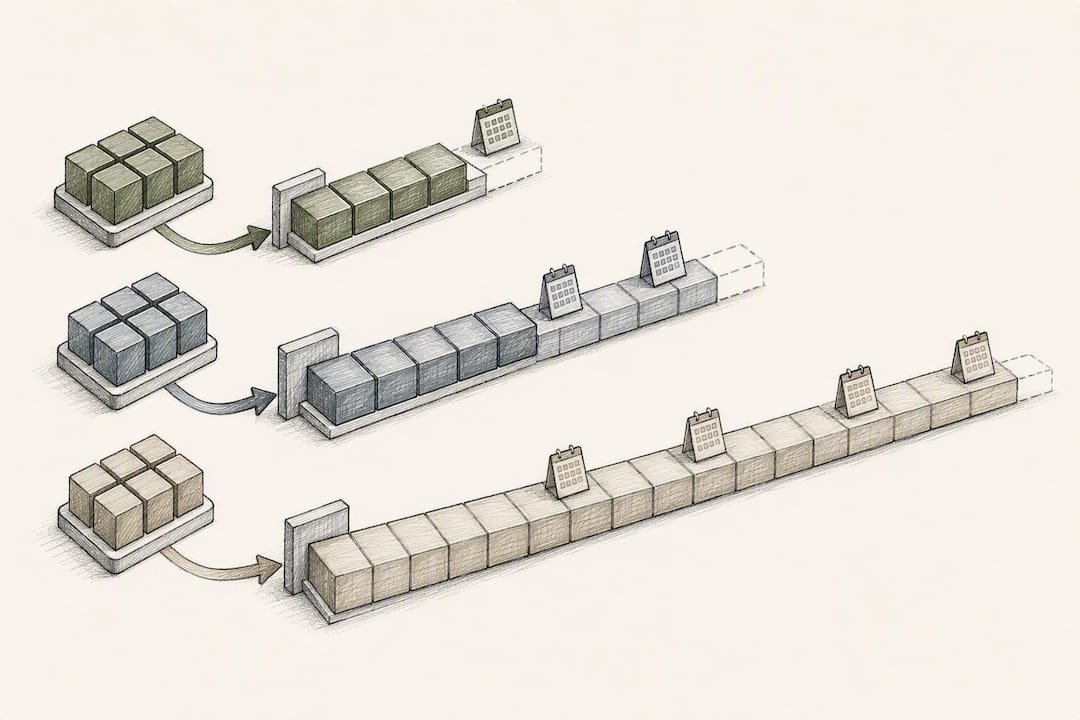
- Small business, general files: Daily backups retained 30 days, weekly backups retained 90 days, monthly backups retained 12 months.
- Midsize company, mixed workloads: Daily backups retained 60 days, weekly retained 6 months, monthly retained 12 to 24 months, yearly retained 3 to 7 years for financial records.
- Regulated data (healthcare, finance): Daily retained 90 days, monthly retained 24 months, yearly retained per the applicable regulation, often 6 years or more.
GFS rotation is the mechanism behind most of these tiers. A typical GFS scheme keeps 7 daily copies, 4 to 5 weekly copies, and 12 to 84 monthly copies depending on your compliance window, with the oldest daily copy rolling into the weekly slot and the oldest weekly rolling into the monthly slot.
Pro Tip: Don't set every workload to the same retention length just because it's easier to manage. A 7 year retention policy on your entire file server multiplies storage cost for data that never needed more than 90 days.
The 3-2-1 rule (three copies of data, on two different media, with one copy offsite) remains the baseline most vendors recommend. A hardened variant, 3-2-1-1-0, adds one immutable or air-gapped copy and zero errors verified through restore testing. Azure SQL's long term retention feature lets you configure weekly, monthly, and yearly LTR copies for up to 10 years, which is a practical way to apply the "1" in 3-2-1-1-0 without building custom archival infrastructure.
How Do You Enforce a Backup Retention Policy Technically?
A written policy that isn't enforced technically is just a document nobody follows. Enforcement means lifecycle rules, tags, and vault minimums that make the retention window automatic rather than manual.
- Lifecycle rules move backups between storage tiers and delete them automatically once they age past their retention window, removing the need for someone to remember to clean up old copies.
- Tags classify each backup by data type, business unit, or compliance requirement, so a single vault can host multiple retention rules without confusion.
- Vault-level minimums stop a backup plan from setting a retention shorter than the vault allows, which prevents an individual admin from accidentally shortening retention on regulated data.
Retention locks and immutability go a step further: once applied, the backup can't be deleted or altered until the lock period expires, even by an administrator. Snowflake and most major backup platforms document this as an irreversible setting that can increase storage costs, since you're committing to pay for that data regardless of whether you still need it. Apply immutability selectively, on your most critical or most regulated data sets, rather than as a blanket setting across every backup job.
Storage topology affects cost as much as it affects recovery speed. Archive tiers like cold or deep-archive storage are appropriate for long-term retention copies you rarely touch, but retrieval from those tiers takes hours and costs more per request, according to TechTarget's guidance on backup best practices. Keep your operational recovery tier on fast storage and push only the long-term compliance copies to archive.
What Restore Tests and Evidence Do Auditors Expect?
A backup that's never been restored is a hypothesis, not a recovery plan. Auditors and cybersecurity insurers increasingly ask for proof, not just a screenshot of a completed backup job.
- Run quarterly full restores on your most critical systems and monthly spot checks on everything else, a cadence Veeam's documentation recommends as the practical minimum.
- Record the RTO and RPO actually achieved during each test, not just the target you set on paper. If your target RTO is 4 hours and the test takes 7, that gap needs to be documented and addressed.
- Keep the restore unit, test environment, tester name, and pass/fail result for every test. This level of detail is what auditors treat as primary evidence of recoverability.
Automating test scheduling and evidence collection removes the biggest risk in this process: a test that quietly stops happening because nobody remembers to trigger it. A policy that specifies quarterly testing but has no automated trigger usually drifts into "whenever someone has time," and that's exactly the gap an audit will find.
Who Owns a Backup Retention Policy and How Are Exceptions Handled?
Every retention policy needs one named owner, usually someone in IT operations or security, who's accountable for keeping the rules current and enforced. Without a named owner, retention rules erode as staff turns over and nobody remembers why a given rule exists.
- Document an exception and change-control workflow for temporary deviations, such as extending retention for a legal hold or shortening it for a decommissioned system.
- Run automated coverage scans to catch new servers, cloud accounts, or SaaS applications that don't yet have a backup policy assigned, since new assets is where most gaps in real deployments were shown to appear.
- Review the policy on a fixed cadence, at least annually, rather than only when a new regulation forces a change.
How Does Compliance Affect Long-Term Retention?
Compliance requirements often extend retention well past what operational recovery needs. Healthcare organizations handling protected health information need to align retention decisions with HHS guidance on HIPAA obligations, and financial or legal records frequently carry multi-year statutory minimums that vary by jurisdiction and record type.
- Legal holds suspend normal deletion schedules for any data relevant to litigation or investigation, and the hold itself needs to be documented, including who requested it and when it was lifted.
- Cloud platforms offer purpose-built LTR features, like Azure SQL's long-term retention settings, which can hold weekly, monthly, or yearly backups for up to a decade.
- Immutability settings on LTR copies are often irreversible, so confirm the retention length before applying a lock rather than after.
How Ventis Consulting Group Approaches Retention for SMBs
- A written policy template covering ownership, retention rules, and exception handling.
- Quarterly restore tests with documented evidence auditors and cyber insurers can review.
- Guidance on applying the hardened 3-2-1-1-0 backup approach and backing up SaaS platforms like Microsoft 365.
What IT Teams Get Wrong About Backup Retention
Most retention failures aren't storage failures, they're process failures. Teams set a schedule once, never test it, and assume the backup job succeeding means the data is recoverable. Start with the 30/90/12-month tiers above, tighten only where compliance demands it, and treat an untested restore as an unproven policy.
— Greg
Ventis Consulting Group: Turning Retention Policy Into a Working System
A written retention schedule is only as good as the enforcement behind it, and that's the part most SMB IT teams don't have staff or hours to build alone. Ventis Consulting Group's approach to backup and disaster recovery pairs the policy design work covered above with the technical enforcement, immutability configuration, and quarterly restore testing that turn a document into a system that actually holds up under audit.

A team can map RTO/RPO targets to retention tiers, configure lifecycle rules and vault minimums to enforce them, and document restore tests with evidence fields auditors expect. If your current backup setup has never been stress-tested against an actual restore, a free cybersecurity assessment is the fastest way to find out where the gaps are before an auditor, or an incident, finds them for you.
Sources
- HIPAA for Professionals — HHS
- Backup retention policy best practices — TechTarget
- CREATE BACKUP POLICY — Snowflake documentation
- Retention policy — Veeam Help Center
FAQ
What Is a Good Backup Retention Policy?
A good backup retention policy uses tiered retention: daily backups for 30 to 90 days, monthly backups for 12 months, and longer retention only where compliance requires it. It also includes documented restore testing, since Veeam's guidance treats an untested backup as unproven recoverability, not a real safety net.
How Long Should Backups Be Retained?
Retention length depends on the data's business value and regulatory status, not a single universal number. Operational data typically needs 30 to 90 days, financial and healthcare records often need multiple years, and platforms like Azure SQL support LTR configurations up to 10 years for regulated workloads.
What Is the 3-2-1 Rule for Backups?
The 3-2-1 rule means keeping three copies of your data, on two different types of storage media, with one copy stored offsite. A hardened version, 3-2-1-1-0, adds one immutable or air-gapped copy and requires zero errors verified through regular restore testing, an approach Ventis Consulting Group covers in detail for SMB environments.
What Is a 7 Year Retention Policy?
A 7 year retention policy keeps specific backup copies, usually yearly financial or compliance records, for seven years before deletion. It typically applies only to a subset of regulated data rather than an entire backup environment, since applying it universally multiplies storage costs for data that doesn't need it.
Does Ventis Consulting Group Help Set Up Backup Retention Policies?
Yes, Ventis Consulting Group builds and enforces backup retention policies as part of its backup and disaster recovery services, including RTO/RPO mapping and quarterly restore testing. Pricing is available on request through a consultation.