

A cloud managed service is one where a provider operates the management and control plane from the cloud, handling operations, monitoring, patching, and policy enforcement across your infrastructure — whether your workloads and devices live in the cloud, on-premises, or both. The industry term for the provider is a Managed Cloud Service Provider (MCSP).
TL;DR — when does this apply to you?
- Multi-site or distributed operations: Cloud-managed networking and services give you a single pane of glass across every location without on-site controllers at each branch.
- Limited in-house ops staff: Managed cloud services let your internal team focus on business priorities rather than day-to-day infrastructure tasks.
- Regulated industries (HIPAA, PCI DSS): Centralized policy enforcement and logging make compliance evidence far easier to produce than per-site manual configurations.
- Risk summary: Your biggest exposures are connectivity dependency, subscription continuity, and vendor lock-in. If the management plane goes offline, configuration pushes and telemetry stop — though data-plane traffic typically continues locally.
- Procurement tip: Read the SLA and exit terms before anything else. Demand a documented migration runbook and a clear data-export path before you sign.
Two certifications to require from any provider: SOC 2 Type II and ISO 27001. One KPI to track from day one: Mean Time to Resolve (MTTR) — it is the clearest signal that cloud-managed automation is actually delivering value.
Table of Contents
- What "cloud managed" actually means — and how it differs from related terms
- What types of cloud-managed services are available?
- Why cloud-managed approaches deliver real operational gains
- Risks and tradeoffs you need to evaluate honestly
- How cloud-managed networking works in practice
- Security and compliance considerations for U.S. organizations
- How to evaluate and choose a cloud-managed provider
- What cloud-managed services typically cost and how long onboarding takes
- When to adopt cloud-managed, when to stay on-prem, or when to build in-house
- Key Takeaways
- The gap between what cloud-managed promises and what actually matters
- How Ventis Consulting Group approaches cloud-managed adoption
- Useful sources and further reading
What "cloud managed" actually means — and how it differs from related terms
The phrase gets used loosely, so let's pin it down. In a cloud-managed model, the management and control plane runs in a public or private cloud. The physical infrastructure — switches, access points, servers, storage — can remain entirely on-premises. What moves to the cloud is the dashboard, the policy engine, the telemetry collector, and the automation layer.
Component breakdown:
| Component | Where it lives | What it does |
|---|---|---|
| Control plane / management console | Cloud-hosted | Pushes config, collects telemetry, enforces policy |
| On-device agent / firmware | On-premises hardware | Executes config, forwards data-plane traffic |
| Telemetry pipeline | Cloud-hosted | Aggregates logs, metrics, and events for AIOps |
| Data plane | On-premises or cloud | Carries actual user/application traffic |
| Edge devices (APs, switches, gateways) | On-premises | Physical network endpoints managed remotely |
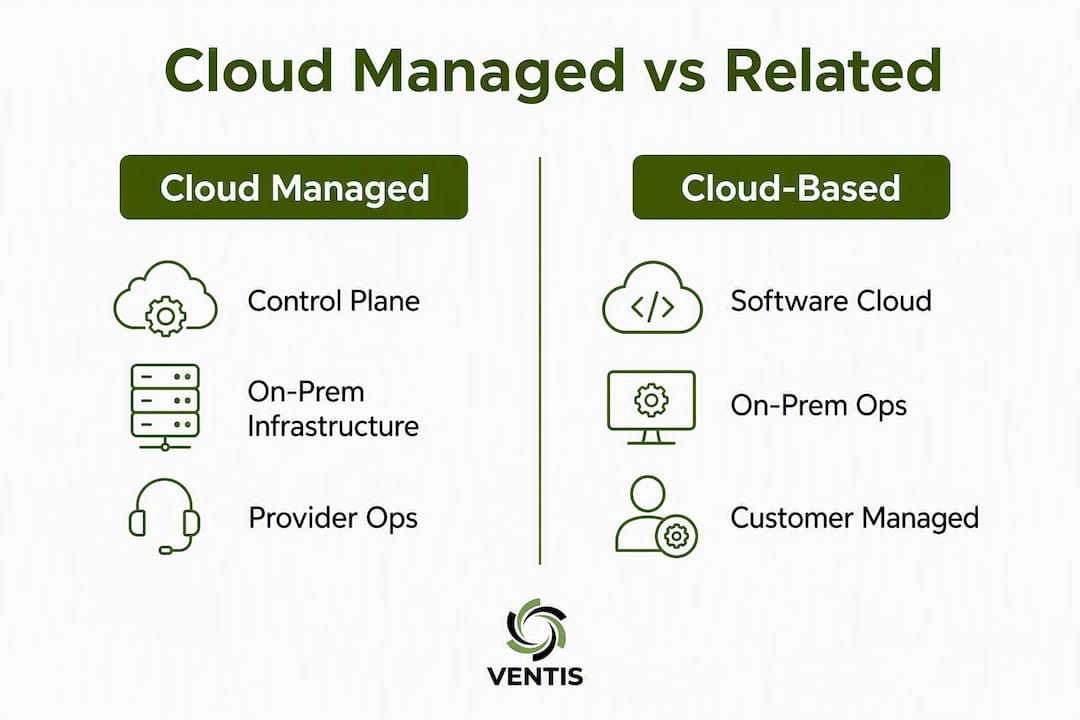
Cloud-managed networking specifically means the management system is cloud-deployed while the network hardware stays on-site. That is different from two terms people often confuse it with:
| Term | Management plane | Infrastructure | Who manages ops? |
|---|---|---|---|
| Cloud managed | Cloud-hosted | On-prem or cloud | MCSP or shared |
| Cloud-based | Cloud-hosted | Cloud only | Customer or MCSP |
| Managed cloud | Cloud-hosted | Cloud only | MCSP (full ops) |
The practical difference matters for procurement. "Cloud-based" just means the software runs in the cloud — you may still operate it yourself. "Managed cloud" typically implies the provider handles the full operational stack on cloud infrastructure. "Cloud managed" is the broadest term: it covers any scenario where the management plane is cloud-hosted, regardless of where the underlying hardware or workloads sit.
Hybrid and multi-cloud environments are common. Many organizations run cloud-managed tooling across a mix of AWS, Azure, on-premises data centers, and branch offices simultaneously. The management console unifies all of it — that is precisely the value proposition.
What types of cloud-managed services are available?
Managed cloud services span the full IT stack. Here is a practical map of the main categories and who typically needs each:
- Cloud-managed networking: — The management plane runs in the cloud; switches, routers, and access points stay on-site. Ideal for retail chains, healthcare networks, and any organization with multiple physical locations.
Packaging varies. Some providers bundle these into a fixed monthly managed service fee. Others sell them a la carte per device, per user, or per resource. For SMBs, a bundled managed IT contract that includes cloud-managed networking, backup, and security monitoring often delivers better value than assembling individual services.
Why cloud-managed approaches deliver real operational gains
The core benefit is centralized visibility. Instead of logging into each device or site individually, your team — or your provider — manages everything from one dashboard. AIOps and automation capabilities that once required enterprise-scale teams are now accessible to organizations with five IT staff or fewer.
Key operational benefits:
- Faster deployment: Zero-touch provisioning lets a new branch go live without sending a technician on-site. A device ships pre-registered; it calls home to the cloud controller and pulls its configuration automatically.
- Reduced truck rolls: Firmware updates, policy changes, and troubleshooting happen remotely. For a 10-site retail chain, eliminating even two on-site visits per month adds up quickly.
- Consistent policy enforcement: Centralized logging and configuration state mean every site runs the same security policy. No more configuration drift between locations.
- AIOps-driven troubleshooting: Cloud platforms correlate telemetry across all devices simultaneously, surfacing anomalies faster than manual log review.
- Automated updates: Patching and firmware management happen on a provider-controlled schedule, reducing the window of exposure to known vulnerabilities.
How to measure ROI:
Track these KPIs before and after migration:
- MTTR (Mean Time to Resolve incidents) — the clearest signal of operational improvement
- Time-to-deploy for new sites or devices
- Provisioning hours saved per month (compare pre-migration manual effort to post-migration automated provisioning)
- License and ops-cost delta (subscription cost vs. previous labor and hardware maintenance costs)
Pro Tip: Set your baseline telemetry before migration, not after. Pull MTTR, incident volume, and provisioning hours from your current ticketing system for the 90 days prior to cutover. Without that baseline, you cannot objectively measure what the cloud-managed model actually changed.
Risks and tradeoffs you need to evaluate honestly
Cloud-managed models are not universally better. Every benefit has a corresponding tradeoff, and the ones below catch organizations off guard most often.
The subscription continuity risk is underappreciated. If licenses lapse — even briefly — management access to your infrastructure can be restricted. You may still forward traffic, but you lose the ability to push config changes, receive telemetry, or respond to incidents through the platform. Treat subscription renewals as a critical operational task, not an administrative afterthought.
Core risks to evaluate:
- Connectivity dependency: Config pushes and telemetry require an active management-plane connection. A WAN outage at a branch does not drop local traffic, but it does blind you to that site until connectivity is restored.
- Vendor lock-in: Proprietary agents, firmware, and APIs can make migration to a different platform expensive. Always ask for a documented data-export and out-migration procedure before signing.
- Subscription lapses: As noted above, letting licenses lapse can restrict management access even when hardware is physically operational.
- Privacy and data residency: Telemetry and configuration data flow to the provider's cloud. For organizations subject to state data laws or sector-specific rules, confirm where that data is stored and processed.
- Legacy integration friction: Older hardware may not support the firmware or agents required for full cloud-managed features. This can force unplanned hardware refresh spending.
- OPEX growth: Per-device or per-site subscription models scale linearly with your footprint. Model your 3-year cost at 1.5x and 2x current device count before committing.
Operational tradeoffs:
Losing direct CLI access to devices is a real adjustment for network engineers. Cloud-managed platforms abstract configuration into policy templates, which speeds up routine changes but can limit granular control. On the other side, the provider handles patching — which reduces your workload but means you accept their patching schedule and must trust their change management process.
Red flags during procurement:
- Pricing that changes based on undisclosed usage thresholds
- SLAs that define uptime for the management platform but not for incident remediation
- No documented runbook for migrating off the platform
- Monitoring dashboards the customer cannot access directly
How cloud-managed networking works in practice
Here is the operational flow from zero to a live managed network, step by step:
- Hardware procurement and registration: Devices (switches, APs, SD-WAN gateways) are ordered and pre-registered to your cloud controller account using serial numbers or claim codes. No on-site configuration is required at this stage.
- Zero-touch provisioning (ZTP): The device ships to the branch, is plugged in, and connects to the internet. It contacts the cloud controller, authenticates, and pulls its assigned configuration profile automatically.
- Initial policy push: The cloud controller pushes VLAN assignments, SSID configurations, firewall rules, QoS policies, and security settings to the device. This typically completes within minutes of first contact.
- Telemetry collection begins: The device starts sending performance metrics, client association data, traffic statistics, and event logs to the cloud platform. AIOps engines begin building a baseline.
- Ongoing configuration management: All changes are made in the cloud dashboard and pushed to devices in real time or on a scheduled maintenance window. No CLI access to individual devices is required for routine operations.
- Incident detection and response: The AIOps layer flags anomalies — a switch port flapping, an AP with degraded signal, a WAN link with elevated latency. Alerts route to the provider's NOC or your internal team depending on the SLA.
- Failover behavior: Devices continue to forward local traffic autonomously if the management-plane connection is lost. A branch office stays online; you just lose visibility and the ability to push changes until connectivity is restored. Design your WAN with this in mind — dual-ISP or LTE failover at critical sites is worth the cost.
Core components in a typical cloud-managed network:
- Cloud controller / dashboard: The central management interface. Hosts policy templates, telemetry dashboards, firmware repositories, and alerting rules.
- On-device agent / firmware: Vendor-specific software running on each device. Maintains the secure tunnel to the cloud controller and executes pushed configurations.
- SD-WAN / gateway elements: Manage WAN path selection, traffic prioritization, and site-to-site connectivity. Often the most complex component to onboard.
- Managed APs and switches: Edge devices that handle local user traffic. Managed entirely through the cloud dashboard post-provisioning.
Security and compliance considerations for U.S. organizations
Cloud-managed services shift some security responsibilities to the provider — but not all of them. The shared responsibility model still applies, and misunderstanding the boundary is one of the most common compliance gaps.

Minimum security checks before contracting:
| Control area | What to verify | Why it matters |
|---|---|---|
| SOC 2 Type II | Request the audit report, not just a certificate | Confirms operational controls are tested, not just designed |
| ISO 27001 | Verify current certification scope covers your service | Scope gaps mean some services are uncertified |
| Encryption | Confirm AES-256 at rest, TLS 1.2+ in transit | Baseline for HIPAA and PCI DSS |
| Identity & access | MFA enforced, role-based access controls documented | Limits blast radius of credential compromise |
| Log retention | Minimum 90 days accessible; 1 year archived | PCI DSS requires 12 months; HIPAA audit trails vary |
| Data residency | Confirm U.S.-based storage if required by contract or regulation | State privacy laws and some federal contracts require this |
| Incident notification | SLA must specify breach notification timeline | HIPAA requires timely notification of incidents |
Shared responsibility — what stays with you:
Even with a fully managed provider, your organization retains responsibility for identity management (who has access to what), data classification, application-level configurations, and user behavior policies. The MCSP manages the platform; you manage what runs on it and who can touch it.
U.S. regulatory callouts:
- HIPAA: If the provider touches any system that stores or transmits protected health information (PHI), a Business Associate Agreement (BAA) is required. Verify the provider will sign one and that their SLA covers the covered entity's audit obligations.
- PCI DSS: Cardholder data environments require network segmentation, logging, and access controls that must be documented in your compliance evidence. Cloud-managed centralized logging supports this — but you must confirm the provider's log retention and export capabilities meet your QSA's requirements.
- State data privacy laws: California (CCPA/CPRA), Virginia (VCDPA), and others impose data handling obligations. Confirm the provider's data processing agreement addresses these.
For a deeper look at cybersecurity compliance practices relevant to SMBs, including how centralized visibility supports audit readiness, that resource covers the key controls in plain language.
How to evaluate and choose a cloud-managed provider
Feature checklists are a starting point, not a decision framework. The providers that look best on paper often disappoint on operational transparency. Evaluating providers on runbooks, status pages, and documented out-migration procedures consistently yields better long-term outcomes than scoring features alone.
Vendor scorecard template:
| Evaluation dimension | What to score | Weight (suggested) |
|---|---|---|
| Services managed | IaaS, PaaS, SaaS, networking, security, BDR | High |
| Best-fit customer size | SMB, mid-market, enterprise | Medium |
| Deployment model | Single-cloud, multi-cloud, hybrid | High |
| SLA: uptime & remediation | Uptime %, response time, remediation time | High |
| Pricing transparency | Per-device, per-user, fixed tier, blended | High |
| Certifications | SOC 2 Type II, ISO 27001, HIPAA BAA | High |
| Automation & AIOps tooling | Zero-touch provisioning, analytics, alerting | Medium |
| Migration & exit support | Runbook documented, data export available | High |
Ten questions to ask every prospective provider:
- What is your guaranteed uptime for the management platform, and what is the remediation SLA for incidents affecting production workloads?
- Can you provide your SOC 2 Type II report and current ISO 27001 certificate with scope documentation?
- Walk me through your migration runbook — what does onboarding look like week by week?
- If we decide to leave, what does the out-migration process look like and how long does it take?
- How does billing change as we add devices, users, or sites — and are there usage thresholds that trigger price changes?
- Who owns change management? How are changes communicated, approved, and rolled back if needed?
- What APIs or integrations do you support for our existing ITSM, SIEM, or ticketing tools?
- Do we have direct access to our telemetry and logs, or only through your dashboard?
- When did you last complete a third-party security audit, and can we see the findings summary?
- What does a pilot engagement look like — scope, timeline, success criteria, and cost?
For a broader evaluation framework on choosing a managed IT provider, that guide covers the questions and red flags in more depth.
Contract and SLA negotiation tips:
Insist on a documented migration runbook as a contract exhibit, not a verbal promise. Require transparent billing with itemized invoices. Set a reporting cadence (weekly during onboarding, monthly in steady state) and specify what metrics appear in each report. Define the escalation path for P1 incidents in writing.
What cloud-managed services typically cost and how long onboarding takes
Pricing models vary significantly by provider and service type. Understanding the cost structure before you negotiate is the difference between a predictable budget and a surprise invoice.
Common pricing models:
| Model | Typical structure | Best for |
|---|---|---|
| Per-device subscription | Monthly fee per managed AP, switch, or server | Cloud-managed networking, SMB to mid-market |
| Per-user / per-seat | Monthly fee per end user | Managed SaaS admin, unified communications |
| Per-resource | Fee per VM, GB of storage, or data transfer | Managed IaaS, DBaaS |
| Fixed tier | Flat monthly fee for a defined service bundle | SMBs wanting predictable costs |
| Blended managed service | Monthly fee covering devices + labor + monitoring | Full managed IT contracts |
Cost drivers to watch:
- Number of sites and devices (scales linearly in per-device models)
- Data egress fees from cloud providers (often underestimated)
- Hardware refresh requirements — some advanced features like zero-touch provisioning require newer firmware or hardware, forcing CAPEX you may not have budgeted
- Monitoring and log retention windows beyond the default
- Custom SLA tiers or dedicated support
Two illustrative cost scenarios:
SMB pilot (10 devices, 2 sites): Expect one-time onboarding costs covering assessment, provisioning, and documentation. Monthly subscription costs depend on the per-device rate and any bundled monitoring. Hardware refresh for devices that do not support the required firmware adds a one-time CAPEX line.
Mid-market rollout (50+ devices, 8 sites): Phased deployment across sites adds project management and travel costs if on-site work is needed. Monthly subscription scales with device count. Custom SLA tiers and dedicated NOC support add a premium over standard tiers.
Typical onboarding timeline:
| Phase | Duration | Key activities |
|---|---|---|
| Pilot | a few weeks | Onboard a site, test ZTP, validate telemetry and policy push |
| Phased rollout | several weeks per site | Sequential site onboarding, integration testing, staff training |
| Full optimization | several months post-rollout | AIOps tuning, reporting cadence, compliance evidence collection |
For guidance on scaling cloud infrastructure to match business growth, that resource covers planning considerations for organizations moving beyond the pilot phase.
When to adopt cloud-managed, when to stay on-prem, or when to build in-house
The right answer depends on four variables: team capacity, compliance requirements, scale, and cost tolerance. A managed approach makes costs predictable but requires clear scope — and that scope definition is where most decisions go wrong.
Cloud-managed is the right call when:
- You operate multiple sites and lack on-site IT staff at each location
- Your internal team handles tickets and projects but does not have bandwidth for 24/7 monitoring
- You need centralized policy enforcement across distributed locations for compliance
- You want AIOps and automation without hiring a dedicated network operations team
Stay on-premises when:
- Data residency requirements prohibit telemetry leaving your facility
- You have extreme low-latency edge requirements (manufacturing, real-time control systems) where even brief management-plane outages are unacceptable
- Your existing team has deep infrastructure expertise and the headcount to maintain it
Build in-house when:
- You have a mature internal cloud operations team with full DevOps/CloudOps capability
- Your workloads are highly customized and do not fit standard managed service scopes
- Cost modeling shows in-house operations are cheaper at your scale over a 3-year horizon
Recommended pilot scope:
Test these five things in your pilot before committing to a full rollout:
- Device onboarding via zero-touch provisioning at one site
- Telemetry completeness — are all the metrics you need actually flowing to the dashboard?
- Policy enforcement — push a change and verify it applies correctly across all pilot devices
- Incident response — simulate a failure and measure how quickly the provider detects and responds
- Billing transparency — review the first invoice against your contract and flag any discrepancies immediately
A multi-week pilot at a single site is enough to validate all five. Do not expand to additional sites until you have passed each checkpoint.
Key Takeaways
Cloud-managed services deliver real operational value when the provider's scope, SLA, and exit terms are defined clearly before you sign.
| Point | Details |
|---|---|
| Define the management plane first | Confirm whether the provider manages the control plane, data plane, or both before comparing features. |
| Require SOC 2 and exit runbooks | Ask for the SOC 2 Type II report and a documented out-migration procedure as contract exhibits, not promises. |
| Run a 4–8 week pilot | Test ZTP, telemetry, policy enforcement, incident response, and billing at one site before scaling. |
| Track MTTR from day one | Set your baseline before migration so you can measure whether the cloud-managed model actually reduces resolution time. |
| Ventis Consulting Group | Provides managed cloud, Network as a Service, and cybersecurity for SMBs in Pittsburgh and Western PA with a consultative, runbook-driven onboarding process. |
The gap between what cloud-managed promises and what actually matters
Most articles on this topic lead with feature lists. AIOps, zero-touch provisioning, centralized dashboards — they all sound compelling. But the organizations that get the most out of cloud-managed services are not the ones who chose the platform with the longest feature list. They are the ones who spent the most time on the contract.
The single biggest mistake I see in cloud-managed evaluations is treating the SLA as a formality. Buyers focus on the demo, the dashboard, and the per-device price. Then six months in, an incident occurs, and they discover the SLA covers management platform uptime but says nothing about how fast the provider will actually resolve a production outage. Those are two completely different commitments.
The second underappreciated issue is the exit path. Vendor lock-in in cloud-managed networking is real and specific: proprietary firmware, cloud-only configuration storage, and APIs that do not export cleanly to competing platforms. The time to negotiate your exit terms is before you onboard, not after you decide to leave. A provider that resists documenting the out-migration process is telling you something important about how they view the relationship.
There is also a tendency to underestimate hardware refresh costs. Some of the most attractive cloud-managed platforms require specific firmware versions or hardware generations to unlock the features that justified the purchase. That compatibility gap can turn a subscription-based OPEX model into an unexpected CAPEX event in year one.
The good news: these risks are all manageable with the right procurement discipline. Demand the SOC 2 report, the runbook, the out-migration procedure, and a clear billing structure before you sign anything. The providers who push back on those requests are the ones to walk away from.
How Ventis Consulting Group approaches cloud-managed adoption
If you are evaluating cloud-managed services for your business in Pittsburgh or Western PA, Ventis Consulting Group offers a consultative path that starts with a discovery session — not a sales pitch.

The process begins with a scoped assessment of your current infrastructure, connectivity, and compliance requirements. From there, Ventis builds a pilot plan with documented success criteria, a migration runbook, and a clear onboarding timeline. Services include managed cloud infrastructure, cloud-managed networking, cybersecurity and compliance support, backup and disaster recovery, and Network as a Service for organizations that want predictable monthly costs without hardware ownership. Throughout the engagement, you get 24/7 monitoring, transparent billing, and a reporting cadence that keeps your leadership team informed.
Ready to scope your pilot? Contact Ventis Consulting Group to schedule a discovery session and get a clear picture of what cloud-managed adoption looks like for your specific environment.
Useful sources and further reading
- Cloud Managed Services: Definition, Types & Benefits | Netdata — Covers the full scope of managed cloud services including migration, patching, monitoring, and SLA structures. Supports the types of services and how-to-choose sections.
- What is cloud-managed networking? | HPE — Authoritative definition of cloud-managed networking, AIOps capabilities, and centralized policy enforcement. Supports the definition, benefits, and security sections.
- Cloud-Managed Network | NetworkLessons — Operational detail on control plane vs. data plane, device autonomy during controller outages, and subscription continuity risks. Supports the how-it-works and risks sections.
- What Are Cloud Managed Services? | Aerospike — Explains the MCSP model and primary adoption drivers. Supports the definition and types sections.
- What Is Managed Cloud? | IBM — Decision criteria for when managed cloud is appropriate vs. on-prem or in-house builds. Supports the use-cases and how-to-choose sections.