

IT management services are outsourced, proactively delivered IT functions provided by a Managed Services Provider (MSP) under a recurring subscription or service agreement. If your business is spending more time reacting to tech problems than running operations, a managed IT model is worth a serious look. Providers certified to standards like ISO/IEC 20000 and operating under defined SLA metrics give you a measurable baseline for what you're buying. Ventis Consulting Group, for example, delivers managed IT, cybersecurity, and cloud solutions to SMBs in Pittsburgh and Western PA with a consultative approach and a highly-rated service record.
The term "IT management services" is sometimes used loosely to describe anything from a one-time tech fix to a full outsourced IT department. The industry term you'll encounter most often is managed IT services, and understanding the distinction between that and basic tech support, or formal IT Service Management (ITSM), is what separates a well-structured contract from a frustrating one.
Table of Contents
- What IT management services actually are and who uses them
- Limitations and risks you need to plan for
- How managed IT services are priced and what drives cost
- How to choose a managed IT services provider
- What onboarding and implementation actually look like
- How managed IT services relate to ITSM and formal frameworks
- Key Takeaways
- What the managed IT conversation gets wrong
- Ventis Consulting Group: managed IT for Pittsburgh-area SMBs
- Useful sources and further reading
What IT management services actually are and who uses them
Managed IT services are an outsourced model where an MSP takes ongoing responsibility for monitoring, managing, and maintaining a client's IT infrastructure, applications, or business processes under a recurring subscription or service agreement. That's the formal definition. In practice, it means your provider watches your systems around the clock, patches vulnerabilities before they become incidents, and handles day-to-day IT operations so your team doesn't have to.
SMBs, distributed teams, and regulated businesses in sectors like healthcare, finance, and legal services are the most common buyers. Their shared objective is usually the same: reduce downtime, control IT costs, and stay compliant without building a full internal IT department.
Typical use cases include 24/7 infrastructure monitoring, cloud environment management, and a dedicated service desk for employee support. Gartner's taxonomy extends this further to include system operation and support, capacity planning, asset management, and performance management, which gives you a useful checklist when scoping what a provider actually covers.
Managed IT services vs. break-fix support at a glance:
- Managed IT services: — Proactive, subscription-based, ongoing monitoring and management with defined SLAs
For a deeper look at break-fix vs. managed services, the contrast in total cost of ownership over a 12-month period is often what tips the decision.
Limitations and risks you need to plan for
Managed IT services solve a lot of problems, but they introduce trade-offs worth understanding before you sign anything.
Common limitations:
- Scope gaps: Contracts define what's covered. Anything outside that scope, such as a custom application or a legacy system, may incur extra charges or simply not be supported
- Vendor lock-in: Proprietary tools, custom configurations, and long contract terms can make switching providers expensive and disruptive
- Loss of direct control: Day-to-day IT decisions move to the provider; internal staff may lose visibility into what's happening on their own infrastructure
- Hidden fees: Setup fees, out-of-scope labor rates, and hardware markups are common in contracts that look affordable at first glance
- Data residency and compliance concerns: If your provider uses subcontractors or offshore support, your data may cross jurisdictions in ways that conflict with your compliance obligations
Red flags to watch for during vetting:
- No documented escalation path beyond a generic support email
- SLAs measured in business hours rather than calendar hours for critical systems
- Refusal to provide references from clients in your industry
- Contracts with auto-renewal clauses and no exit provisions
- Subcontractor use not disclosed upfront
Operational dependency is the risk most buyers underestimate. When your provider is the only one who knows your environment, a poor relationship or a provider going out of business creates a genuine crisis. Require full documentation of your environment as a contractual deliverable, not a courtesy.
How managed IT services are priced and what drives cost
Most MSPs use one of five pricing models. Understanding them lets you compare proposals on equal terms rather than getting distracted by headline numbers.
| Pricing Model | Typical Use Case | What It Covers |
|---|---|---|
| Per-user | SMBs with consistent headcount | All devices and services per employee, regardless of device count |
| Per-device | Device-heavy environments (warehouses, labs) | Each managed endpoint billed individually |
| Tiered flat-fee | Most SMBs; predictable budgeting | Bundled services at defined tiers (basic, standard, premium) |
| Consumption-based | Cloud-heavy workloads | Billed by actual resource usage (storage, compute, bandwidth) |
| Project / one-off | Migrations, assessments, deployments | Fixed-scope work outside the recurring contract |
Cost drivers that move the price up or down:
- Number of managed endpoints and users
- Security and compliance requirements (MDR, HIPAA, PCI-DSS alignment)
- SLA response and resolution time commitments
- Cloud consumption volume
- On-site support requirements vs. fully remote delivery
- Contract length and included hardware refresh cycles
Pricing varies significantly by market, provider size, and scope. The ranges above are illustrative. Always request an itemized proposal and confirm what's excluded before comparing quotes.
For a side-by-side look at IT support vs. in-house staff costs, the total cost of ownership calculation usually favors managed services for businesses under 100 employees once you factor in salary, benefits, training, and tool licensing for an internal hire.
How to choose a managed IT services provider
Selection mistakes are common because buyers focus on price first and contract terms last. Flip that order.
Step-by-step evaluation checklist:
- Define your scope first. Document your current environment: endpoint count, cloud services, compliance requirements, and support hours needed. You can't evaluate a proposal without a baseline.
- Verify security posture. Ask for the provider's own security documentation, not just what they do for clients. A provider with weak internal security is a liability.
- Check certifications. ISO/IEC 20000 certification signals a mature service management system. SOC 2 Type II indicates strong data security controls. ITIL-trained staff suggests structured process delivery.
- Scrutinize SLA terms. Get specific numbers: target uptime percentage, mean time to respond (MTTR), first-contact resolution rate, and ticket response times by priority level.
- Assess industry experience. A provider who has worked with businesses in your sector understands your compliance obligations and common risk patterns.
- Request references. Ask for two or three current clients of similar size and industry. Call them.
- Review escalation paths. Who handles a P1 incident at 2 AM? What's the escalation chain? Get it in writing.
- Evaluate reporting. Monthly reports should cover uptime, ticket volume and resolution times, patch compliance, and security events. If a provider can't show you a sample report, that's a problem.
- Negotiate exit terms. Require a 30-to-90-day exit clause and a contractual obligation to return all documentation and credentials at termination.
- Run a pilot if possible. A 30-to-60-day pilot engagement on a defined scope lets you evaluate responsiveness and communication before committing to a multi-year contract.
Sample SLA clauses to request:
- 99.9% or higher uptime commitment for critical systems
- P1 (critical) incident response within 15–30 minutes, 24/7
- P2 (high) response within 2–4 hours
- Monthly reporting with incident postmortem for any P1 event
- Patch compliance rate of 95% or higher within defined windows
For a more detailed guide to choosing a managed IT provider, the questions to ask during the RFP stage are where most buyers find the real differentiators.
What onboarding and implementation actually look like
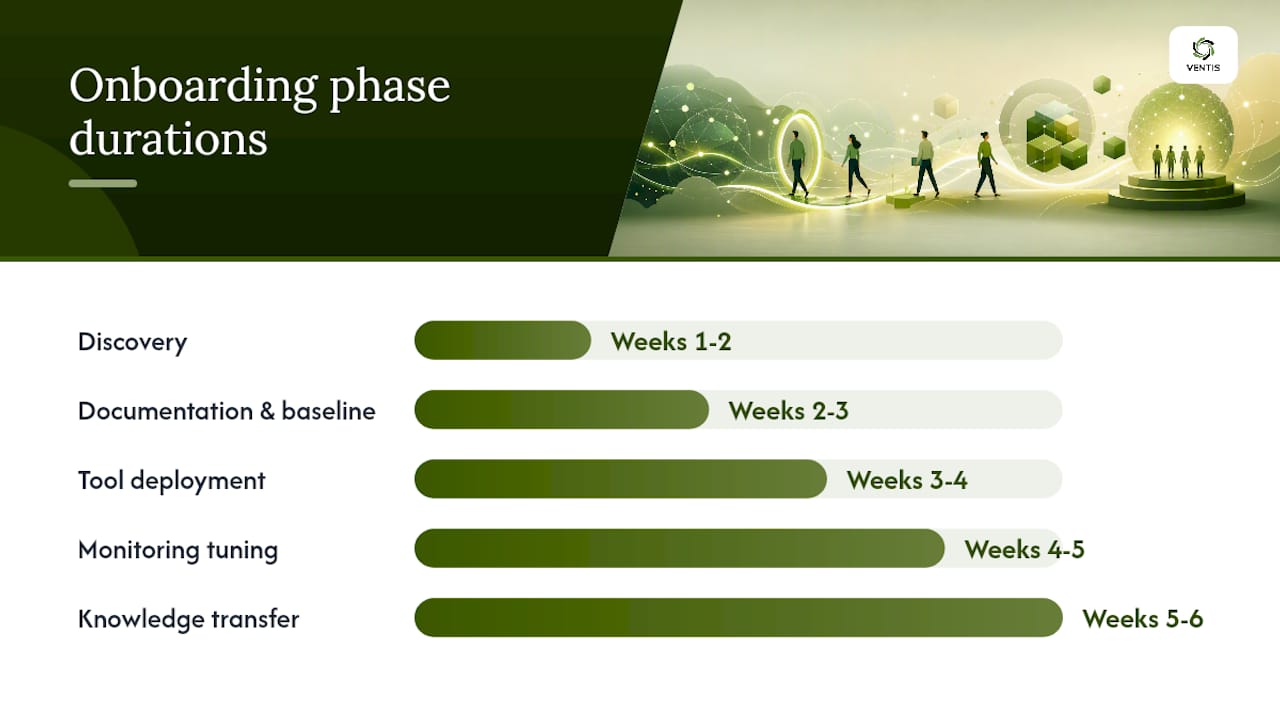
Most managed IT engagements take four to eight weeks from contract signing to steady-state operations. The timeline depends heavily on environment complexity and how prepared your team is to share access and documentation.
Typical onboarding phases:
- Discovery (Weeks 1–2): Provider audits your current environment, documents all assets, maps network topology, and identifies gaps. Deliverable: environment assessment report.
- Documentation and baseline (Weeks 2–3): All systems, credentials, and configurations are documented in the provider's management platform. Deliverable: runbook and asset register.
- Tool deployment (Weeks 3–4): RMM agents, security tools, and backup clients are deployed across endpoints and servers. Deliverable: monitoring dashboard live.
- Monitoring tuning (Weeks 4–5): Alert thresholds are calibrated to reduce noise and catch real issues. Deliverable: tuned alert policy.
- Knowledge transfer (Week 5–6): Your team learns how to submit tickets, escalate issues, and use self-service resources. Deliverable: onboarding documentation for staff.
- Steady-state operations (Week 6+): Full managed services delivery begins under the contracted SLAs. First monthly report issued at 30 days.
Common blockers that delay onboarding:
- Incomplete or missing network documentation from the previous provider
- Shared or undocumented admin credentials that need to be rotated
- Legacy systems that require custom agent configurations
- Slow internal approval processes for tool deployment on endpoints
The single biggest accelerator is a clean handoff from your previous provider or IT staff. If you're switching from break-fix or an outgoing MSP, request all documentation and credentials before the contract ends, not after.
How managed IT services relate to ITSM and formal frameworks
This is where a lot of buyers get confused, and the confusion costs them. Managed IT services and IT Service Management (ITSM) are related but not the same thing.
ITSM, as defined by Atlassian, is the process discipline that organizes how IT teams design, deliver, and support services to meet business and user needs. It's the how behind service delivery. Managed IT services are the what, the actual outsourced functions a provider performs. A provider can deliver managed services without any formal ITSM processes, and the difference in outcomes is significant.
IBM's ITSM research makes this point directly: without structured ITSM processes, a provider may resolve individual tickets but fail to prevent recurring root causes. Incident management, problem management, change control, and configuration management are the processes that turn reactive support into lasting improvement.
Red Hat's ITSM guidance adds that ITSM-based automation frees staff from repetitive tasks and shifts capacity to higher-value work, a benefit decision-makers often miss when they equate ITSM with basic helpdesk support.
Key frameworks and what they mean for vendor selection:
- ITIL (Information Technology Infrastructure Library): The most widely adopted ITSM framework; ITIL-certified staff indicates structured process knowledge
- ISO/IEC 20000: An internationally recognized certification for service management systems; the strongest third-party proof of provider maturity
- COBIT: A governance framework focused on aligning IT with business objectives; more relevant for enterprise buyers but useful for compliance-heavy SMBs
- ITSM platforms (ServiceNow, Jira Service Management): Tools that operationalize ITSM processes; ask providers which platform they use and whether you get reporting access
What to request from any provider:
- Evidence of ITIL-trained staff or ITIL-aligned processes
- ISO/IEC 20000 certification or a documented service management system
- A process map showing how incidents, changes, and problems are handled
- Access to the ticketing platform so you can see your own data
The Wikipedia ITSM reference provides a useful overview of how these frameworks interrelate if you want to go deeper on the process side before your next vendor conversation.
Key Takeaways
Managed IT services deliver the most value when you select a provider with documented ITSM processes, outcome-tied SLAs, and transparent reporting, not just a low monthly rate.
| Point | Details |
|---|---|
| Define scope before comparing | Document endpoints, compliance needs, and support hours before requesting any proposal. |
| Demand outcome-tied SLAs | Require uptime, MTTR, and patch compliance targets in writing, not just response-time promises. |
| ITSM processes prevent recurrence | Providers without incident, problem, and change management processes resolve tickets but repeat root causes. |
| Pricing model affects total cost | Per-user pricing suits most SMBs; per-device suits hardware-heavy environments. Always check what's excluded. |
| Ventis Consulting Group | Delivers managed IT, cybersecurity, cloud, and unified communications for SMBs in Pittsburgh and Western PA with a highly rated service record. |
What the managed IT conversation gets wrong
The most common mistake I see SMB decision-makers make is treating managed IT services as a cost-cutting exercise rather than a risk management decision. The math looks simple: outsource IT, pay less than a full-time hire, done. But that framing misses the point entirely.
The real value of a well-structured managed IT engagement is what doesn't happen. The ransomware attack that gets blocked at the endpoint. The server failure that gets caught at 3 AM before anyone arrives at the office. The compliance gap that gets closed before an audit. None of those show up as a line item on a cost-savings report, which is exactly why they get undervalued until something goes wrong.
The other thing buyers consistently underestimate is the importance of ITSM process maturity in a provider. A provider can have excellent tools and responsive staff and still deliver poor outcomes if they have no structured problem management process. You'll get your tickets closed. You'll also get the same tickets reopened six months later because the root cause was never addressed. That's not a technology failure. It's a process failure, and it's entirely preventable if you ask the right questions during selection.
The businesses that get the most out of managed IT services treat their provider as an extension of their own team, share business context openly, and hold quarterly reviews that go beyond ticket counts. That relationship dynamic is what turns a vendor into a partner.
Ventis Consulting Group: managed IT for Pittsburgh-area SMBs
If you've worked through this guide and are ready to move from evaluation to action, Ventis Consulting Group offers managed IT services, cybersecurity and compliance solutions, cloud infrastructure management, and unified communications platforms for small to mid-sized businesses in Pittsburgh and the surrounding region.

What makes Ventis different from a generic national MSP is the consultative approach. You get a local team that knows your environment, responds to your calls, and shows up when on-site work is needed. Contracts are available as recurring managed services agreements or one-off project engagements, so you can start with a scoped assessment before committing to a full managed services relationship.
Ventis carries a 5-star service rating and works with businesses across Western PA that need reliable IT support without the overhead of a full internal IT department. To get started, schedule a free IT assessment and find out exactly where your current environment stands.
Useful sources and further reading
These references are worth bookmarking if you're going deeper on standards, frameworks, or service definitions:
- What Are Managed Services? | TSIA
- ITSM: IT service management | Atlassian
- What Is ITSM (IT service management)? | IBM
- What is IT service management (ITSM)? | Red Hat
- IT managed services | Deloitte
- ISO/IEC 20000-1:2018 – Information technology — Service management — Part 1
- IT management services - Information Technology Glossary | Gartner
- What is IT support? | ServiceNow
- IT service management | Wikipedia