

A patch management policy is the written rule set that tells your organization how software vulnerabilities get fixed, and by when. The single most important requirement is a risk-based service level agreement, paired with a documented exception process for anything that misses it. Get those two things right and the rest of the policy, from scope to reporting, builds naturally around them.
TL;DR:
- Most organizations should patch critical vulnerabilities within 72 hours using an accelerated deployment ring, especially when active exploitation is confirmed.
- Asset inventories must include detailed fields like operating system, owner, network zone, and last patch date to ensure accurate tracking and audit compliance.
- Patch policies require clear roles with accountable owners, staged testing procedures, and documented exception processes with defined review cycles to manage risks effectively.
- Tiered SLAs should prioritize patches based on CVSS scores, exploitation status, and business impact, with critical patches often requiring immediate action.
- Small teams benefit from simplified maintenance groups and automation tools, focusing on critical assets first and using straightforward exception and reporting templates.
Table of Contents
- What Is a Patch Management Policy, and What Does It Cover?
- Definitions and Key Terms Your Policy Needs
- Who Owns Patching Decisions: Roles and Responsibilities
- Building the Asset Inventory and Maintenance Groups
- Setting Risk-Based Prioritization and Patch SLAs
- Testing, Staged Rollouts, and Rollback Planning
- How to Handle Patch Exceptions and Waivers
- Tracking Patch Compliance: Metrics and KPIs That Matter
- Rolling Out the Policy: A 30/90/180-Day Checklist
- A Practitioner's Take on Making This Work for Small Teams
- Where to Find the Underlying Standards and Templates
- Sources
- FAQ
What Is a Patch Management Policy, and What Does It Cover?
A patch management policy exists to solve two problems at once: keep systems running and keep attackers out. Unpatched software is one of the most common entry points for breaches, and regulators increasingly expect written proof that you're closing those gaps on a schedule, not just when someone remembers.
The policy also has to draw a hard line around what it governs. Vague scope is the number one reason patch policies fail audits, because "everything" is not an inventory. NIST SP 800-40 Rev. 4 frames patching as ongoing preventive maintenance, which means the scope section needs to name categories, not just gesture at "IT systems."
A workable scope statement enumerates:
- Operating systems and firmware across servers, workstations, and laptops
- Network devices: firewalls, switches, routers, and wireless access points
- Cloud workloads and container images, including infrastructure managed by third parties
- Mobile devices and any IoT or specialty hardware connected to the network
- Third-party applications and middleware, not just the OS layer
Review the policy on a fixed cadence, typically annually or after a major incident, and version every revision. Auditors will ask when it was last updated and who approved the change. If you can't answer that in one sentence, the document itself becomes a finding.
Definitions and Key Terms Your Policy Needs
Every audit-ready policy defines its own vocabulary. Skip this section and you'll spend meetings arguing about what "critical" means instead of fixing anything.
At minimum, define these terms in plain language:
- Patch: A vendor-released code change that fixes a bug, closes a vulnerability, or improves stability.
- Update: A broader term covering patches, feature releases, and version upgrades.
- Hotfix: An urgent, narrowly scoped patch issued outside the normal release cycle.
- Firmware: Low-level software embedded in hardware, patched separately from the OS.
- Vulnerability: A weakness that could be exploited to compromise confidentiality, integrity, or availability.
- Maintenance group: A defined cluster of assets that share a patch schedule and risk tolerance, a concept NIST recommends building policy around.
- CVSS: The Common Vulnerability Scoring System, used to rate severity from 0 to 10.
Statistic Callout: NIST's guidance treats patching explicitly as preventive maintenance for technology, not a reactive fire drill, and recommends assigning every asset to a maintenance group so schedules and mitigations can be applied consistently rather than case by case.
Link out to authoritative sources rather than restating them. Point readers to the CVE database for vulnerability identifiers and CVSS scoring guidance instead of copying definitions that change over time.
Who Owns Patching Decisions: Roles and Responsibilities
Patch management fails most often not from a missing tool, but from a missing name. Every asset needs one person accountable for its patch status, and that person needs to be named in the policy, not implied by job title.
NIST's guidance is explicit that patching works best as a shared organizational priority. Business and mission owners have to weigh in on downtime tolerance, not just IT. A server owner who says "never reboot this during business hours" is giving you operational data your SLA needs to respect.
Build a RACI structure that covers the full patch lifecycle:
- Responsible: The system administrator or engineer who applies the patch
- Accountable: The asset owner who signs off on the patch window and accepts residual risk
- Consulted: The business owner whose operations the asset supports
- Informed: Security leadership and compliance stakeholders who need visibility into outcomes
Emergency patches need a separate, faster approval path. Name a specific role, often the CISO or IT director, with authority to bypass the standard testing window when active exploitation is confirmed. Document that authority in writing so nobody is improvising during an incident. Read more on how security responsibility should be distributed across a small IT team, since SMBs often assign these roles too thinly to survive someone's vacation.
Leadership engagement isn't a courtesy add-on. When an executive understands why a maintenance window matters, exception requests drop and patch compliance climbs, because the tradeoff between uptime and risk gets made at the right level instead of getting stuck with an overworked sysadmin.
Building the Asset Inventory and Maintenance Groups
You cannot patch what you cannot see. An inventory that only tracks "servers" and "laptops" will not survive an audit, and it will not tell you which systems missed last month's critical fix.
The inventory needs specific fields per asset, not a general description:
| Field | Why It Matters |
|---|---|
| Device name/ID | Unique identifier for tracking across systems |
| Operating system and version | Determines which patches apply |
| Asset owner | The named accountable person from your RACI |
| Business criticality | Drives SLA tier and testing rigor |
| Network zone | Informs isolation options and exception risk |
| Last patch date | Core compliance metric |
| Reboot requirement | Flags scheduling constraints |
Maintenance groups are how you turn a flat inventory into something you can actually schedule. Group assets by shared characteristics, such as criticality tier, operating system, or business unit, so one SLA and one testing plan applies to the whole group instead of negotiating each server individually. NIST recommends this grouping specifically because it lets you map mitigations and maintenance plans efficiently rather than one asset at a time.
New assets need a defined onboarding window during which they're brought into an existing maintenance group and baseline patched before going into production. Without a grace period rule, new servers tend to sit unpatched indefinitely because nobody's process officially "owns" them yet.
Setting Risk-Based Prioritization and Patch SLAs
Not every patch deserves the same urgency, and treating them equally is how patch backlogs balloon. Prioritization should combine three inputs: the CVSS severity score, whether the vulnerability is being actively exploited in the wild, and how critical the affected asset is to the business.
A vulnerability with a CVSS score of 9.8 on an internet-facing server demands a different response than the same score on an isolated test machine. Active exploitation status matters more than the raw score alone. A moderately rated vulnerability under active attack should often jump ahead of a higher-rated one with no known exploit code.
Statistic Callout: ManageEngine's guidance on patch policy offers commonly cited SLA benchmarks that many organizations adopt as a starting point: Critical patches as soon as possible, high severity patches within approximately a week, and medium severity patches within about a month. Treat these as defensible defaults, then adjust based on your own risk tolerance and operational constraints.
Reasonable SLA structure by tier:
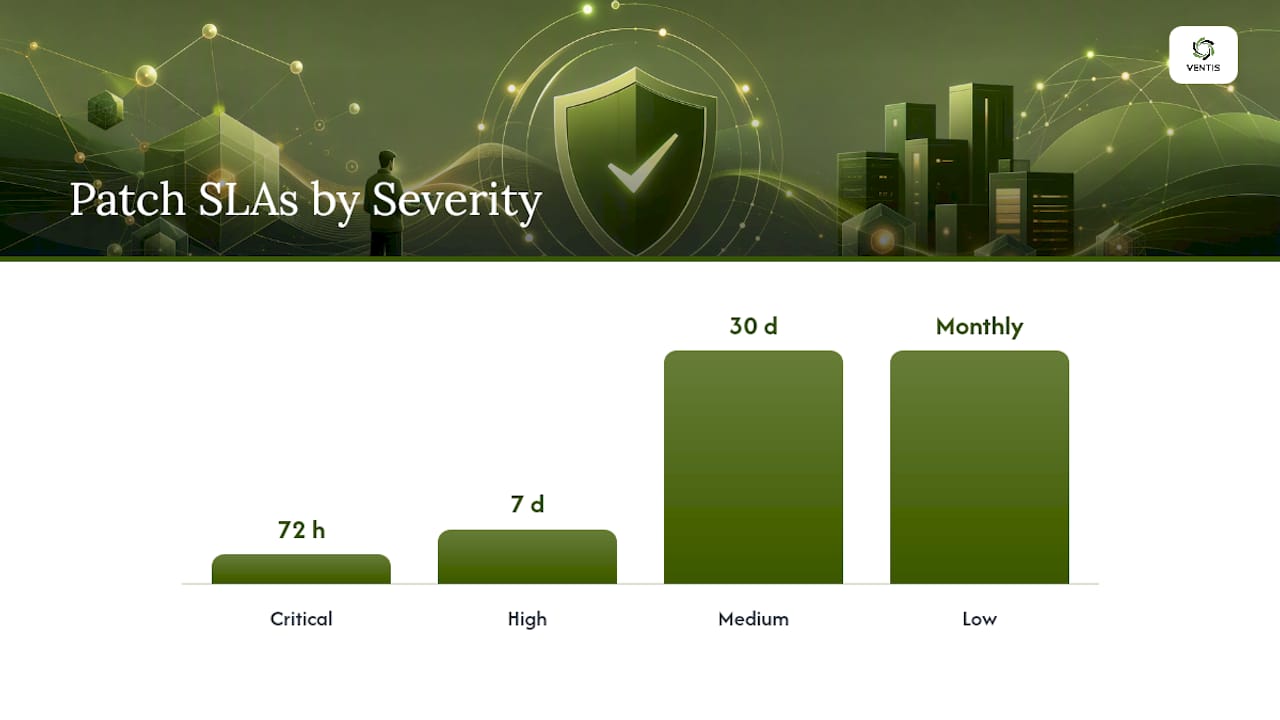
- Critical (active exploitation or CVSS 9.0+): Patch within 72 hours, often via an accelerated deployment ring that skips extended pilot testing
- High (CVSS 7.0 to 8.9): Patch within 7 days, following standard staged rollout
- Medium (CVSS 4.0 to 6.9): Patch within 30 days, batched into the regular maintenance window
- Low: Patch within the next scheduled cycle, typically monthly
Operational constraints will occasionally push a critical patch past 72 hours. A hospital's imaging server or a manufacturer's line-control system can't always reboot on demand. When that happens, the exception process, not a silent extension, should be the mechanism that absorbs the delay. HUD's patch management policy requires a formal request for a documented delay whenever a critical patch timeframe is missed, which is a model worth borrowing regardless of your industry.
Emergency patch authority ties directly back to the accelerated ring: whoever holds that authority should be able to push a critical fix through testing in hours, not days, when exploitation is confirmed. Understanding dwell time in cybersecurity helps make the case internally for why 72 hours, not 30 days, is the right target for your highest-severity findings.
Testing, Staged Rollouts, and Rollback Planning
Pushing a patch straight to production without testing is how a security fix becomes an outage. The policy needs a defined path from test to full deployment, with clear go/no-go criteria at each stage.
- Build a representative pilot group. Select a small set of machines that mirror production configurations across OS versions, hardware, and critical applications. A pilot group that's all identical laptops tells you nothing about how the patch behaves on your file server.
- Deploy to pilot and monitor for 24 to 72 hours. Watch for failed installs, application errors, and performance regressions before touching anything else.
- Advance to a broader ring covering a subset of production systems, still segmented by business criticality, once pilot metrics come back clean.
- Complete full deployment to remaining maintenance groups on the SLA timeline, batching by group rather than pushing to everything simultaneously.
- Run post-deployment verification confirming patch installation succeeded, services restarted correctly, and no new errors appeared in logs.
Rollback criteria need to be decided before deployment starts, not improvised after something breaks. Define what triggers a rollback: a spike in failed logons, an application crash rate above a set threshold, or a critical business process going down. Have the previous version, image, or configuration backup ready before the patch window opens, not during the incident.
Pro Tip: Schedule your pilot group's patch window a full cycle ahead of your broader rollout, even for medium-severity patches. A 48-hour head start on a handful of machines has caught more driver conflicts and application incompatibilities than any changelog ever will.
Reboot policies deserve their own line in the runbook, separate from the policy itself. Some maintenance groups tolerate immediate reboots; others need a maintenance window scheduled days in advance. Document which is which per group, and confirm through a network penetration test periodically that patched systems are actually closing the vulnerabilities they were meant to fix.
How to Handle Patch Exceptions and Waivers
Every patch program eventually hits a system that can't be patched on schedule, whether it's legacy software with no vendor support or a production line that can't tolerate downtime. The exception process is what keeps that reality from becoming an unmonitored risk.
An auditable exception record needs four elements every time:
- Justification: Why the patch cannot be applied within the standard SLA
- Named owner: Who is accountable for the exception and its eventual remediation
- Compensating control: What mitigates the risk in the meantime, such as network isolation or increased monitoring
- Expiration date: When the exception must be reviewed or the patch applied
Compensating controls should be specific and documented, not a vague promise to "keep an eye on it." Network segmentation, tighter firewall rules, or routing the asset through a managed detection and response service to flag anomalous activity are all defensible substitutes while a patch is pending. HUD's policy structure requires a formal plan of action and milestones for any delayed critical patch, which forces the compensating control conversation to happen on paper rather than in someone's memory.
The failure mode to avoid is the exception that never expires. Set a review cycle, commonly 30 or 90 days depending on severity, and require re-justification at every review. An exception that's been renewed five times without a remediation plan isn't an exception anymore. It's an accepted, unmanaged risk, and auditors will treat it that way.
Tracking Patch Compliance: Metrics and KPIs That Matter
A policy without measurement is a document nobody checks. The metrics you track should answer one question for any auditor or executive: are we actually patching on the timeline we committed to?
Four KPIs cover most of what you need:
- Patch compliance percentage: The share of in-scope assets patched within SLA, broken out by maintenance group
- Time to remediate by severity: Average and maximum days from patch release to deployment, tracked separately for critical, high, and medium tiers
- Failed installation rate: How often patches fail to apply cleanly, a leading indicator of testing gaps
- Outstanding exception count: Active exceptions by age, flagging anything approaching its expiration
Statistic Callout: DC OCTO's patch management policy treats inventory tracking, scheduled patching, and outcome tracking as core, non-negotiable responsibilities. That structure holds up well as a baseline for any organization building its first reporting cadence.
Automated evidence beats manual spreadsheets every time an auditor asks for proof. Compliance reports generated directly from your patch management tool, tied to change request or RFC records, give you a defensible paper trail without someone reconstructing history from memory. Feed these metrics back into the policy itself: a maintenance group that consistently misses SLA might need a schedule adjustment, not another reminder email. Review KPIs on a quarterly cadence at minimum, and after any significant incident.
Rolling Out the Policy: A 30/90/180-Day Checklist
A policy that sits in a shared drive unread accomplishes nothing. Adoption needs milestones, just like the patching process itself.
- Days 1 to 30: Finalize scope and inventory, assign named asset owners, and publish the policy draft for stakeholder review.
- Days 31 to 90: Stand up maintenance groups, run the first pilot deployment cycle, and train IT staff on the exception request process.
- Days 91 to 180: Complete a full quarterly compliance report, conduct a tabletop review of the emergency patch process, and formally close out the policy's first review cycle.
Subordinate documents do the operational heavy lifting the policy itself shouldn't. ManageEngine's guidance makes the case that governance and execution belong in separate documents, and that separation is what keeps the policy readable years later. Attach a deployment schedule, per-group runbooks, an exception request form, and a link to your change management process.
Training and communication can't be an afterthought either. Staff need to know what a maintenance window notice looks like and who to contact if a patch causes a problem. Employee cybersecurity training that covers patch notifications specifically reduces the volume of confused help desk tickets during every rollout.
| Milestone | Owner | Evidence for Audit |
|---|---|---|
| Policy published and versioned | IT director | Signed, dated document with version history |
| Asset inventory complete | Named owners | Inventory export with all required fields populated |
| First pilot deployment run | Patch admin | Deployment log and post-verification report |
| Exception form in use | Security lead | Sample completed exception with expiration date |
| Quarterly compliance report | Compliance owner | Automated report tied to change records |
A Practitioner's Take on Making This Work for Small Teams
Most patch management guidance is written as if you have a dedicated patching engineer and a change advisory board. Small businesses have neither, and pretending otherwise is how policies end up unread.
The fix isn't a simpler policy. It's fewer maintenance groups and more automation doing the grunt work. A five-person IT team doesn't need twelve maintenance groups. Three, maybe four, organized around business criticality rather than department, will cover almost every SMB environment without creating a scheduling headache nobody has time to manage. Automated patch deployment tools that report compliance status without manual spreadsheet updates matter more here than anywhere else, since there's no headcount to absorb the busywork NIST's own guidance assumes larger enterprises have on staff.
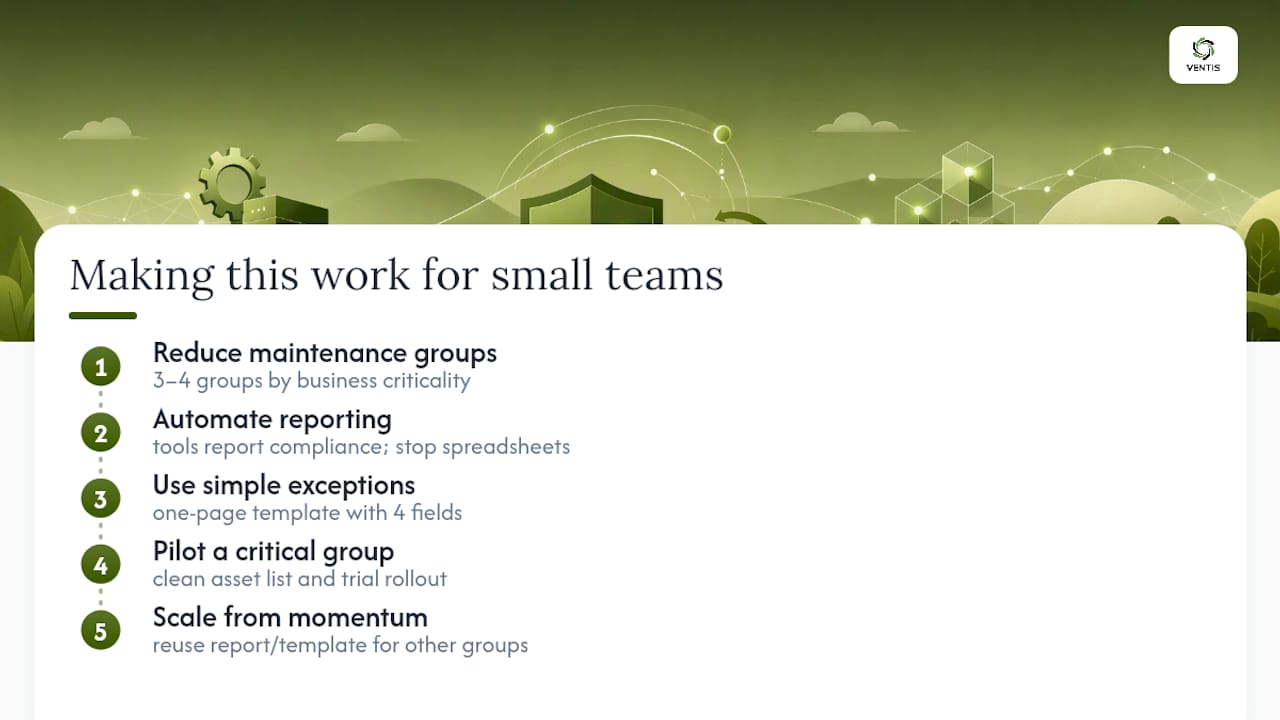
Exception documentation doesn't need to be heavy to be defensible. A one-page template with the four required fields, justification, owner, compensating control, expiration, takes ten minutes to fill out and holds up fine in an audit. What sinks small teams isn't a missing form. It's exceptions nobody ever revisits, because there was no calendar reminder forcing the conversation.
If you're starting from nothing, don't try to inventory everything on day one. Clean up the asset list for your most critical maintenance group first, pilot your rollout process on that group, and use the reporting template you build there as the pattern for the rest. Momentum on one clean group beats a stalled attempt at a perfect, comprehensive inventory.
— Greg
Where to Find the Underlying Standards and Templates
Building a policy from scratch is faster when you're not reinventing definitions or SLA logic that already exist in published guidance.
- NIST SP 800-40 Rev. 4 remains the baseline framework for enterprise patch management, covering maintenance groups, automation, and leadership involvement in more depth than any single article can.
- NYIT's Vulnerability and Patch Management Policy is a solid structural example if you want to see purpose, scope, definitions, and exceptions laid out in a real institutional document.
- HUD's Enterprise Patch Management Policy shows how a federal agency handles RFCs and formal exception documentation for delayed critical patches.
- Track exploit advisories and severity data through the CVE database referenced in NIST's guidance rather than relying on secondhand summaries.
Sources
- Guide to Enterprise Patch Management Planning: Preventive Maintenance for Technology (NIST SP 800-40 Rev. 4)
- HUD Enterprise Patch Management Policy
- Patch management policy: why you need it, how to implement it and best practices | ManageEngine
- Patch Management Policy - DC OCTO
FAQ
What Are the NIST Guidelines for Patch Management?
NIST SP 800-40 Rev. 4 recommends treating patching as ongoing preventive maintenance, grouping assets into maintenance groups with shared schedules, automating deployment where possible, and involving business leadership in decisions that affect uptime.
What Should General Patch Management Guidelines Include?
At minimum, guidelines should define scope, assign named asset owners, set risk-based SLAs by severity, require staged testing before full rollout, and document any exceptions with compensating controls and an expiration date.
What Is the Best Patch Management Strategy?
The strongest strategy prioritizes patches using CVSS score, active exploitation status, and business criticality together, then applies tiered SLAs, commonly 72 hours for critical, 7 days for high, and 30 days for medium severity, with staged rollouts to catch problems before they reach production.
What Is a Patch Management Process?
A patch management process is the operational sequence, from identifying available patches through inventory scanning, testing them in a pilot group, deploying in stages, and verifying successful installation, that puts a patch management policy into practice.
Ready to move from policy on paper to a patching program that actually runs itself? Ventis Consulting Group's managed IT and cybersecurity services handle inventory, staged deployment, and compliance reporting for small and mid-sized businesses across the Pittsburgh region, so your patch SLAs don't depend on someone remembering to check a dashboard.